Payroll software for an S corp has one job first: pay every working shareholder a W-2 salary with tax withholding, deposit employment taxes, and file Form 941 (and year-end W-2 / Form 940) on schedule. In 2026, the practical shortlist for most one-owner or small S corps is full-service software—Gusto, OnPay, Patriot Full Service, SurePayroll, or QuickBooks Payroll if your books already live in QuickBooks Online. Your CPA sets a reasonable salary; the software runs the paychecks and filings.
Research note: Educational guide only—not tax, legal, accounting, or financial advice. Rules for S corp compensation and employment taxes come from the IRS and can change. Salary amounts are facts-and-circumstances decisions with your CPA. Product features and list prices below were checked against public vendor pages on 2026-10-29; confirm live rates before you buy. This page may include affiliate links (Gusto). We may earn a commission if you sign up through our partner link, at no extra cost to you.

What payroll software for an S corp actually has to do
An S corporation passes profit and loss through to shareholders, but a shareholder who works in the business is usually also an employee. Corporate officers who perform more than minor services and receive (or are entitled to receive) pay are employees for FICA, FUTA, and federal income-tax withholding. That is why “payroll software for S corp” searches land on tools that can:
- Run recurring W-2 pay for the owner (and any other employees)
- Withhold employee Social Security / Medicare and federal/state income tax
- Calculate and deposit employer payroll taxes
- File quarterly Form 941 (or the form that fits your filing schedule) and annual Form 940 when FUTA applies
- Issue Form W-2 to the owner-employee by the IRS deadline
- Optionally pay contractors and issue Form 1099-NEC from the same system
- Sync wage expense into your bookkeeping stack
Distributions of remaining profit are a separate transaction from wages. Software that only pushes ACH “owner draws” without a wage run does not replace payroll. For the broader LLC question (before or without an S election), see do I need payroll for my LLC and how to pay yourself from an LLC.
Takeaway: S corp payroll software must produce a real W-2 wage run for working shareholders—not just bank transfers labeled as distributions.
Do you need payroll software, or can you DIY?
You are allowed to calculate wages, deposit taxes, and file forms yourself. The IRS pages on depositing and reporting employment taxes explain the forms; nothing forces you onto a SaaS plan. In practice, most one-owner S corps buy full-service software because a missed deposit or late 941 is more expensive than a ~$40–$60/month base fee.
DIY can still make sense when:
- You already pay a bookkeeper or CPA who runs payroll inside their practice software
- You are in a zero-activity quarter and only need blank / zero filings (some tools advertise this; confirm with your accountant)
- You want calculation helpers only and will deposit/file yourself (cheaper “basic” tiers exist—for example Patriot Basic—but you own the filing risk)
If you expect to hire even one W-2 employee, start from a full-service path. Our cheapest payroll for one employee and best payroll software for 1 to 5 employees guides cover the micro-team angle; this page stays on the S corp owner-salary problem.
Takeaway: DIY is legal; full-service software is usually cheaper than cleaning up late deposits and amended filings.
Reasonable compensation: what the IRS expects
Before you shop features, lock the salary rule. The IRS states that S corporations must pay reasonable compensation to a shareholder-employee for services before non-wage distributions. Instructions to Form 1120-S treat distributions and other payments to a corporate officer as wages to the extent they are reasonable compensation for services. The IRS can reclassify distributions as wages subject to employment taxes.
There is no single IRS percentage or fixed dollar formula. Courts and IRS guidance look at facts and circumstances. Factors commonly cited include training and experience, duties and responsibilities, time and effort, dividend/distribution history, pay to non-shareholder employees, what comparable businesses pay for similar services, compensation agreements, and any formula used to set pay. Gross receipts driven by the shareholder’s personal services weigh toward wage treatment; receipts driven mainly by capital, equipment, or other employees leave more room for non-wage distributions—still after a reasonable wage for the owner’s own work.
Primary sources to keep open with your CPA:
- IRS: S corporation compensation and medical insurance issues
- IRS: S corporation employees, shareholders and corporate officers
- IRS Fact Sheet FS-2008-25 (wage compensation for S corporation officers)
For a deeper walkthrough of salary documentation (without inventing a “safe” number), use our pillar S corp reasonable compensation. Software will not invent a defensible salary for you.
Takeaway: Your CPA sets reasonable compensation; payroll software only executes the wage amount you enter.
How to choose: decision matrix for S corp owners
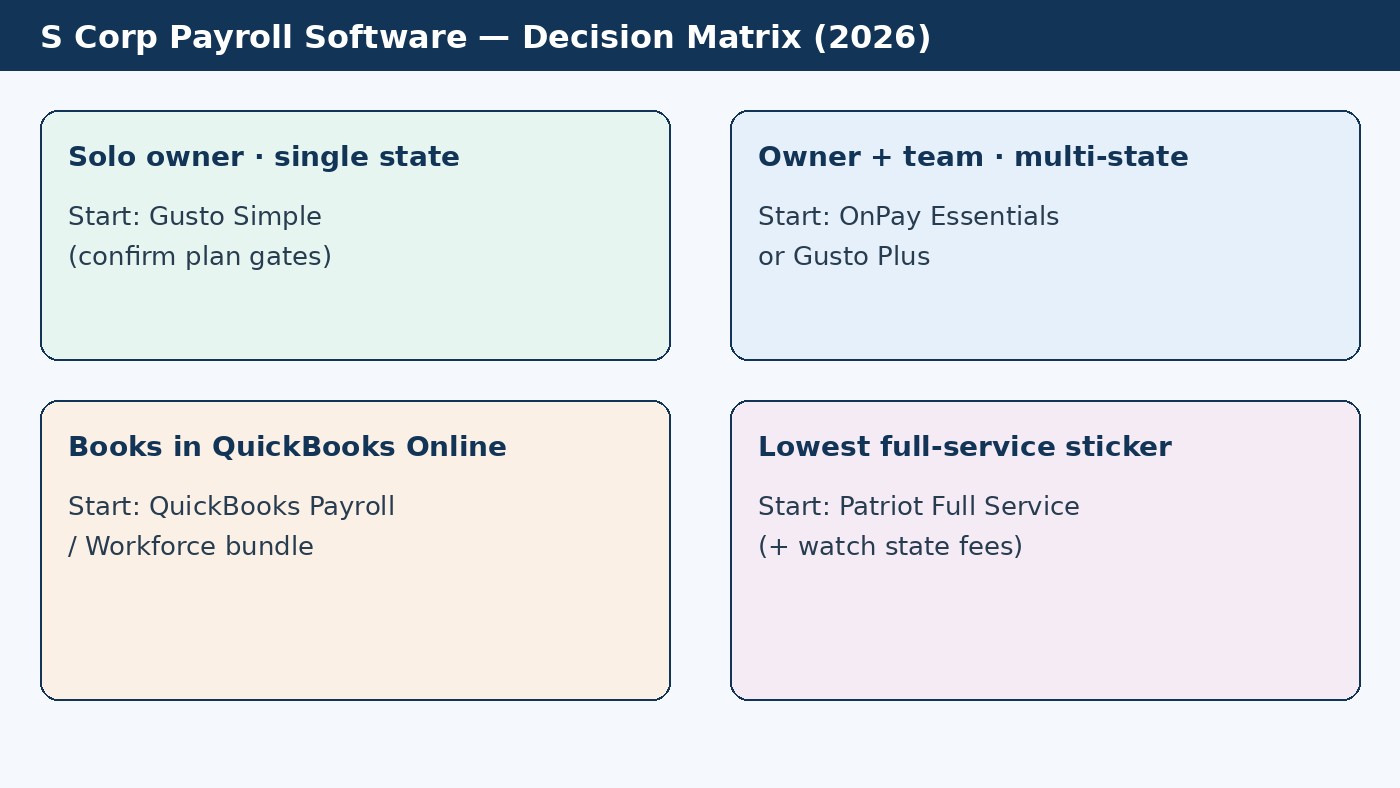
Use this matrix before you compare brand names:
| Your situation | Start here | Why |
|---|---|---|
| One-owner S corp, single state, want published prices + benefits path later | Gusto Simple (confirm plan gates) | Transparent tiers; full-service filing; easy upgrade into Plus if you add states or time tools |
| Owner + small team; multi-state or want one flat plan | OnPay Essentials | Published $49 + $6/worker with multi-state and benefits admin on the base plan (per OnPay public pages) |
| Lowest full-service sticker; salary-only or tiny team | Patriot Full Service | Lower base + per-worker list price; watch extra-state fees and benefits depth |
| Books already in QuickBooks Online | QuickBooks Payroll / Workforce | Native ledger posting; compare the payroll+QBO bundle total, not payroll alone |
| Want Paychex brand / phone-heavy support | SurePayroll (by Paychex) | Strong S-corp marketing; confirm current promo vs ongoing monthly cost |
| Need calculations/records but will deposit and file yourself | Basic / owner-calculator tools (e.g. Patriot Basic, LeoFolio-style) | Cheaper sticker; you own deposit deadlines and Form 941 accuracy |
Takeaway: Pick by state count, accounting stack, and whether you need full-service filing—not by which vendor bought the “S corp” ad.
Best payroll software for S corps compared (2026)
List prices below are public monthly figures checked 2026-10-29 (and consistent with our October 2026 payroll roundups). Promos expire. Per-person fees usually apply to active employees; contractors are often billed only in months you pay them—confirm each vendor’s rule.
| Provider | Published pricing band | S corp fit | Watch-out |
|---|---|---|---|
| Gusto | Simple $49 + $6/person; Plus $80 + $12; Premium $180 + $22 | Strong default for owner-employees who want transparent pricing and a benefits path | Multi-state and richer time tools sit on Plus+; confirm Simple covers your state count |
| OnPay | Essentials $49 + $6/worker | One plan with multi-state + benefits admin; blank quarterly filings marketed for quiet quarters | HR / native time often add-ons or bundles |
| Patriot Software | Full Service $37 + $5/worker; Basic $17 + $4 (self-file) | Lean owner salary or tiny team on a lower sticker | Extra state filing fee on Full Service; benefits depth thinner than Gusto/OnPay |
| SurePayroll (Paychex) | Promo-led; confirm live checkout | Owner + team payroll with Paychex filing stack | Harder to model ongoing cost from marketing “from $1/day” language alone |
| QuickBooks Payroll | Sold mainly with QBO Workforce bundles (promo figures change) | Best when the general ledger already lives in QBO | Compare bundle total to Gusto/OnPay + your current books tool |
| LeoFolio Owner Payroll (example of calc-only) | One-time / per-run style pricing (no subscription) | Owner who will deposit and file personally | Does not replace full-service tax deposit and e-file |
Gusto — default pick for many S corp owner-employees
Gusto publishes Simple / Plus / Premium tiers and markets an S corp solution for owner pay on autopilot, automated federal/state/local filings, and W-2 / 1099 year-end forms. Unlimited payroll runs are included on listed plans. As of 2026-10-29, Simple is positioned for basic single-state payroll at $49/mo + $6 per person; Plus at $80 + $12 adds multi-state and time tracking; Premium at $180 + $22 adds dedicated support and advanced HR/compliance tooling.
Choose Gusto when you want checkout pricing, room to add health benefits later, and a product that already appears on S corp SERPs. Pair this page with Gusto vs QuickBooks Payroll, Gusto vs Rippling, and the hub at leading payroll providers.
Takeaway: Gusto is the affiliate-aligned default here when Simple’s state/feature gates match your S corp—upgrade to Plus before you force multi-state onto Simple.
OnPay — flat plan with multi-state on the base tier
OnPay’s S corp pages emphasize reasonable salary pay runs, blank quarterly filings when you skip a quarter, and one Essentials price: $49 base + $6 per worker paid. That structure is attractive if you already know you need multi-state or benefits administration without climbing a Simple→Plus ladder. Scenario math lives in our OnPay pricing breakdown.
Patriot Full Service — lower sticker for salary-only setups
Patriot Full Service lists about $37/mo + $5 per worker, with a Basic tier for buyers who will deposit and file themselves. For a single owner salary, that often undercuts Gusto Simple and OnPay on monthly math. Confirm extra-state fees and whether you need benefits admin that sits behind other vendors’ higher tiers.
SurePayroll, QuickBooks Payroll, and calc-only tools
SurePayroll (Paychex) markets S corp owner payroll with tax calculation, deposit, and Form 941 support—get a clear monthly quote after any promo. QuickBooks Payroll wins on ledger convenience when QBO is non-negotiable. Calc-only products (LeoFolio-style owner payroll) can produce figures and records without a monthly SaaS bill, but they do not remove your duty to deposit taxes and file on time.
Cost scenarios for a one-owner S corp (dated 2026-10-29)
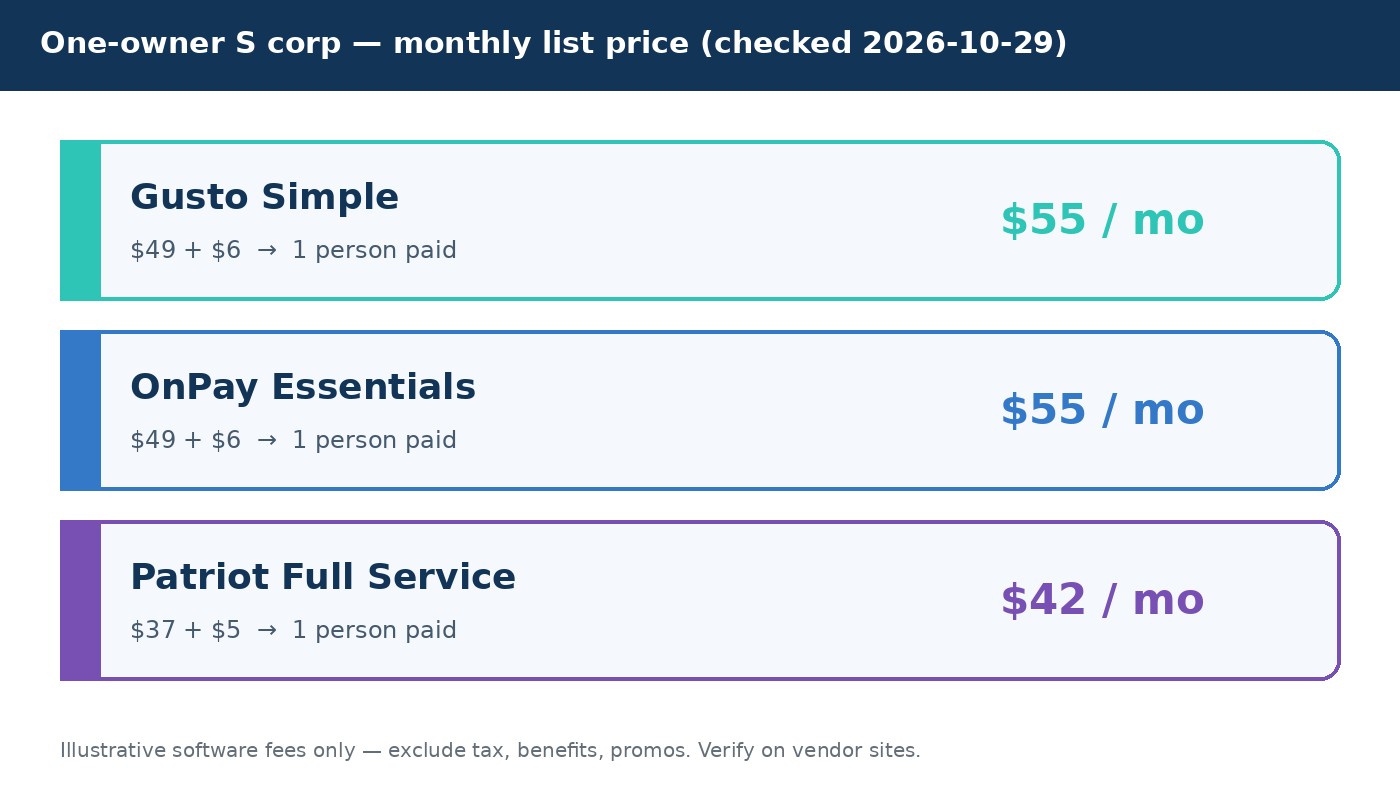
Illustrative monthly software fees only (no sales tax, benefit premiums, or promo discounts):
| People paid | Gusto Simple | OnPay Essentials | Patriot Full Service |
|---|---|---|---|
| 1 (owner only) | $55 | $55 | $42 |
| 5 (owner + 4) | $79 | $79 | $62 |
Software cost is usually small next to payroll tax itself. Budget for employer FICA, FUTA/SUTA, and any state disability or local taxes your CPA flags. See payroll taxes for your first employee for the tax stack overview.
Takeaway: At one owner, Gusto Simple and OnPay often land on the same $55 list total; Patriot Full Service undercuts on sticker if you accept its feature tradeoffs.
Setup checklist: first S corp owner pay run
- Confirm the S election and entity details with your CPA (effective date, shareholders, officers).
- Get employer accounts ready: EIN, federal deposit schedule, state withholding/unemployment accounts where required.
- Document reasonable compensation (role description, hours, comparable pay notes, board/consent minutes). Store it outside the payroll app.
- Pick full-service vs basic using the matrix above; create the company and owner-employee profile.
- Enter the salary and pay schedule (biweekly and semimonthly are common). Avoid “one giant December paycheck” as a default strategy without CPA sign-off.
- Connect the business bank account and run a test or first live payroll with enough lead time for direct deposit.
- Map >2% shareholder health premiums if the S corp pays them: IRS guidance generally requires those premiums in Box 1 wages for income-tax withholding purposes, while they are not subject to Social Security/Medicare or FUTA—setup matters; have your CPA confirm reporting in the software.
- Reconcile each pay run to the books and calendar Form 941 / W-2 / Form 940 deadlines (IRS depositing and reporting employment taxes).
Hiring your first non-owner employee? Layer on how to run payroll for your first employee and the new-hire payroll checklist.
Takeaway: Software onboarding is step four—salary documentation and tax accounts come first.
Common mistakes that create IRS risk
- Distributions only, $0 W-2 while the owner works full-time in a service business
- Loan / “draw” labels that are really pay for labor
- Letting the software “suggest” a salary without CPA review of comparables
- Ignoring state accounts after federal setup looks “green” in the dashboard
- Mis-reporting >2% shareholder health premiums on the W-2
- Mixing employee and contractor pay without a classification review—see W-2 vs 1099
Payroll software reduces calculation mistakes. It does not legalize an unreasonable compensation strategy.
Takeaway: The expensive failure mode is bad compensation policy, not picking OnPay instead of Gusto.
FAQ: payroll software for S corps
Does every S corp need payroll software?
No. You need a compliant way to pay reasonable wages and file employment taxes. That can be a CPA-run payroll service, full-service software, or careful DIY. Most small S corps choose software because deposit and filing automation is cheaper than manual error risk.
What is the best payroll software for a one-owner S corp?
For published prices and a benefits path, Gusto Simple is a strong default when you are single-state. OnPay matches the $49 + $6 entry math with multi-state on the base plan. Patriot Full Service usually wins on sticker. If books are already in QBO, compare QuickBooks Payroll bundles before you add a second system.
Can an S corp owner take only distributions?
If the owner provides more than minor services, the IRS expects reasonable wage treatment before non-wage distributions. Distributions-only strategies for working owners are a common audit theme. Read the IRS compensation pages linked above and our reasonable compensation guide with your CPA.
How often should an S corp owner run payroll?
Follow a regular schedule (weekly, biweekly, semimonthly, or monthly) that matches cash flow and state rules. Irregular “whenever there is cash” patterns make reasonable-compensation defense harder. Ask your CPA before annual-only pay.
Will payroll software set my reasonable salary?
No. You (with your CPA) enter the wage. Software computes withholdings, deposits, and forms from that input.
Do I still need a CPA if I use Gusto or OnPay?
Yes for S election timing, reasonable compensation, shareholder basis, and Form 1120-S. Payroll software does not replace tax advice.
How are health insurance premiums for >2% shareholders handled?
Per IRS compensation/medical insurance guidance, premiums the S corp pays for a >2% shareholder-employee are generally deductible by the corporation and included in Box 1 wages for income-tax withholding, but are not subject to Social Security, Medicare, or FUTA. Configure this carefully in software with your CPA.
Gusto vs OnPay for S corp owner payroll?
Entry list math is often identical ($49 + $6). Choose Gusto for tiered benefits/HR growth and brand familiarity; choose OnPay when you want multi-state and benefits admin without leaving the base plan. Compare live feature matrices the week you buy—see also comparisons.
Next step
If you need full-service S corp owner payroll with transparent US SMB pricing, start a Gusto account, enter the reasonable salary your CPA documented, and confirm whether Simple or Plus matches your state count. Then keep payroll and tax compliance hubs handy for the first-hire and filing checklists linked above.