OnPay pricing in 2026 starts at $49 per month plus $6 per worker on Payroll Essentials. That base plan covers unlimited pay runs, federal/state/local tax filings, multi-state payroll, W-2s and 1099s, hiring/onboarding tools, and benefits administration without a separate multi-state surcharge. Optional add-ons stack on top: HR at $15 + $2/worker, Time Tracking at $15 + $4/worker, Compliance Resources at $10, and Live HR Support at $65 (list prices checked on OnPay’s public pricing page). Your true monthly bill is base + per-worker fees for anyone included in a pay run during the lookback period, plus any add-ons you enable.
Disclosure: Educational guide only. Not tax, legal, accounting, or financial advice. This page may include affiliate links. We may earn a commission if you sign up through our Gusto partner link, at no extra cost to you. OnPay figures below were checked against OnPay’s costs & pricing page and help-center pricing article on 2026-09-23. Competitor list prices are illustrative from public vendor pages the same week. Confirm live rates on each vendor before you buy.
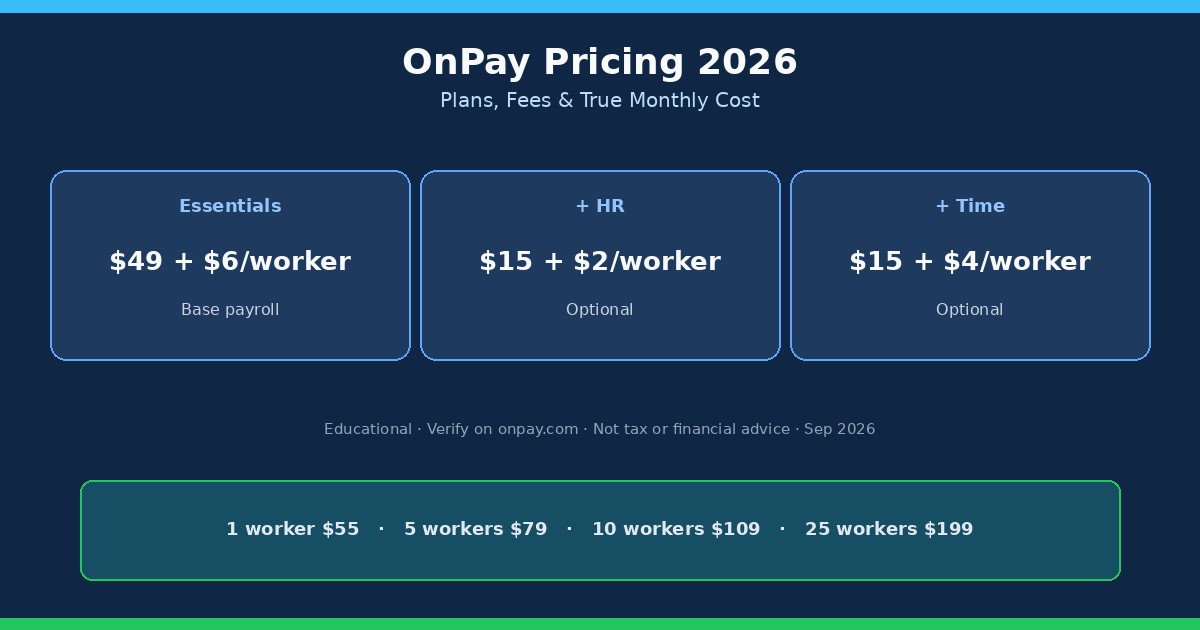
OnPay plans and list prices (2026)
Takeaway: OnPay sells one payroll base plan plus optional HR, time, and compliance add-ons, not a three-tier Simple/Plus/Premium ladder.
OnPay is full-service payroll software aimed at US small businesses that want published prices instead of a sales quote. Public list pricing as of 2026-09-23:
| Product | List price (monthly) | What it is for |
|---|---|---|
| Payroll Essentials (base) | $49 base + $6 per worker | Full-service payroll, tax filings, multi-state, W-2/1099, onboarding, benefits admin |
| HR add-on | $15 base + $2 per worker | PTO workflows, org chart, advanced onboarding, document/e-sign templates, equipment tracking |
| Time Tracking add-on | $15 base + $4 per worker | Time clocks, geofencing, overtime rules, timesheet approval synced into payroll |
| Compliance Resources | $10 base | State compliance alerts and HR document library |
| Live HR Support | $65 base | Concierge support from licensed HR experts |
Marketing pages also advertise a free first month and free setup/migration. Treat promo language as time-limited: confirm the current trial terms in the checkout or sales flow when you sign up.
OnPay also publishes discounted bundles (for example Payroll + Time + HR, or Payroll + HR + Compliance + Live HR Support). Bundle math changes with headcount, so use OnPay’s on-page calculator rather than adding every add-on à la carte if you know you need the full stack.
What Payroll Essentials includes (and what still costs extra)
Takeaway: multi-state filings, unlimited runs, and year-end forms sit in the base price. HR depth and time clocks do not.
For buyers comparing this page to quote-only payroll vendors, the useful question is what OnPay stops charging for. Per OnPay’s public feature list, Payroll Essentials includes:
- Unlimited pay runs and schedules (including bonus/off-cycle runs)
- Federal, state, and local tax calculations, filings, and payments
- Multi-state payroll with no published per-state surcharge
- W-2 and 1099 workers in one system; year-end forms included
- Direct deposit, check, or prepaid debit card payout options
- Hiring/onboarding helpers (new-hire reporting, offer letter, I-9/W-4 e-sign)
- Benefits administration tooling and broker/advisor guidance (you still pay plan premiums to carriers)
- Accounting integrations and phone/chat/email support
You still pay separately for add-on HR workflows, native time tracking, compliance resource packs, and live HR concierge support. Health, dental, vision, and similar benefits premiums are paid to the carrier, not absorbed into the $49 base. In some states, SaaS subscriptions are subject to sales tax; OnPay’s help center notes that exempt buyers need a valid exemption certificate on file.
If you are still deciding whether you need payroll software at all (versus contractor-only payments), start with Do I need payroll for my LLC? and how to run payroll for your first employee before you model vendor fees.
True-cost scenarios: 1, 5, 10, and 25 workers
Takeaway: Essentials-only math is linear ($49 + $6 × workers), so small headcount stays cheap until you bolt on HR and time.
These scenarios use OnPay’s published Essentials formula only. They exclude sales tax, benefit premiums, and temporary promos. “Workers” means employees or contractors included in at least one pay run in the billing lookback period.
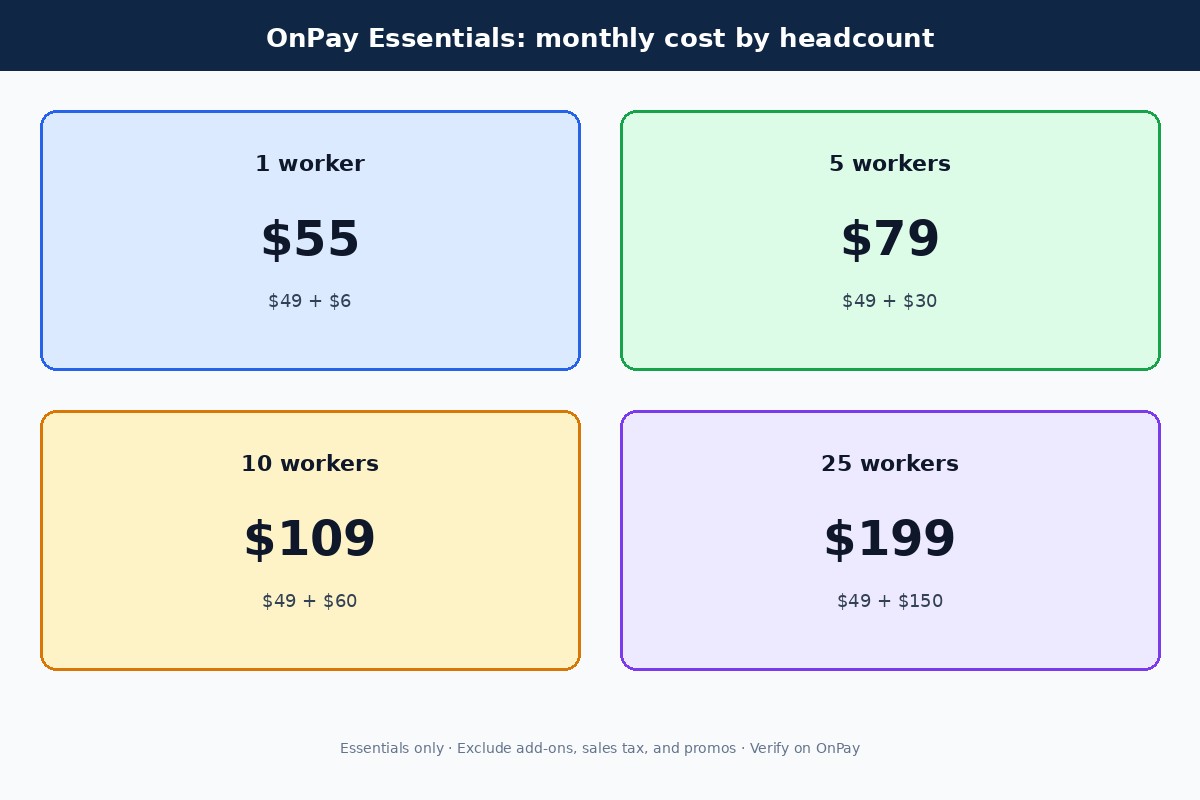
| Workers paid | Essentials only | Essentials + HR | Essentials + HR + Time |
|---|---|---|---|
| 1 | $55 | $72 | $91 |
| 5 | $79 | $104 | $139 |
| 10 | $109 | $144 | $199 |
| 25 | $199 | $264 | $379 |
For a solo founder with one W-2 hire, $55/mo Essentials-only is the headline number that shows up in “cheapest full-service payroll” comparisons. That is why OnPay often appears next to Gusto Simple in micro-team roundups. See our cheapest payroll for one employee guide for the broader category view.
At 10 workers, Essentials-only is still $109/mo. Adding HR and Time Tracking jumps that to about $199/mo before bundles. If your team is hourly and multi-site, budget the time add-on early; if you mainly need tax-correct payroll and light PTO tracking, Essentials alone may be enough for longer than the sales page implies.
How OnPay billing and the per-worker lookback work
Takeaway: you pay the $6 fee once per worker per month, even if you pay them weekly, and inactive people still count if they appear on a run.
OnPay’s help center explains two details that change the true cost for messy months:
- Pay frequency does not multiply the fee. One employee paid weekly still counts as one worker for the month.
- Inclusion counts. Anyone included in a pay run during the lookback period triggers the per-worker fee, even if net pay is $0.
- Billing cadence. OnPay bills monthly; usage (per-worker) charges are based on payrolls processed in the previous billing period (lookback).
- Contractors count. 1099 workers included in a run are billed the same $6 per-person fee as W-2 employees.
Practical tip: if you keep terminated employees or zero-pay placeholders on a run “just in case,” you can inflate the bill. Clean the roster before you process. For contractor-heavy teams, also compare whether you need full payroll at all. Our guide on paying contractors with Gusto and the tax compliance hub cover 1099 workflows separately from W-2 payroll.
OnPay vs Gusto pricing at the same headcount
Takeaway: OnPay Essentials and Gusto Simple share the same $49 + $6 entry math, but feature gates (especially multi-state and time tracking) diverge fast.
Gusto is the natural comparison for US SMBs shopping published payroll prices. Illustrative public tiers checked the same week (verify on gusto.com/product/pricing):
- Gusto Simple: about $49/mo + $6 per person (generally positioned for single-state payroll)
- Gusto Plus: about $80/mo + $12 per person (multi-state, time tracking, richer HR tooling)
- Gusto Premium: about $180/mo + $22 per person (dedicated support / advanced HR path)
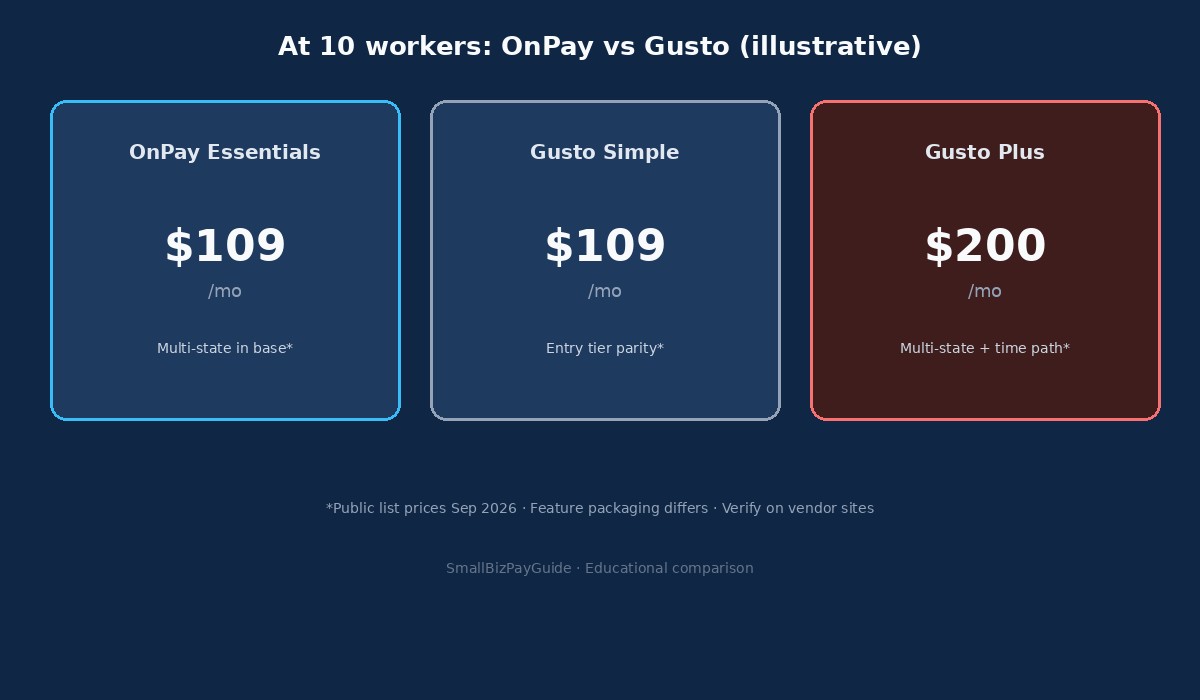
| Scenario (10 workers) | Approx. monthly software fee | Notes |
|---|---|---|
| OnPay Essentials | $109 | Multi-state included in base on OnPay’s public list |
| OnPay Essentials + HR + Time | $199 | Add-ons stacked; check bundles for discounts |
| Gusto Simple | $109 | Same sticker math; confirm state/time limits on Simple |
| Gusto Plus | $200 | Typical path when you need multi-state + time tracking |
If you already lean Gusto for UX, benefits marketplace, or a longer HR roadmap, price parity at the entry tier does not automatically favor OnPay. Read Gusto vs Rippling and Gusto vs QuickBooks Payroll for stack fit, then come back to this page for OnPay’s fee formula. For micro-teams, also see best payroll software for 1 to 5 employees.
Who OnPay pricing fits (and who should look elsewhere)
Takeaway: OnPay fits owners who want transparent full-service payroll with multi-state included; skip it if you need enterprise HRIS quoting or bill-pay AP software.
OnPay’s pricing model tends to fit when:
- You want a published monthly formula, not a custom quote
- You pay workers in more than one state and do not want a higher “Plus” tier just for multi-state
- You need W-2 and 1099 in one payroll tool with year-end forms included
- Your HR needs are light-to-moderate and you can add modules later
Look elsewhere (or at least shortlist a second vendor) when:
- You need a deep HRIS / IT device stack (Rippling-style platforms)
- Your accounting already lives inside QuickBooks and you want native QBO payroll packaging
- You mainly need vendor bill pay / AP, not employee payroll (that is Melio / BILL territory. See Melio pricing)
- You want a single branded “Gusto-only” benefits and contractor experience and already prefer that ecosystem
Decision checklist before you subscribe:
- Count active W-2 + 1099 workers you will include on runs each month
- List every state where you already have (or expect) employees
- Decide if you need native time clocks this quarter or can use a separate tool
- Decide if PTO approvals / org charts are must-haves or nice-to-haves
- Ask whether an accountant needs collaborator access (OnPay markets accountant-friendly permissions)
- Run OnPay’s calculator and one Gusto cart side by side at the same headcount
- Confirm first-month promo, migration help, and any SaaS sales tax
- Re-check list prices the week you buy. Payroll vendors revise pages
Entities and terms used on this page
Takeaway: price comparisons only work when “worker,” “base plan,” and “add-on” mean the same thing on each vendor’s page.
- Payroll Essentials: OnPay’s single published base payroll plan ($49 + $6/worker).
- Worker / per-person fee: An employee or contractor included in at least one pay run during OnPay’s lookback billing period.
- Multi-state payroll: Paying workers who live or work in more than one US state, with state/local withholding and filings handled in-product.
- Lookback period: The prior billing window OnPay uses to count which workers trigger the $6 fee on the next invoice.
- Full-service payroll: Software that calculates, files, and often remits payroll taxes (not DIY spreadsheet payroll).
- Benefits administration: Tools to enroll workers and deduct premiums; carrier premiums remain separate from software fees.
OnPay also markets an accuracy / error-free guarantee on tax filings. That is a vendor service promise, not a substitute for reviewing your own employee setup, state registrations, or classification decisions. If you are unsure whether a worker is W-2 or 1099, sort classification first. Fee tables will not fix misclassification risk. Pair this pricing page with the new hire payroll checklist when you onboard someone.
Bundles vs à la carte add-ons
OnPay’s pricing page shows discounted bundles that combine Payroll Essentials with Time Tracking, HR, Compliance Resources, and/or Live HR Support. Example list configurations published on the page (verify live): a Payroll + Time + HR bundle and broader HR-support bundles with lower combined base and per-worker rates than stacking every module separately. If you already know you need HR and time clocks, compare the bundle line against à la carte math before you click subscribe. If you only need payroll this quarter, stay on Essentials and add modules later. OnPay’s model is built for that path.
OnPay pricing FAQ
How much does OnPay cost per month?
Public list pricing for Payroll Essentials is $49 per month plus $6 per worker. Add-ons for HR, time tracking, compliance resources, and live HR support stack on top. Use OnPay’s calculator for your exact mix.
Is the first month free?
OnPay marketing pages advertise a free first month and free setup/migration. Confirm the current promo in the live signup flow; promotions change.
Does OnPay charge extra for multi-state payroll?
OnPay’s public Essentials packaging includes multi-state payroll without a listed per-state surcharge. Always confirm coverage for your specific localities during setup.
Are W-2s and 1099s included?
Yes. OnPay lists year-end W-2 and 1099 filings in the Essentials inclusions. You still owe employer payroll taxes and any benefit premiums separately.
How much is the HR add-on?
The HR add-on lists at $15 base + $2 per worker per month. Time Tracking lists at $15 + $4 per worker. Compliance Resources is $10; Live HR Support is $65 on the public page checked 2026-09-23.
Is OnPay cheaper than Gusto?
At the entry tier, sticker math often matches (both around $49 + $6). OnPay can look cheaper when you need multi-state or time tools that push Gusto onto Plus. Gusto can still win on product fit. Compare live carts, not blog tables alone.
Do contractors count toward the per-worker fee?
Yes. OnPay’s help center states the per-person fee applies to employees or contractors included in at least one pay run during the lookback period.
Should I re-check OnPay pricing later?
Yes. Base fees, add-ons, bundles, and promos change. Re-open OnPay’s pricing page before you upgrade, renew, or model a new hiring wave.
Related reading and next step
- Cheapest payroll for one employee
- Best payroll software for 1 to 5 employees
- Gusto vs Rippling
- Gusto vs QuickBooks Payroll
- How to run payroll for your first employee
- New hire payroll checklist
- Payroll hub, comparisons hub, and tax compliance hub
Next step: Plug your worker count and add-on needs into OnPay’s public calculator, then put the same headcount into a Gusto plan comparison (affiliate) if you want a second published-price payroll option. For category context, start from our payroll hub and the one-employee cost guide before you lock a vendor.