Disclosure: This guide is educational and may include affiliate links. We may earn a commission if you sign up through our Gusto partner link, at no extra cost to you. It is not legal, tax, accounting, or financial advice. Provider plans, prices, and state coverage change; verify details on official vendor pages and with a qualified professional before you buy or file.
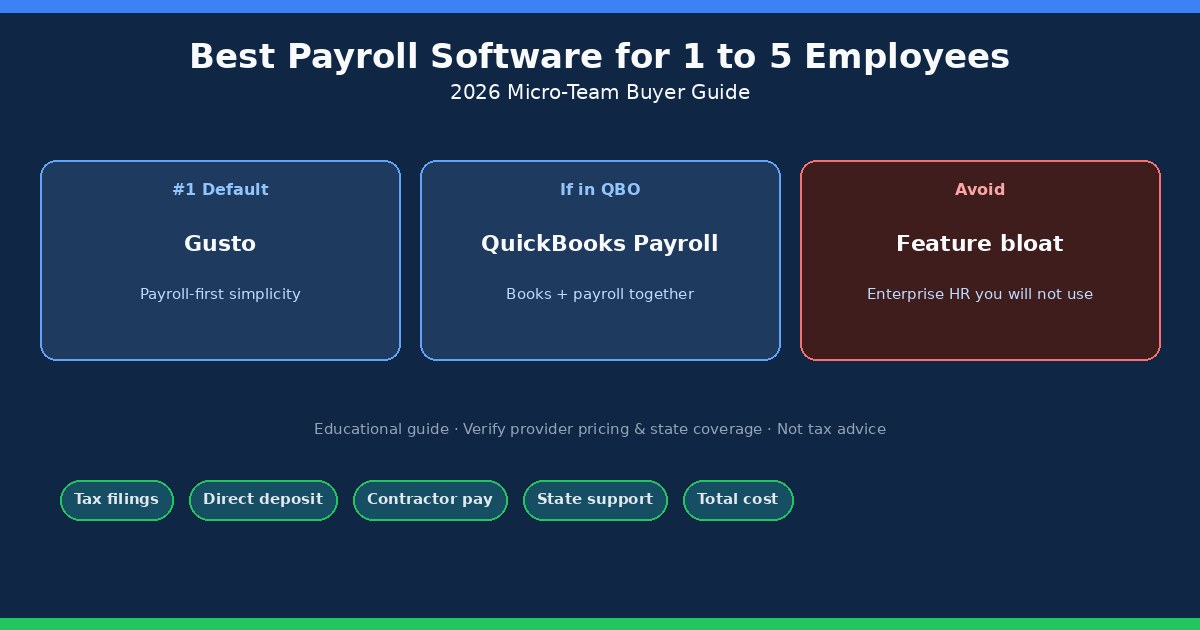
For a team of one to five people, the best payroll software is usually the one that runs reliable paydays, tax deposits, and year-end forms without burying you in HR features you will never open. In 2026 that still points most micro teams toward Gusto when payroll is the main problem to solve, and toward QuickBooks Payroll (also marketed as QuickBooks Workforce) when bookkeeping already lives in QuickBooks Online. Feature lists look similar on marketing pages; the useful decision is which system matches how you already work.
Payroll is small until it goes wrong. Then it fills the week: agency letters, confused teammates, and year-end form hunts. The goal of this guide is a boring, defensible choice for a US micro team—not a feature tournament.
Quick picks for teams of 1 to 5
- Default pick: Gusto when you want payroll-first onboarding, tax filings for supported locations, direct deposit, and a clean path for mixing employees and contractors.
- If you already live in QuickBooks Online: QuickBooks Payroll so wages and liabilities stay closer to the ledger your accountant already reviews.
- Skip for now: Enterprise HR suites, complex workforce platforms, and “all-in-one” stacks built for problems a five-person shop does not have.
Side-by-side product detail belongs in Gusto vs QuickBooks Payroll. This page is the buyer map for micro teams: what you need, how the two leaders fit, what other brands are for, how to read pricing, and the checklist that keeps you from overbuying.
What micro teams actually need from payroll software
A one-to-five-person business rarely needs elaborate workforce planning or a sprawling policy library. You need a short, visible routine: enter accurate hours or salary, preview the run, fund the bank pull, pay people on time, and keep deposits and filings on calendars you can explain. Tiny errors still get expensive—missed deposits, wrong classification, late W-2s—so software helps, but it does not remove your duty as the employer.
At a minimum, evaluate whether the product covers:
- Payroll runs for hourly and salaried employees, including overtime when due.
- Federal and state tax calculations, deposits, and filings for your work locations.
- W-2 preparation and, if you pay contractors, 1099-NEC support.
- Direct deposit with clear funding cutoffs (and a backup payment method if needed).
- Help with or clear guidance on state employer registrations and new-hire reporting.
- Employee self-service for stubs, tax forms, and banking details.
- Reports your bookkeeper can use without rebuilding every entry.
- Support you can reach when a notice arrives or a deposit fails.
Also confirm the provider supports the states where people work—not just a nationwide marketing claim. Benefits, retirement deductions, and multi-state moves change the shortlist. If you are still deciding whether the LLC needs payroll at all, start with do I need payroll for my LLC? and come back when W-2 wages are real.
Gusto: the payroll-first default for many micro teams
Gusto fits best when payroll is the center of gravity. Onboarding is designed for small employers, employees can usually pull stubs and tax documents themselves, and the run pattern stays familiar: enter people and pay details, choose a schedule, preview, approve. For a first hire, a small agency mixing W-2 and 1099 pay, or an S-corp owner who needs reasonable compensation as wages, that rhythm matters more than a long feature matrix.
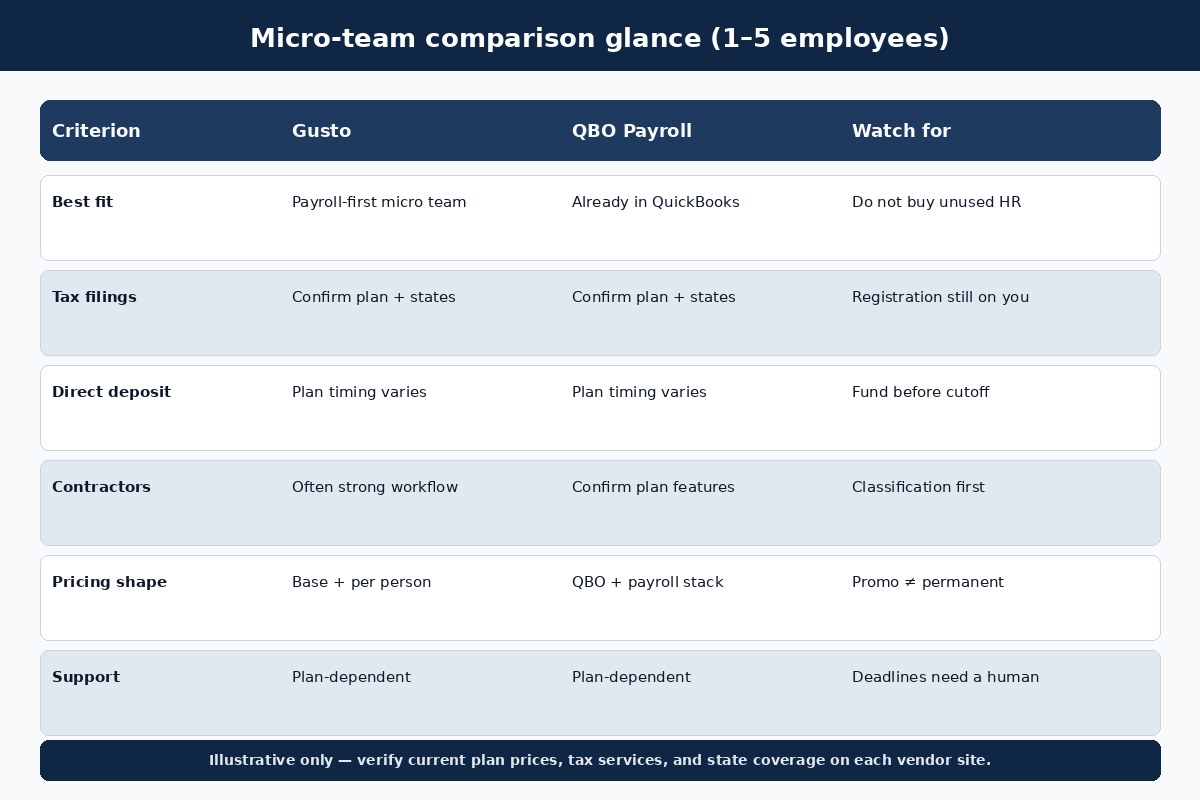
Confirm what your plan actually includes: automated tax payments and filings, contractor payments, state registration help, deposit timing, benefits add-ons, and support level. “Automated” means different things across tiers, and a promo rate is not the permanent monthly cost. Gusto is less compelling when you already refuse to leave QuickBooks for day-to-day books and do not want another system of record for payroll entries.
Illustrative Gusto list pricing (verify on Gusto’s pricing page): Simple often lists around $49/month plus $6 per person for single-state payroll; Plus around $80 plus $12 for multi-state and more tools; Premium around $180 plus $22 with dedicated support. Contractor-only and Solo offerings exist for narrower cases. Add-ons (faster pay, priority support, benefits tools) can move the total. Treat every number here as a snapshot to re-check before you enroll.
Watch the operational edges, not the brochure. Confirm deposit timing on the plan you will buy, whether next-day or same-day pay is included or billed as an add-on, and what happens if your bank balance is short on funding day. Ask how amended filings and agency notices are handled. If an employee moves to another state mid-year, map the registration and filing steps before the first paycheck in the new location. Multi-state payroll is manageable; improvising after payday is not.
Gusto also tends to keep the employee experience straightforward: stubs, tax documents, and banking updates in one portal. That matters when you are hiring against larger employers. Still, plan limits are real—single-state versus multi-state, benefits administration, time tools, and support tiers should match how you actually pay people, not how a demo script runs.
QuickBooks Payroll: best when books already live in QBO
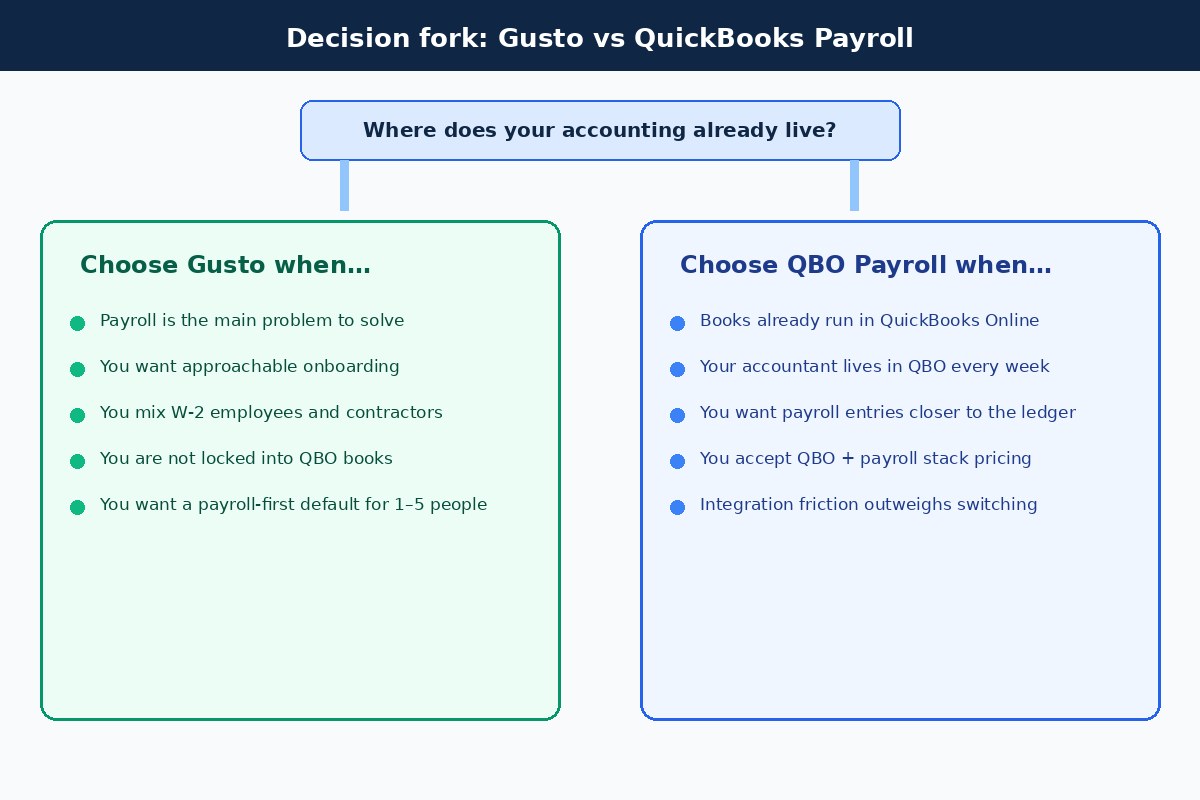
QuickBooks Payroll (Intuit has also branded plans under QuickBooks Workforce) wins on integration, not on being the simplest standalone payroll product. If invoices, expenses, and the general ledger already sit in QuickBooks Online, connecting payroll can reduce duplicate entry and keep liabilities visible next to the books your CPA already opens. Employee self-service and direct-deposit options are useful; the trade-off is stack pricing—QuickBooks Online subscription plus a payroll tier plus any state or add-on fees.
Ask for the regular (post-promo) monthly rate, per-employee charge, contractor fees, multi-state charges, and which tax filings the plan remits. Entry Workforce/Payroll tiers are often summarized in the ballpark of roughly $50/month plus about $6.50 per employee before QBO itself, with Premium and Elite higher—always confirm on Intuit’s current pages because names and PEPM fees have been shifting. For a brand-new business that only wants payroll and has no QBO habit, Gusto usually feels cleaner.
Integration is the reason to choose QuickBooks Payroll—not a longer feature checklist. If your accounting lives elsewhere, forcing payroll into Intuit just to “match a review” usually creates more friction than it removes. If your bookkeeper already reconciles QBO weekly, the opposite is true: duplicate wage entries become the tax you pay for using a separate payroll product.
Before you commit, walk one full cycle with your accountant: how wages post, how employer taxes appear, how contractor payments are labeled, and how year-end W-2/1099 packages export. Confirm local tax support if your city or county collects employer taxes. Intuit’s plan names have been shifting toward “Workforce” branding; compare the exact tier you are quoted, not an old Core/Premium blog post from a prior year.
Tax filings, deposits, and state support
Payroll software generally does three connected jobs: calculate taxes, send deposits, and file forms. Confirm all three for federal and for every work state. For employees that usually means income-tax withholding, Social Security and Medicare, unemployment where due, quarterly returns such as Form 941, annual Form 940 when it applies, and W-2s. State portals add withholding accounts, UI, new-hire reporting, and sometimes paid leave or local taxes.
Do not assume a subscription registers you with every agency. Some providers assist with registration; others hand you instructions. Keep deposit schedules, filing confirmations, and liability reports where you can retrieve them if an agency asks. Software errors and short bank balances still land on the employer. Pair product choice with the tax map in payroll taxes for your first employee rather than treating the vendor FAQ as your only compliance guide.
Direct deposit details deserve their own checklist: funding deadline, processing days, holiday calendar, and whether employees enter their own bank info. Contractor payments need a separate look—easy 1099 data collection is useful only after classification is honest. The IRS worker classification guidance is the reference when a role is fuzzy; the payment button in software is not.
Match the tool to your business structure
Entity type changes the payroll question. A default single-member LLC often pays the owner through draws, not a W-2, until employees or an S-corp wage requirement appears. A multi-member partnership LLC usually uses draws or guaranteed payments for owners under partnership rules. An LLC taxed as an S corporation generally needs reasonable compensation as W-2 wages for owners who work in the business before distributions—your CPA sets the wage story; software only executes it.
Benefits change the shortlist too. Health premiums, retirement deferrals, and garnishments need a place to live each pay period. If your benefits broker does not sync cleanly, “simple” payroll turns into manual adjustments. Write a one-page ops note: tax election, who is W-2 versus contractor, work states, pay frequency, and who approves the run. Buy software after that note exists.
Other options in brief (no invented rankings)
Several other brands show up on shortlists. Treat them as situational, not as a forced podium:
- Patriot Software and SurePayroll often appeal when budget or a narrower payroll scope is the priority. Read whether you are buying basic payroll (more tax work on you) or full-service filing.
- ADP RUN and Paychex products can make sense when you want heavier HR/benefits support or expect more complexity soon. For a two-person studio, that machinery can be more than you need.
- OnPay, Homebase, and similar tools may fit niches (specific industries, scheduling-heavy shops). Resist buying a platform designed around problems you do not have.
Third-party “best of” lists are useful for discovery. Your state mix, contractor mix, accountant’s tooling, and tolerance for admin still decide the fit.
Pricing notes: model the real monthly cost
Landing-page prices are incomplete. A workable model is:
Monthly payroll cost ≈ base fee + employee charges + contractor charges + tax-service or state fees + add-ons (+ accounting subscription if required).
Calculate the annual cost on the regular price, not only the intro offer. Ask each vendor for base after promotion, per-employee and per-contractor fees, multi-state charges, year-end form fees, expedited deposit fees, and support limits on the plan you are considering. A one-employee shop pays a high effective rate per person because the base fee does not shrink. That can still beat missed filings or hours of manual work—just do not compare promo stickers to full-service reality.
Decision checklist
- Do we need W-2 payroll now, or only contractor payments and 1099s?
- Where do the books already live—QuickBooks Online or elsewhere?
- Which states do employees work in today, and might that change this year?
- Do we need contractor payments inside the same product?
- Who answers when a tax notice or failed deposit shows up?
- What is the post-promo monthly total including accounting software?
- Can we run a preview payday before promising employees a pay date?
Run a sample month in your head: one employee in your state paid twice a month, a phone reimbursement, two contractors, maybe a health premium deduction. Whichever system leaves fewer loose ends—and fewer tools you will ignore—is the better micro-team pick. For setup sequencing after you choose, use how to run payroll for your first employee, the new hire payroll checklist, and payroll taxes for your first employee.
Prefer the product that makes the weekly approval boring. Fancy dashboards do not fix missing state accounts or an underfunded payroll bank account. If two options look equal on filings and deposit timing, choose the one that matches your accounting home and that your ops owner will actually open every payday.
Common mistakes when buying payroll software
- Buying enterprise HR because the demo looked impressive.
- Comparing basic self-file plans to full-service tax filing on price alone.
- Assuming the software registers every state account for you.
- Ignoring direct-deposit cutoffs and bank holidays when setting the first payday.
- Putting a supervised, ongoing worker on 1099 to avoid payroll setup.
- Forgetting that QBO Payroll still needs a QuickBooks Online subscription in the stack.
- Mixing bill-pay or AP tools into a payroll buying decision (different job).
FAQ
What is the best payroll software for 1 to 5 employees in 2026?
For many US micro teams, Gusto is the strongest payroll-first default. QuickBooks Payroll is often better if you already run the business in QuickBooks Online. Confirm current plans, tax services, and state coverage before you enroll.
Is Gusto or QuickBooks Payroll better for a tiny team?
Gusto usually wins when payroll is the main workflow. QuickBooks Payroll usually wins when the ledger already lives in QBO and your accountant wants payroll close to those books. Details: Gusto vs QuickBooks Payroll.
Do I need payroll software for one employee?
You need a compliant payroll process. Software is optional but often safer than manual calculations once deposits, state filings, and W-2s enter the picture. See the first-employee runbook linked above.
How much does payroll software cost for five employees?
Expect a monthly base plus a per-person fee, then add accounting software if required and any state or add-on charges. As a rough illustration only, a five-person Gusto Simple-style stack can land near the high-$70s per month before add-ons; QBO stacks depend on which QuickBooks Online plan you already pay for. Re-check official pricing the week you buy.
Can the same tool pay employees and contractors?
Many platforms can, including Gusto on appropriate plans. Classification still comes first: a worker you control like an employee should not be paid as a contractor just because the software has a contractor button.
Does payroll software replace my CPA?
No. Software calculates and files based on what you enter. Tax elections, reasonable compensation, multi-state questions, and notices still belong with a qualified professional.
What should I set up before the first payday?
EIN and required state accounts, W-4 and I-9 materials, pay schedule and rates, bank funding, and a preview run. Walk the sequence in the how-to-run-payroll guide and new-hire checklist.
Should a five-person company buy ADP or Paychex?
Sometimes, especially if you want deeper HR or benefits administration and are willing to pay for guided service. Many five-person teams are better served by a lighter payroll-first product until complexity actually shows up. Get quotes with the same headcount, states, and filing scope so you are comparing like with like.
Related reading
- Gusto vs QuickBooks Payroll
- How to run payroll for your first employee
- New hire payroll checklist
- Payroll taxes for your first employee
- Do I need payroll for my LLC?
- Payroll hub
- Comparisons hub
Try Gusto for micro-team payroll
If Gusto matches a payroll-first workflow for your one-to-five-person team, compare current plans and state coverage, then run a preview before the first live payday. Gather your EIN, state accounts, employee forms, pay details, and intended schedule first.
Try Gusto (partner link). We may earn a commission at no extra cost to you. Confirm pricing, tax filing services, and state coverage on Gusto’s official pages before you enroll.
Again: this article is educational only. It is not tax or legal advice. Verify IRS Publication 15, state agency rules, and each vendor’s current terms for your facts.