Disclosure: This guide is educational and may include affiliate links. We may earn a commission if you sign up through our Melio partner link, at no extra cost to you. It is not legal, tax, accounting, or financial advice. Worker classification, Form W-9 / 1099-NEC rules, and product pricing change. Verify details with the IRS, your state agencies, provider pages, and a qualified CPA or employment attorney before you act.
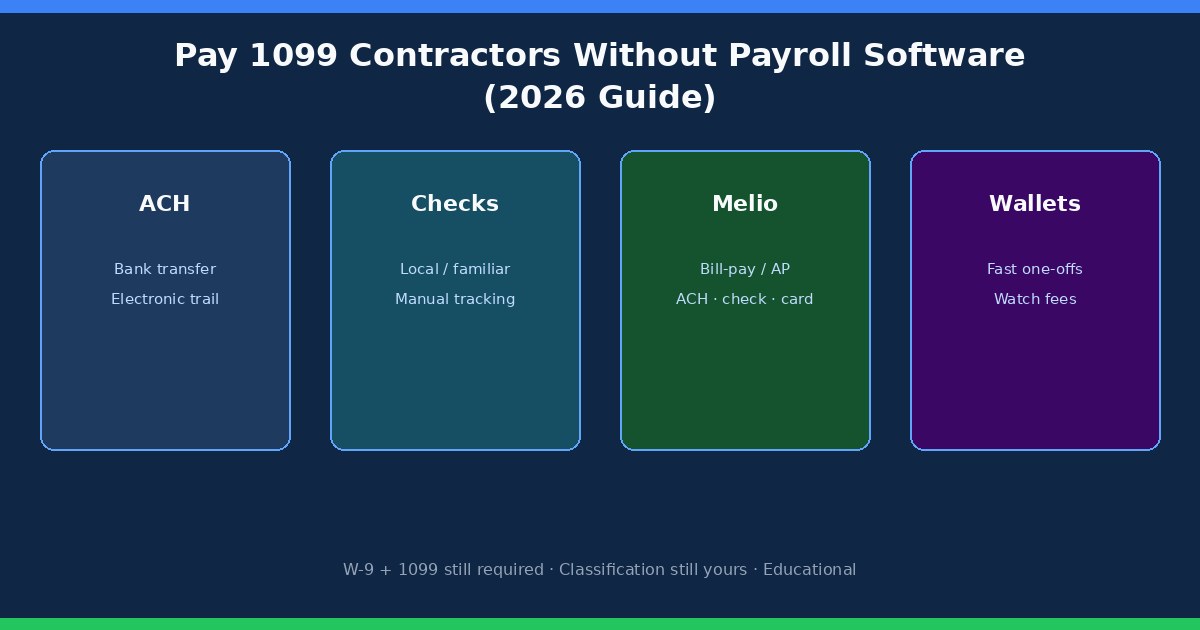
You can pay 1099 contractors without payroll software. Most small US businesses already do it with ACH bank transfers, business checks, bill-pay platforms such as Melio, or digital wallets for occasional payouts. Skipping payroll software does not skip contractor records, tax forms, worker classification, or payment controls. You are choosing a manual or AP-style contractor payment process, not escaping administration.
Quick answer
Pay genuine independent contractors from a business bank account, with a check, through a bill-pay tool, or via a documented digital payment service. You generally do not run those payouts through W-2 payroll because you are not withholding ordinary employee payroll taxes from nonemployee compensation. Classification still follows the working relationship under IRS guidance and state rules—start with W-2 vs 1099 when a role looks like staff under your control. Collect Form W-9 before the first US payment when possible, track year-to-date totals, and file Form 1099-NEC when the rules require it.
| Situation | Likely path |
|---|---|
| Few domestic freelancers on invoices | ACH or Melio-style bill pay + solid records |
| Local trades who prefer paper | Business checks with numbered tracking |
| Need approvals, card funding, accounting sync | Bill-pay platform (e.g. Melio) |
| Hybrid team + onboarding + 1099 next to W-2 | Upgrade path: workforce platform (soft: Gusto contractors) |
| Role looks like employment | Pause—fix classification before any pay tool |
When skipping payroll software is fine
DIY contractor pay works when volume is low, payees are mostly domestic, one person can approve invoices and release funds, and you can produce a clean year-to-date total without opening five apps. A spreadsheet plus bank confirmations can carry a small shop a long way. It fails when invoices hide in email, bank-detail changes arrive only by text, W-9s are missing in December, or several people can send money with no approval trail.
Build one repeatable path even without payroll software: receive invoice → match to contract or PO → approve → pay from the business account or bill-pay tool → file confirmation with the invoice → update the year-to-date total. Consistency matters more than which app logo you use. If project managers can invent payees and release funds the same afternoon, fix permissions before you debate Melio versus ACH.
Payroll software is built for employees: wages, withholding, filings, and W-2s. Some payroll products also support contractors, but that does not mean every freelancer invoice belongs in a payroll run. If the payment looks like a vendor bill, an accounts-payable workflow is often cleaner. If you need contractor profiles, repeated workforce runs, and 1099 Ops sitting next to employees, plan an upgrade rather than stretching DIY forever. Soft comparison: how to pay contractors with Gusto.
ACH and bank transfers
ACH is often the cleanest domestic option. You initiate a transfer from the business account or a bill-pay service; funds move electronically to the contractor’s bank. Recurring payments, verified banking details, and a predictable schedule make ACH especially useful. You get an electronic trail—amount, date, recipient, reference—that reconciles well with bookkeeping.
Verify name and account details through a trusted channel before the first payment. A last-minute email changing bank information is a common fraud pattern. For larger invoices, confirm changes by phone using a number you already have. Settlement often takes a couple of business days. Fees vary by bank and platform. Deeper bank-transfer Ops live in how to pay vendors by bank transfer and ACH vs wire for vendor payments.
Wire transfers are usually the wrong default for ordinary domestic contractor invoices. They are faster and often more expensive, with different recall and fraud characteristics. Reserve wires for true urgency or situations where ACH is unavailable, and document why you chose the higher-cost rail. Same-day ACH options exist at some banks—confirm cutoffs and fees before promising a contractor an arrival date.
Business checks
Checks remain practical for local tradespeople and contractors who will not connect a bank account to an online platform. You get a physical record, but the workflow slows: prepare, authorize, deliver or mail, then wait for deposit and clearing. Do not mark an invoice paid merely because a check left the office—pair the check number with the invoice and reconcile until the bank confirms the disbursement.
Use numbered checks from the business account, not personal checks mixed into the operating pile. Outstanding checks blur cash position until they clear. If check volume is rising and someone spends evenings hunting stubs, bill-pay that can still mail checks may reduce friction without forcing every payee onto ACH.
Bill-pay platforms (Melio) and digital wallets
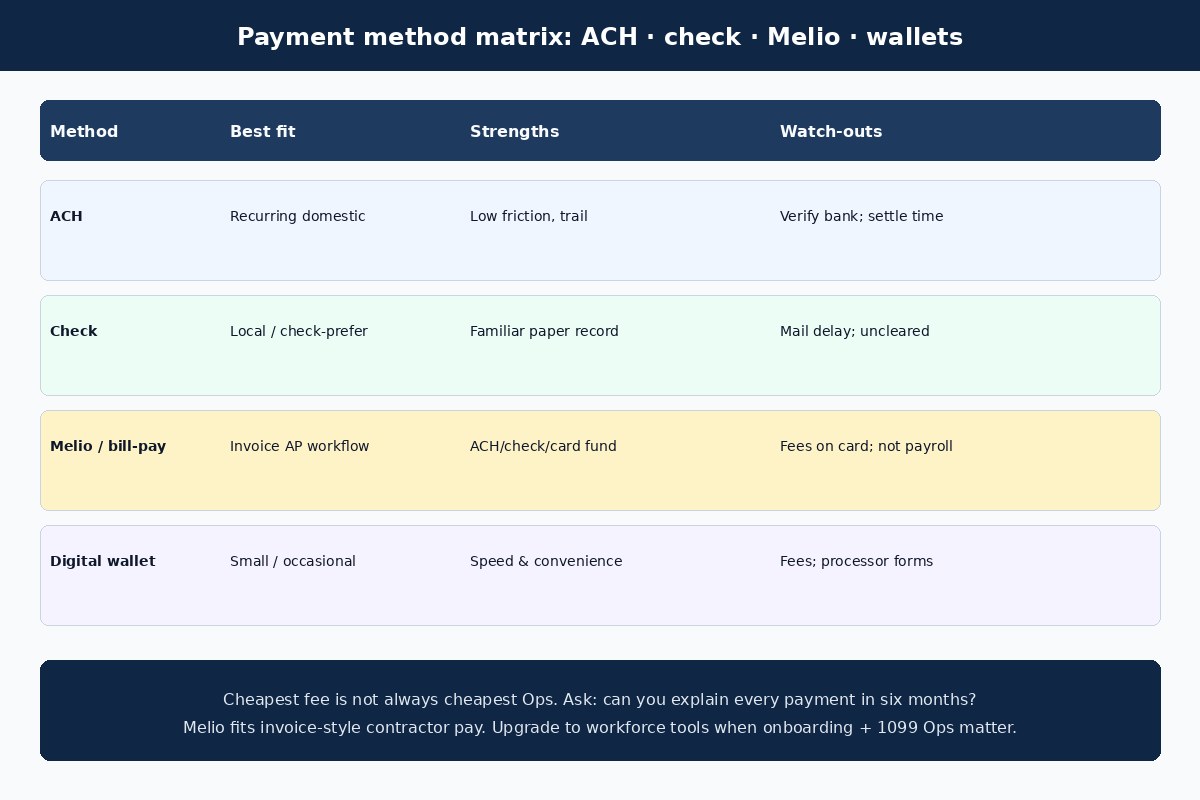
Bill-pay tools sit between raw bank ACH and a full workforce platform. You approve an invoice, schedule ACH or check delivery, optionally fund with a card when the product allows it, and sync status to accounting. Melio is a common fit for invoice-style contractor and vendor pay: recipients often receive funds without creating another software account, and ACH/check/card-funded paths can live in one AP rhythm. Details: can you pay contractors with Melio and the bill pay hub.
Melio is not employee payroll and does not decide classification. It moves and tracks money for bills. If you need deep contractor onboarding and year-end workforce Ops next to W-2 payroll, compare a payroll-adjacent stack instead of stretching bill pay. Soft path: pay contractors with Gusto. Broader tool tradeoffs: comparisons.
Judge Melio (and any bill-pay tool) on the bottleneck you actually have. If invoices stall waiting for approval, you need clearer intake and permissions. If freelancers complain about late ACH, you need scheduling discipline and bank cutoffs—not a second wallet. If December is a scavenger hunt for TINs, you need W-9 collection before first pay, whether that lives in Melio, your drive, or a workforce system. Card-funded contractor payments can help cash flow when available; model the percentage fee against rewards and float before you standardize on cards for every invoice.
Digital wallets (PayPal, Venmo for Business, and similar) can work for small or occasional projects when speed matters. Read fee rules for business transactions, instant transfers, and card funding. Keep your own receipt, transaction ID, and accounting entry—do not rely on the contractor’s screenshot. Processors may issue their own information forms under separate rules; keep your totals anyway and ask your CPA how they interact with 1099-NEC.
International contractor notes
Cross-border payees add currency, documentation, and tax questions. Specialized transfer services may support local rails and clearer FX than a domestic bank wire, but you still document the USD value, fee, rate, and date. Foreign individuals and entities often use Form W-8 series documents rather than Form W-9. Whether Form 1099-NEC applies depends on facts such as where services were performed—do not guess from nationality alone. Treat international contractor pay as a separate project with your CPA.
Recordkeeping and 1099 hygiene
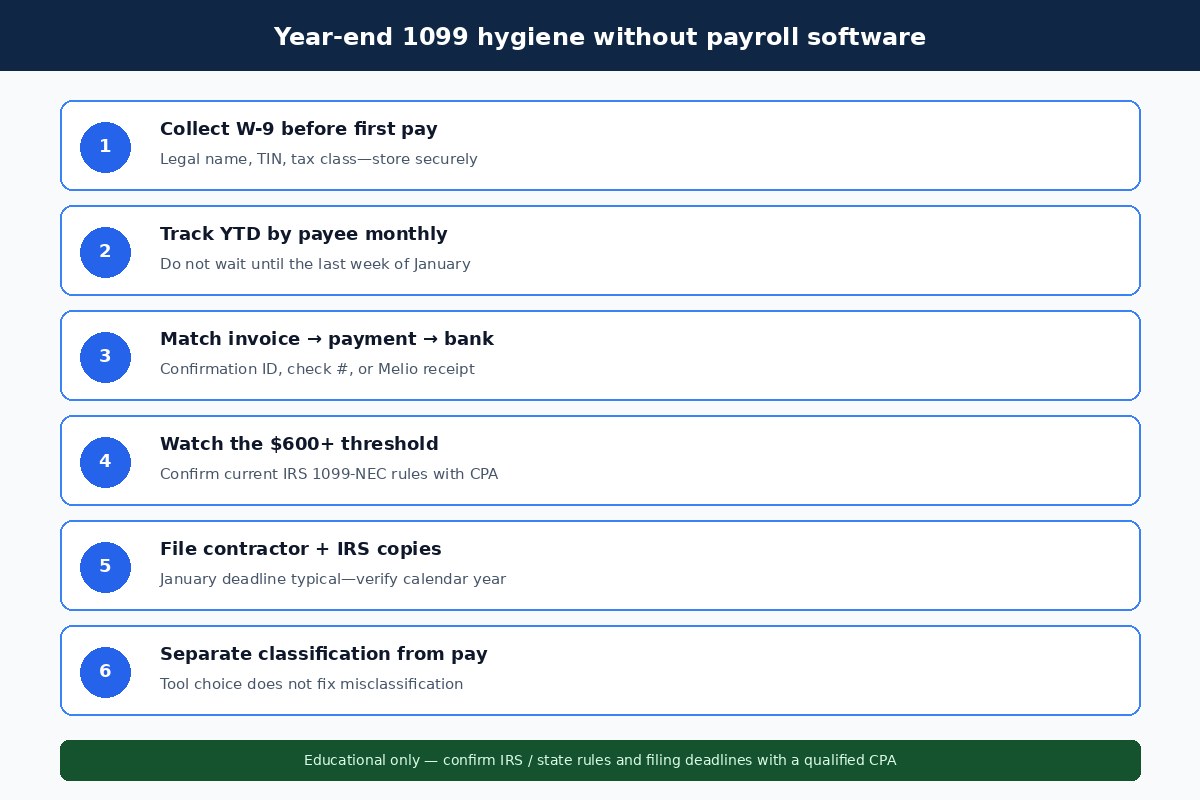
Request a completed Form W-9 before the first payment to a US contractor whenever possible. The form identifies the payee for tax purposes; it does not prove independent-contractor status. Store it securely. If a contractor refuses to provide needed information, pause and ask your accountant—backup withholding questions can arise.
Track nonemployee compensation all year. For many business payments, federal Form 1099-NEC reporting applies when you pay a nonemployee $600 or more for qualifying services during the calendar year—confirm current IRS rules, exceptions, and January filing deadlines with a CPA. Keep contracts, invoices, approvals, confirmations, and running totals together so Melio (or bank) history, books, and tax forms agree. A missed or wrong 1099 is the clearest signal that DIY volume has outgrown your process.
Monthly hygiene beats January heroics. Export or sync payment history, sum by payee, and flag missing W-9s while people still answer email. Name mismatches between the invoice, the W-9, and the bank account create filing headaches. State information-return rules can add requirements beyond federal Form 1099-NEC—ask your CPA which states matter for your payees. If you file yourself, confirm current IRS e-file options; many owners prefer a preparer once contractor count climbs.
When to upgrade to Gusto (or similar)
Upgrade when manual work creates errors, late payments, missing W-9s, or reconciliation that burns hours every month. Triggers include batch contractor payouts, secure W-9 collection at scale, multi-person approvals, accounting integration you cannot maintain by hand, or the need for 1099 preparation next to employee payroll. A contractor-only shop with two monthly freelancers may stay on ACH or Melio indefinitely. Twenty contractors across states with employees on payroll is a different animal.
Choose the tool that matches the job: bank ACH or checks for small domestic volume with accurate records; Melio-style bill pay when invoice approval and scheduling consume time; workforce platforms when onboarding and 1099 Ops belong beside payroll. Soft guide for the workforce path: how to pay contractors with Gusto. Do not buy employee payroll features to solve a vendor-payment problem, and do not run a serious AP operation only through casual wallet apps.
Some businesses run both without conflict: Melio or bank ACH for vendor-style freelancer invoices, and a payroll product for employees plus any contractors intentionally managed as workforce records. The mistake is forcing every payout into one logo because it already sits in your bookmark bar. Revisit the stack when you hire your first employee, add multi-state contractors, or when year-end filing becomes a recurring scramble.
Common mistakes
- Treating the payment app as classification. Paying someone as a “contractor” in software does not make them one.
- Skipping W-9 until December. Collect tax details before first pay.
- Trusting emailed bank-detail changes. Callback a known number.
- Marking checks paid when mailed. Reconcile to bank clearance.
- Relying on wallet screenshots as the only record. Keep business confirmations and accounting entries.
- Ignoring year-to-date totals. Thresholds accumulate; January is too late to invent history.
- Using Melio (or ACH) as fake payroll for employees. Employees need a payroll process.
- Buying a workforce platform for rare vendor-style payouts—or the reverse. Match tool to volume and Ops needs.
FAQ
Can you pay a 1099 contractor without payroll software?
Yes. Use ACH, checks, bill-pay platforms, or documented digital payments. You remain responsible for classification, records, W-9 collection, and required tax reporting.
Do you need a W-9 before paying?
Request and collect Form W-9 before payments to a US contractor whenever possible. If the contractor will not provide it, ask a tax professional about next steps.
When do you issue Form 1099-NEC?
For qualifying service payments, the common federal reporting threshold is $600 or more paid to a nonemployee during the calendar year. Confirm current deadlines and exceptions before filing.
Are contractors paid through payroll?
Genuine independent contractors are usually paid through accounts payable or another vendor-payment workflow, not employee payroll. Some “contractor payroll” products still function as workforce tools—examine what they actually do.
Is Melio enough, or do I need Gusto?
Melio fits invoice-style contractor and vendor bills. Choose a workforce platform when you need onboarding, profiles, and 1099 Ops next to payroll. See Melio for contractors and Gusto for contractors.
Can a contractor also be an employee?
Separate roles are possible, but classification depends on facts for each arrangement. Get advice before issuing both W-2 wages and 1099 compensation to the same person for overlapping work.
What about international freelancers?
Expect W-8 documentation, FX fees, and different reporting questions. Confirm with a CPA before assuming domestic 1099-NEC treatment applies.
Related reading
- W-2 vs 1099: what small business owners need to know
- Can you pay contractors with Melio?
- How to pay contractors with Gusto
- How to pay vendors by bank transfer
- ACH vs wire for vendor payments
- Bill pay hub
- Comparisons
Try Melio
If Melio fits the invoice-style contractor payment workflow described here—ACH, check, or card-funded bills without forcing every freelancer onto a new account—you can explore Melio through our partner link: Try Melio. We may earn a commission at no extra cost to you. Confirm pricing, ACH limits, card fees, check delivery, accounting integrations, and current contractor/vendor features on Melio’s official pages before you enroll.
If your real need is workforce onboarding and 1099 Ops next to payroll, start with the Gusto contractor guide linked above rather than forcing every payout into bill pay. Pick the system that matches how often you pay people and whether the payment is a vendor bill or a workforce record.
Again: this article is educational only. It is not tax, legal, or accounting advice. Worker classification, Form W-9 / 1099-NEC obligations, backup withholding, and payment-tool fees depend on your facts. Verify IRS guidance, state rules, and provider terms with qualified professionals before you change how you pay contractors.