Disclosure: This guide is educational and may include affiliate links. We may earn a commission if you sign up through our Gusto partner link, at no extra cost to you. It is not legal, tax, accounting, or financial advice. Payroll pricing and tax rules change. Confirm current plan rates on each vendor’s site and verify deposit and filing duties with IRS Publication 15 guidance and your CPA or payroll provider before you buy or run payroll.
The cheapest full-service payroll for one W-2 employee in mid-2026 typically lands around the low-$40s per month on budget full-service plans (for example, Patriot Full Service list pricing around $37 base + $5 per worker paid ≈ $42). Mid-tier options such as Gusto Simple and OnPay list at about $49 + $6 per person ≈ $55 for one worker. QuickBooks Payroll Core lists near $50 + $6.50 ≈ $56.50 for the payroll add-on alone—but you also need an active QuickBooks Online subscription if you are not already on QBO. DIY “calculate-only” plans can look cheaper on paper; they leave tax deposits and filings on you, which is where many one-person shops get burned. Prices below are illustrative list rates as of mid-2026—always re-check the vendor page before you subscribe.
What “cheapest” should mean for one employee
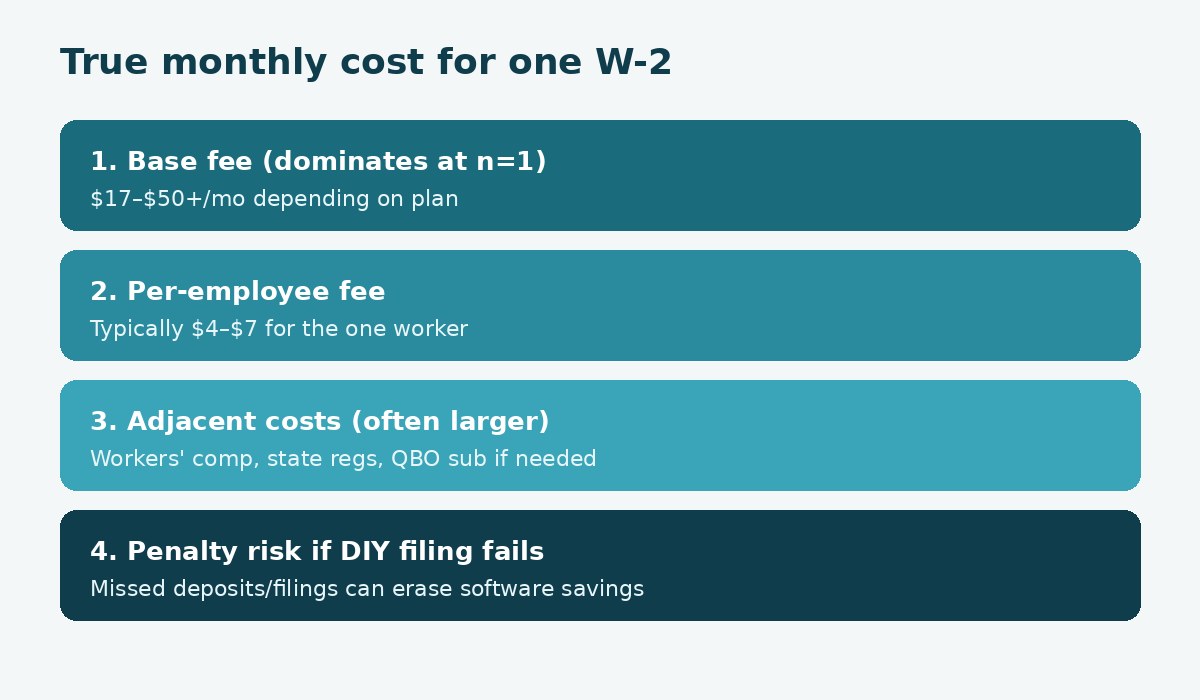
Owners searching for the cheapest payroll for one employee usually want the lowest monthly software bill. That number is incomplete. For a single W-2 worker, almost every vendor’s bill is mostly the base fee. The per-employee charge is only a few dollars. The real comparison is:
- Does the plan file and pay federal, state, and local payroll taxes for you (full-service), or do you self-file?
- What do you pay outside software—workers’ compensation, state employer accounts, optional HR add-ons, or a QuickBooks Online subscription?
- Will you stay at one employee, or will you add people and states within a year?
- If you are an S corporation owner-operator, payroll is often required for reasonable compensation—saving $15/month on software does not remove that duty.
Treat “cheapest” as lowest compliant full-service cost that matches your stack, not the lowest sticker on a DIY tier.
Illustrative cost table at one W-2 (mid-2026 list prices)
Figures below use commonly published list pricing from vendor pages and vendor comparison materials reviewed for this 2026 guide. Promotions, annual billing, sales tax on SaaS, and add-ons can change your invoice. Recalculate with each vendor’s calculator before you decide.
| Provider / plan | List formula | Approx. total at 1 W-2 | Tax filing | Notes |
|---|---|---|---|---|
| Patriot Basic | $17 + $4 / worker paid | ~$21 | You file/pay | Lowest sticker; DIY risk |
| Patriot Full Service | $37 + $5 / worker paid | ~$42 | Full-service | Common budget floor |
| SurePayroll (often cited) | ~$29 + $7 | ~$36 | Full-service | Confirm current SurePayroll tiers |
| OnPay | $49 + $6 / person | ~$55 | Full-service (all states) | Single transparent tier |
| Gusto Simple | $49 + $6 / person | ~$55 | Full-service (single-state on Simple) | Plus / Premium for more HR & multi-state |
| QuickBooks Payroll Core | $50 + $6.50 / employee | ~$56.50 payroll-only | Full-service | Requires QBO; all-in higher if new to QBO |
Takeaway: the full-service floor for one employee often sits in the roughly $36–$57/month band. Jumping from ~$42 to ~$55 is about $13/month—often less than one late payroll tax penalty. Feature depth, support, and whether you already live in QuickBooks usually matter more than that gap.
How much does Gusto cost for one employee?
On Gusto’s published pricing (Simple plan), list rates have been $49 per month + $6 per person. For one active W-2 employee that is about $55/month. Higher tiers (Plus, Premium) raise the base and per-person amounts when you need multi-state payroll, richer HR tools, or priority support. Gusto also publishes a contractor-only plan for shops that pay 1099 contractors without W-2 staff; that is a different product path than “one employee.”
Gusto is rarely the absolute cheapest sticker for a lone W-2. Owners pick it when onboarding, employee self-service, benefits administration, and a cleaner first-hire experience are worth roughly the mid-$50s. If you are comparing Gusto against QuickBooks Payroll in more depth, see our Gusto vs QuickBooks Payroll guide. For micro-team feature fit beyond pure price, see best payroll software for 1 to 5 employees.
Soft next step when UX and benefits matter more than the lowest base fee: review current Gusto plans (affiliate link) and confirm the Simple vs Plus fit for your state count.
Is DIY payroll actually cheaper for a single hire?
DIY tiers (Patriot Basic is the usual example) can land near ~$21/month for one worker because the software calculates pay while you deposit and file taxes. On a spreadsheet, that saves roughly $250/year versus a ~$42 full-service plan. In practice, one missed deposit schedule, wrong Form 941 timing, or forgotten state unemployment filing can erase years of that savings.
DIY can still make sense if you (or your bookkeeper/CPA) already run payroll tax calendars reliably and you want the lowest software fee. For most owners hiring their first employee, full-service is the cheaper risk-adjusted choice. Pair software choice with the ops sequence in how to run payroll for your first employee and the tax calendar notes in payroll taxes for your first employee.
Does QuickBooks Payroll win if you already use QuickBooks Online?
QuickBooks Payroll Core list pricing around $50 + $6.50 per employee puts one W-2 near $56.50/month for payroll alone. That looks similar to Gusto/OnPay—until you remember Core is an add-on. If you already pay for QuickBooks Online, native ledger posting is the reason Core often wins. If you are new to QBO, add the QBO subscription (Simple Start and higher tiers vary by promo) before you call Core “cheap.”
Rule of thumb used on this site: choose QuickBooks Payroll when the books already live in QBO and you want fewer export/import steps. Choose a payroll-first tool (Gusto, OnPay, Patriot) when payroll UX or price floor matters more than native QBO posting. Cross-check that fork in Gusto vs QuickBooks Payroll.
Hidden costs that change the real total
Software is only one line on the employer cost sheet. Before you optimize for a $10 monthly gap, budget for:
- Workers’ compensation — many states require coverage even for one employee; premiums dwarf software fees.
- State employer accounts — withholding and unemployment insurance registration (government processes; fees vary by state).
- Multi-state add-ons — some budget plans charge extra per additional state; OnPay markets all-states filing in its base price; Gusto Simple is single-state (upgrade for more).
- HR / PTO / time-tracking modules — optional on several platforms; they change the comparison if you need them on day one.
- Year-end form handling — confirm whether W-2 mailing is included or portal-only.
- Accounting subscription stack — QBO + Payroll is an all-in number, not a payroll-only number.
Use the new-hire payroll checklist so software shopping does not skip registrations and forms.
Decision checklist: which path fits a one-employee shop
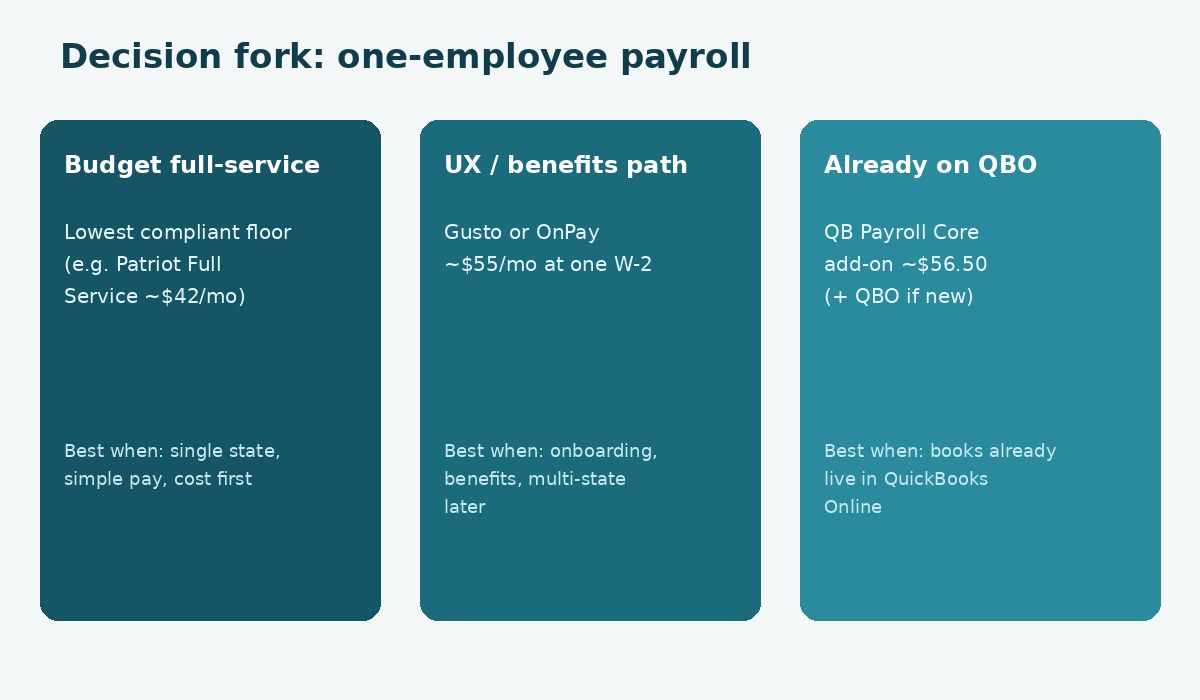
- Need the lowest compliant full-service floor, single state, simple pay: start with budget full-service list pricing (Patriot Full Service is the frequent example near ~$42). Confirm current Patriot rates and support fit.
- Want stronger onboarding, employee app, or a benefits path soon: Gusto or OnPay near ~$55 are typical mid-tier picks. Prefer Gusto when benefits and SMB UX are primary; OnPay when transparent all-states filing in one tier matters.
- Books already in QuickBooks Online: QuickBooks Payroll Core is often the operationally cheapest even when the payroll line is not the lowest sticker.
- Comfortable filing Form 941 and state returns yourself: DIY tiers can cut software cost—only with a real tax calendar owner.
- Still deciding employee vs contractor: classify first (W-2 vs 1099). Paying a contractor through bill-pay tools is a different problem than W-2 payroll.
S-corp owner-only payroll: price is secondary
If you elected S corporation taxation and you perform services for the company, the IRS expects reasonable W-2 compensation before distributions. Skipping payroll to “save” on software is the wrong optimization. Read S corp reasonable compensation and do I need payroll for my LLC, then pick a full-service tool you will actually run every payday. For owner draws vs payroll on LLCs taxed as partnerships or disregarded entities, see how to pay yourself from an LLC.
Common mistakes when chasing the cheapest plan
- Comparing DIY and full-service as equals — they are different products.
- Ignoring the QBO subscription when quoting QuickBooks Payroll.
- Optimizing for today’s one employee while you already plan two states or five hires this year.
- Forgetting workers’ comp and state accounts, then blaming payroll software for “high employer cost.”
- Buying software before classification and registrations — the runbook order matters.
- Assuming a percentage “tax hack” replaces reasonable W-2 pay for S-corp owners.
How OnPay compares at one employee
OnPay publishes a single main payroll price: $49 per month + $6 per person, so one W-2 is about $55/month—the same list band as Gusto Simple. OnPay’s help center states that tax filings and payments in all 50 states are included in that price, along with unlimited pay runs. That packaging is useful if you already have (or expect) multi-state complexity and do not want a “base state + add-on state” surprise on a budget plan.
Feature depth beyond payroll (HR modules, time tools) may be add-ons depending on the package you choose. For a pure one-employee, single-state shop that only wants tax filing done, OnPay is rarely cheaper than Patriot Full Service on sticker. It becomes competitive when all-states filing and support quality matter more than saving roughly $10–$15 per month.
A simple 30-day shopping plan
If you are deciding this week, use a short sequence instead of endless tab comparisons:
- Confirm worker status — W-2 employee vs contractor. Do not buy payroll to pay someone who should stay on 1099 (or the reverse).
- List your constraints — states you withhold in today, whether books already sit in QuickBooks Online, and whether you need benefits quotes in the next 90 days.
- Shortlist two full-service tools — one budget floor candidate and one mid-tier (Gusto or OnPay), plus QuickBooks Payroll only if you are already on QBO.
- Run each vendor’s official calculator for one employee and write down base, per-person, sales tax on SaaS if shown, and any required accounting subscription.
- Complete a dry-run onboarding — add the employee, set a pay schedule, and generate a preview paycheck before funding the first live run.
That process usually surfaces the true monthly number faster than reading another roundup. Keep IRS Publication 15 concepts and your state’s withholding/UI instructions next to the software wizard so setup questions do not stall payday.
FAQ: cheapest payroll for one employee
What is the cheapest full-service payroll for one employee?
Among widely advertised full-service plans in mid-2026, budget options such as Patriot Full Service (about $37 + $5 ≈ $42) and similar low-base products often set the floor. Confirm live pricing; promotions change. Mid-tier tools like Gusto and OnPay usually cost more at one employee in exchange for UX and feature depth.
How much does Gusto cost for one employee?
Gusto Simple list pricing has been $49/month + $6 per person, or about $55 for one W-2. Higher tiers cost more. Check Gusto’s pricing page for the current Simple / Plus / Premium numbers.
Is Patriot cheaper than Gusto for one worker?
On published full-service list rates, Patriot Full Service is typically cheaper than Gusto Simple at one employee (~$42 vs ~$55). Compare support, multi-state needs, and HR add-ons before choosing on price alone.
Should I use DIY payroll to save money?
Only if someone reliable owns deposits and filings. The software savings are small relative to employment tax penalty risk for first-time employers.
Does QuickBooks Payroll include QuickBooks Online?
No. Core (and higher) payroll plans are add-ons that require an active QuickBooks Online subscription. Quote all-in cost if you are not already on QBO.
What extra costs sit outside software fees?
Workers’ compensation, state employer registration processes, possible multi-state or HR modules, year-end form handling options, and any accounting subscription required by your payroll choice.
Do S-corp owners need payroll for just themselves?
If you perform more than minor services and take money out of the S corp, the IRS expects reasonable W-2 compensation. See our reasonable compensation guide. Software price is secondary to running compliant owner payroll.
Is this pricing guaranteed?
No. This article uses illustrative mid-2026 list prices for education. Vendors change rates, bundles, and promos. Verify on official pages before you subscribe.
Related reading and next step
Price is one input. Wire it into the rest of your payroll stack:
- Payroll hub and comparisons hub
- How to run payroll for your first employee
- Payroll taxes for your first employee
- Best payroll software for 1 to 5 employees
- Gusto vs QuickBooks Payroll
- Tax compliance hub for related employer education
If you want a payroll-first product with clear SMB onboarding and room to add benefits later, compare current Gusto plans (affiliate). Re-check Simple vs Plus against your state count, then run a test payroll preview before the first live payday. For vendor bills outside payroll, our bill pay hub covers AP tools separately.