Disclosure: This guide is educational and may include affiliate links. We may earn a commission if you sign up through our Melio partner link, at no extra cost to you. It is not accounting, tax, legal, or financial advice. Stripe and QuickBooks Online (QBO) features change over time. Confirm steps in your own Stripe Dashboard and Intuit help center, and review material differences with a CPA or bookkeeper before you change how you book revenue.
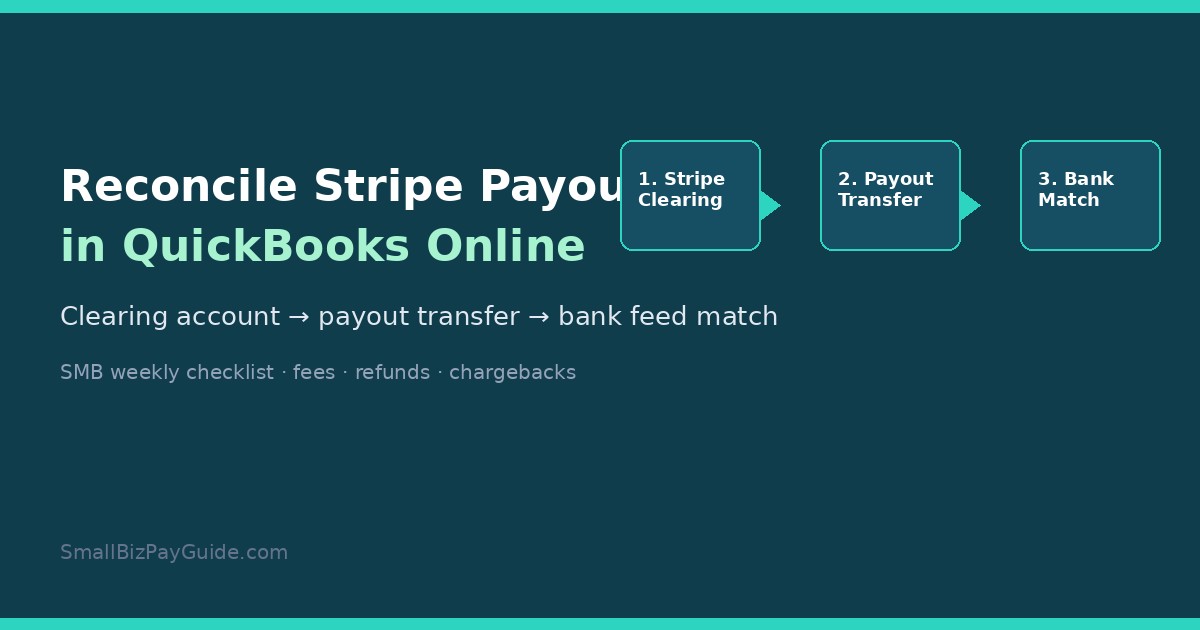
To reconcile Stripe payouts in QuickBooks, create a bank-type (or other current asset) account named something like Stripe Clearing, record customer charges at the gross amount into that account, book Stripe fees/refunds/disputes as separate clearing activity, then record each Stripe payout as a transfer from Stripe Clearing to your operating checking account and match the bank-feed deposit to that transfer. Do not categorize the deposit as Sales Income. When the clearing balance matches your Stripe available (or remaining) balance for the same date, the payout batch is reconciled. Stripe documents payout-level BalanceTransactions for automatic payouts; Intuit documents Stripe Connector flows that link payouts to bank deposits in QBO.
Quick answer: how do you reconcile Stripe payouts in QuickBooks?
Most US small businesses land on one of two paths. Path A is manual: a Stripe Clearing account plus weekly matching from the Stripe payout detail to QBO. Path B is automated: Stripe Connector by QuickBooks or a third-party sync that posts sales, fees, refunds, and payout transfers for you. Both paths share the same rule. The bank deposit from Stripe is a movement of cash you already earned inside Stripe, not a new sale. If you book the deposit as income, revenue gets double counted and fees disappear into a net number that P&L cannot explain.
Who this guide is for
Use this if you sell through Stripe Checkout, Payment Links, invoices, or a card terminal and you keep books in QuickBooks Online. It fits owners who reconcile on Fridays, part-time bookkeepers, and founders who outgrew “just dump the deposit into Sales.” It is not a Stripe Connect platform walkthrough, and it is not a substitute for your CPA’s month-end close. If payroll is your main pain, see Gusto vs QuickBooks Payroll instead. If vendor bills (money out) are the messy stack, our bill pay hub and AP checklist cover that side of cash.
How do Stripe payouts show up in QuickBooks Online?
In Stripe, a payout is the transfer of funds from your Stripe balance to an external bank account. Automatic payouts typically bundle charges, fees, refunds, and adjustments from a settlement window into one net deposit. Stripe’s payout reconciliation documentation explains that for automatic payouts you can list BalanceTransactions filtered by payout ID and see types such as charge, refund, stripe_fee, and the payout itself (Stripe docs: Payout reconciliation, reviewed 2026). Manual payouts are different: you choose the amount and timing, so Stripe cannot always tell you which transactions sit inside that payout.
In QuickBooks Online, that same payout usually appears as a deposit on the bank feed for your operating account (or whatever account Stripe pays into). Intuit’s help for connecting Stripe describes the connector adding sales, refunds, payouts, and related adjustments, and linking a payout to the bank deposit when you add the payout to your books (Intuit: Connect and manage Stripe transactions in QuickBooks Online, reviewed 2026). If you never set up a connector, the bank feed still shows the net deposit. Your job is to give that deposit a matching transfer (or matched deposit package) instead of a sales category.
Why a Stripe clearing account helps
A Stripe Clearing account is an internal ledger account that represents money sitting in Stripe before it hits your bank. Think of it as a holding tank. Gross charges increase the clearing balance. Fees, refunds, dispute losses, and payouts decrease it. After you record a payout as a transfer out of clearing into checking, the clearing balance should line up with what Stripe still shows as available or pending for that same moment in time.
Without a clearing account, people often:
- Book the bank deposit as income (understates fees; can double-count if invoices or sales receipts already posted)
- Ignore fees until tax time, then scramble
- Lose the trail for refunds and chargebacks that hit a later payout
- Fight bank reconciliation because the deposit amount never equals any single invoice
The clearing method keeps P&L honest: sales at gross, merchant fees as expense, refunds as contra-revenue or expense per your CPA’s preference, and the bank line as a pure cash transfer.
Set up Chart of Accounts for Stripe
In QBO, open Chart of Accounts and create:
- Stripe Clearing — Account type Bank (detail type Cash on hand or Checking) or Other Current Asset if your accountant prefers a holding asset. Do not connect a real bank feed to this account. Starting balance should match your Stripe balance on the day you adopt the method (opening journal entry with CPA guidance if you are mid-year).
- Stripe Processing Fees (or Merchant Fees) — Expense / Bank Charges or similar.
- Confirm your Income accounts for products/services already exist.
- Confirm the operating bank account that receives Stripe payouts is the one connected to Banking.
If you already dumped months of Stripe deposits into Sales, clean-up is a separate project. Pause new bad coding first, then reverse and re-match historical deposits with your bookkeeper. Do not invent catch-up journal entries you cannot support with Stripe export files.
Record charges, fees, refunds, and disputes
You can book Stripe activity transaction-by-transaction or as a daily/weekly summary journal. High volume almost always wants a connector or summary journals. Low volume can use sales receipts or invoices deposited to Stripe Clearing, then expense the fee from clearing.
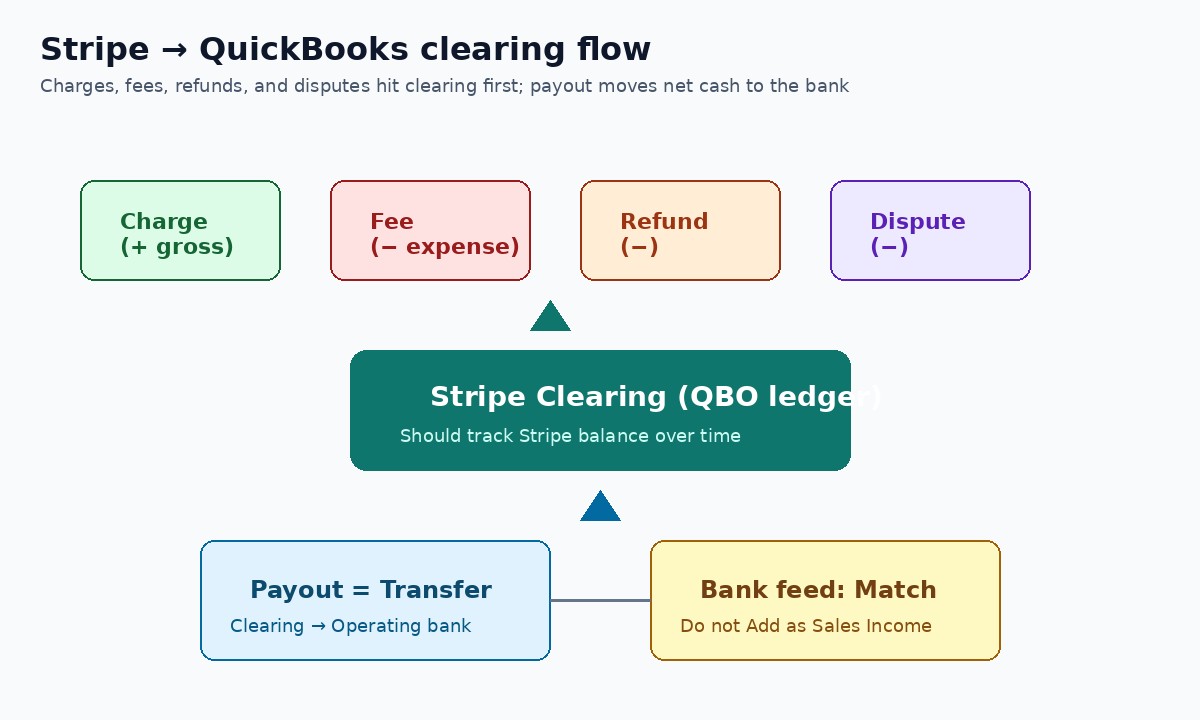
| Payout line type | What it means in Stripe | Typical QBO treatment via clearing |
|---|---|---|
| Charge | Customer payment that increased your Stripe balance | Increase income (or clear A/R) and increase Stripe Clearing for the gross amount |
| Fee (stripe_fee / processing fee) | Stripe’s fee related to the charge or payout window | Expense to Stripe Processing Fees; decrease Stripe Clearing |
| Refund | Money returned to the customer from your Stripe balance | Reduce income or post refund expense per CPA; decrease Stripe Clearing |
| Dispute / chargeback | Card network dispute that pulls funds (often with a dispute fee) | Record dispute loss (and fee) from clearing; restore entries if you win later |
| Payout | Net cash leaving Stripe for your bank | Transfer from Stripe Clearing to operating bank; match bank feed |
Worked numbers (illustrative only, not a fee quote): a $100 charge with a $3.20 fee leaves $96.80 in clearing. A later $100 refund may leave the original fee as a cost unless Stripe returns a portion. A dispute can remove the charge amount plus a separate dispute fee. Always pull the payout’s itemized rows from Stripe Dashboard → Payouts (or the payout reconciliation report for automatic payouts; see Stripe: Payout reconciliation report, reviewed 2026) instead of guessing.
Record the payout as a transfer (not income)
When Stripe pays out $2,481.37, create a Transfer in QuickBooks:
- From: Stripe Clearing
- To: Operating checking (the account that received the deposit)
- Amount: exact payout net
- Date: payout arrival date (or payout created date—pick one policy and stick to it)
- Memo: Stripe payout ID (po_…)
Then open Banking → the operating account → find the deposit → Match to the transfer. Matching is the reconciliation checkpoint for that batch. If QBO offers “Match” to a deposit package built by Stripe Connector, use that path instead of creating a duplicate transfer.
Match deposits to invoices and fees
Invoice-heavy businesses get stuck because one Stripe payout rarely equals one invoice. A Monday payout might include three paid invoices, two fees, one partial refund, and a dispute adjustment. The clearing account absorbs that mess so the bank feed only needs to match one transfer.
Practical matching habits:
- When a customer pays a QBO invoice through Stripe, receive the payment to Stripe Clearing (not undeposited funds into checking).
- If you use Sales Receipts for immediate card sales, deposit them to Stripe Clearing.
- Book fees from the same payout window so clearing stays near Stripe’s running balance.
- Never “split categorize” a bank deposit into Sales + Fees as a shortcut unless your CPA designed that deposit template and you still reconcile fees monthly.
Weekly reconciliation checklist
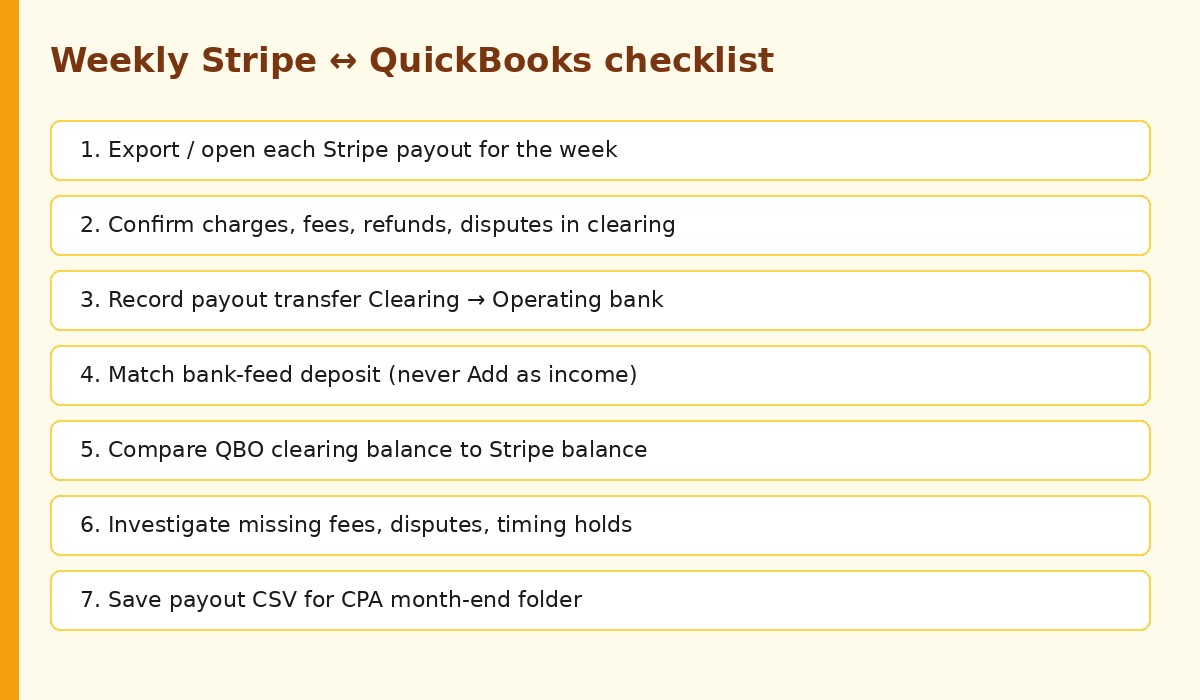
- In Stripe, open Payouts for the week. Download or screenshot each payout’s included transactions.
- Confirm every charge, fee, refund, and dispute in that window is recorded against Stripe Clearing in QBO (manually or via sync).
- For each payout that landed in the bank, record or confirm the Transfer out of Stripe Clearing.
- In the QBO bank feed, Match (do not Add as income) each Stripe deposit.
- Compare Stripe Clearing balance in QBO to Stripe’s balance for the same date/time. Investigate penny differences: missing fee, unrecorded dispute, pending payout timing, or a reserve hold.
- Glance at refunds and disputes older than 7 days that still sit unmatched.
- Export a simple CSV of the week’s payouts into your close folder for the CPA.
If clearing is chronically off by the same fee pattern, you are probably missing fee lines or booking gross vs net inconsistently. Fix the pattern before you automate; syncing a broken chart of accounts just produces wrong entries faster.
Can you automate Stripe → QuickBooks?
Yes. Options fall into three buckets:
- Stripe Connector by QuickBooks — Intuit’s integration path for importing Stripe activity and linking payouts to deposits. Review current app settings for the Stripe deposit account and which locations sync (see Intuit’s Stripe help article linked above; product labels and availability can change by QBO plan and region).
- Third-party sync tools — Vendors in this space often post daily summaries to a clearing/holding account and create payout transfers. Evaluate security, fee posting rules, and how they handle disputes before you connect production data. We are not endorsing a specific paid connector here, and we are not quoting their prices.
- DIY exports — Stripe payout reconciliation report + spreadsheet + weekly journal. Fine for low volume; painful once you have daily payouts and lots of refunds.
Automation still needs the clearing mental model. If the sync deposits payouts straight into income, turn that setting off. Your weekly checklist shrinks to “review exception queue + match bank feed,” not “ignore the books.”
Common mistakes that break reconciliation
- Categorizing the Stripe bank deposit as Sales Income after invoices were already marked paid.
- Booking only net deposits and never recording fees (P&L looks artificially profitable).
- Using Undeposited Funds into checking while Stripe still holds the money for two days.
- Ignoring dispute fees that appear on a later payout.
- Starting a clearing account mid-month without an opening balance that matches Stripe.
- Matching the wrong payout ID when two deposits share a similar amount.
- Treating Stripe Tax or sales-tax lines as processing fees (different problem; see Quaderno vs Stripe Tax and the tax compliance hub for educational tax-tool context).
Vendor bills are a separate cash stream (soft Melio note)
Stripe reconciliation fixes money that customers pay you. It does not pay your rent, contractors, or suppliers. Keep AP in its own workflow so you do not mix merchant deposits with bill payments in one vague “Transfers” account. If you still mail checks or juggle card-float for vendors, an AP tool can sit beside QBO without touching Stripe clearing. Many small teams use Melio for ACH/check vendor payments while QBO remains the system of record. For process detail, see how to pay business bills online without mailing checks and Melio vs QuickBooks Payments.
FAQ
How do I reconcile Stripe payouts in QuickBooks Online?
Record Stripe sales, fees, refunds, and disputes against a Stripe Clearing account, post each payout as a transfer to your operating bank, then Match the bank-feed deposit to that transfer. Compare clearing to Stripe’s balance for the same date.
What is a Stripe clearing account in QuickBooks?
It is an internal Bank or Other Current Asset account that tracks funds while they sit in Stripe. It is not a connected bank feed. Gross activity increases it; fees, refunds, disputes, and payouts decrease it.
Why doesn’t my Stripe deposit match my invoice total?
Because a payout is usually a batch: multiple charges minus fees, refunds, and adjustments. Match the deposit to the payout transfer (or connector deposit package), not to a single invoice.
How should I record Stripe fees in QuickBooks?
Post them as an expense (for example Stripe Processing Fees) that reduces Stripe Clearing, so revenue stays gross and fees stay visible on the P&L. Confirm the exact expense account with your CPA.
How do refunds and chargebacks affect Stripe reconciliation?
They reduce your Stripe balance and often appear inside a later payout batch, sometimes with an extra dispute fee. Record them in clearing when they occur so the next payout transfer still matches the bank.
Can I automate Stripe-to-QuickBooks sync?
Yes, via Stripe Connector by QuickBooks or third-party sync tools, or with scheduled exports for low volume. Automation should still use a clearing or holding account and should not book payouts as new income.
How often should I reconcile Stripe with QuickBooks?
Weekly is a solid SMB default if you have several payouts per week. Daily review helps high-refund or high-dispute accounts. Always reconcile before month-end close.
Is this accounting or tax advice?
No. This is educational process content for US small businesses. Your CPA, your QBO setup, and current Stripe/Intuit documentation control the final entries.
Related reading
- Bill pay hub — vendor payments and AP workflows
- Payroll hub — payroll ops separate from merchant deposits
- Tax compliance hub — educational tax tooling context
- Comparisons hub — tool vs tool guides
- Accounts payable checklist
- Pay business bills online without mailing checks
- Melio vs QuickBooks Payments
- Do I need to 1099 an LLC? and How to file 1099-NEC when contractor payouts (not Stripe card sales) create reporting work
Bottom line: reconcile Stripe payouts in QuickBooks by treating Stripe as a clearing balance, booking gross activity and fees there, transferring each payout to the bank, and matching the feed. Keep vendor AP on a separate track—tools like Melio can help pay bills while your clearing account stays clean for card sales.