Disclosure: This comparison is educational and may mention tax tools in a review context. It is not legal, tax, accounting, or financial advice. Product features, covered jurisdictions, and pricing change. Verify current details on each vendor’s official pages and with a qualified professional before you buy, enable tax collection, or change filing workflows.
Digital product sellers often end up comparing two different shapes of tax tooling. Stripe Tax sits inside the Stripe payments stack and calculates tax where checkout already lives. Quaderno is built as a dedicated tax compliance layer with calculation, invoicing, and multi-channel workflows for sellers who need more than a payments add-on. This 2026 Ops and Finance guide maps when each fits, how US sales tax and VAT/OSS questions show up in the tool choice, and what to verify on official pricing pages before you commit.
Quick answer
Choose Stripe Tax when checkout and billing already live in Stripe and you want tax calculation to stay native to that stack. Choose Quaderno when you need a dedicated tax compliance workflow across gateways or platforms, stronger invoicing and VAT evidence habits, or a tax layer that is not tied to a single processor. Many teams start with one and revisit when channels or cross-border volume grow. For product taxability basics, see do digital products need sales tax?
What is Stripe Tax
Stripe Tax is Stripe’s tax automation product for calculating and collecting sales tax, VAT, and GST on transactions that run through Stripe. It is designed to sit close to Checkout, Billing, Invoicing, Payment Links, and related Stripe payment flows. Sellers who already standardized on Stripe often enable Tax so rates and rules apply inside the same dashboard and API surface they use for payments.
Stripe publishes two main shapes of the product: a pay-as-you-go calculation-focused option (often labeled Tax Basic) and a fuller compliance package (Tax Complete) that can include more registration and filing support depending on plan and region. Exact inclusions, covered countries, and fees change, so treat any summary here as a map and confirm on Stripe’s Tax pricing page.
Ops implication: Stripe Tax shines when the payment system of record is already Stripe. If most of your digital product or SaaS revenue clears through Stripe Checkout or Billing, enabling Tax keeps tax logic next to the charge. If a meaningful share of sales clears elsewhere, you will still need a plan for those channels.
What is Quaderno
Quaderno is a dedicated tax compliance platform aimed at digital sellers, SaaS, and cross-border catalogs. Typical jobs include tax calculation based on product and customer location, nexus or threshold-style alerts, tax-compliant invoices and receipts, multichannel reports, and optional help with registration or filing depending on what you purchase. Integrations commonly cover payment processors and sales platforms beyond a single gateway.
Where Stripe Tax is payments-native, Quaderno is compliance-workflow-native. That difference matters when Finance wants invoices that look right for VAT B2C or B2B, when you sell through more than one processor, or when an advisor asks for jurisdiction reports that are not buried inside a payments export. Confirm current plans and add-ons on Quaderno’s pricing page.
At a glance
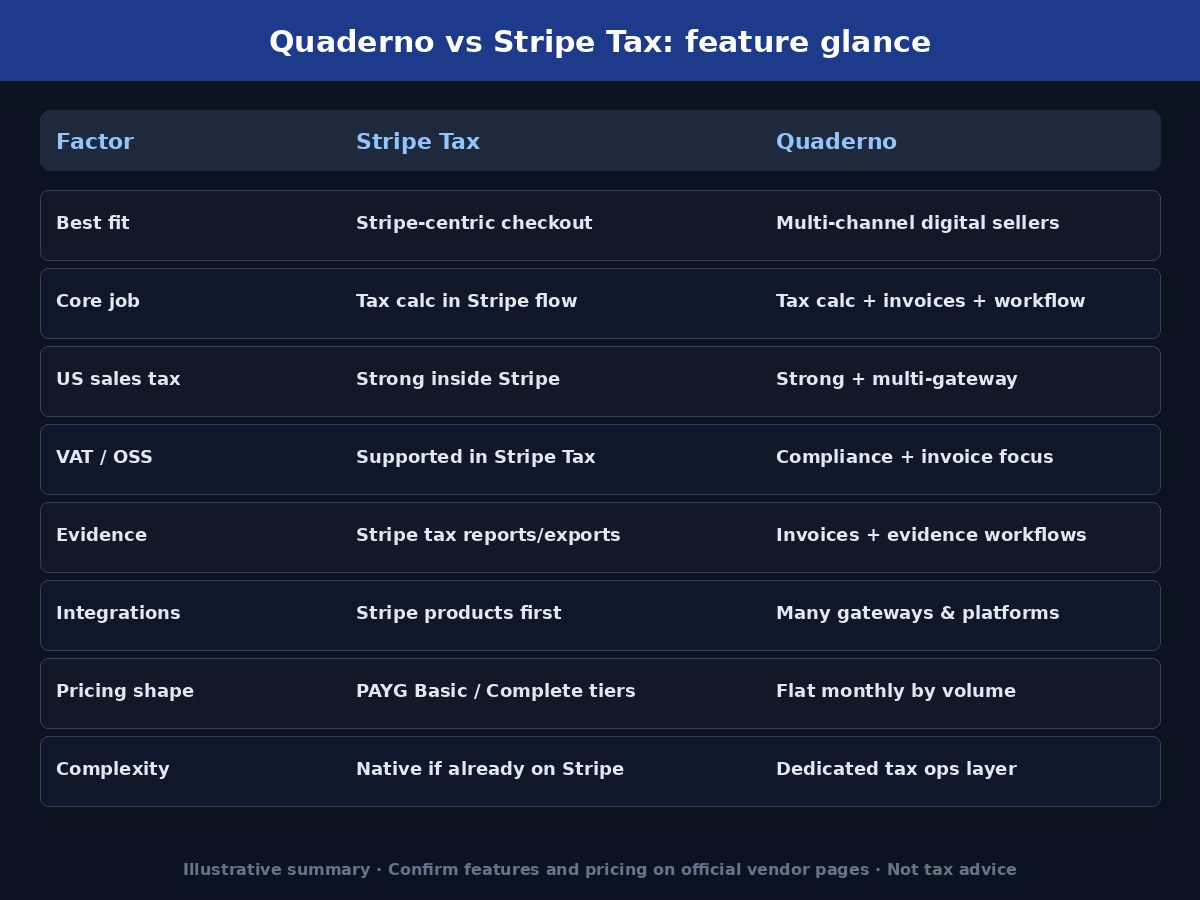
Use this table as a decision shortcut, not a feature audit:
| Factor | Stripe Tax | Quaderno |
|---|---|---|
| Best for | Stripe-centric businesses | Tax-compliance-focused / multi-channel sellers |
| Core use | Tax calculation inside Stripe checkout | Tax calculation, invoices, compliance workflows |
| Fit | Payments stack already on Stripe | Digital products, SaaS, multi-platform sales |
| Workflow | Payments-first | Compliance-first |
| Complexity | More native for existing Stripe users | More specialized tax ops layer |
Neither tool replaces reading state DOR guidance, EU/UK VAT rules, or professional advice on whether you must register and collect. Tools automate calculation and records; they do not invent your nexus or registration duties. Companion maps: sales tax nexus for digital products and when should an online business register for sales tax?
Pricing notes (illustrative; verify)
Do not treat blog summaries as your quote. Open the official pricing pages the week you buy, because tiers and inclusions move.
Stripe Tax (illustrative ballpark from Stripe’s public Tax pricing page): Tax Basic is commonly described as pay-as-you-go for calculations where you are registered to collect, with no-code Stripe integrations often framed around a percentage of the transaction (publicly listed around 0.5% in recent Stripe materials) and API-style pricing framed around a per-transaction fee (publicly listed around 50¢ in recent Stripe materials, with extra calculation calls priced separately). Tax Complete is framed as monthly subscription tiers with an annual contract, with public starting tiers around $90 per month and higher tiers as volume and filings grow. Additional fees can apply outside included registrations/filings or when you exceed plan limits. Verify live numbers and terms on stripe.com/tax/pricing.
Quaderno (illustrative ballpark from Quaderno’s public pricing page): Plans are typically flat monthly fees tied to transaction volume (sales, refunds, and purchases recorded in the app). Public tiers in recent materials include Hobby around $29/month for a small transaction cap, Startup around $49, Business around $99, Growth around $149, and Enterprise for higher volumes. Filing and registration services may be separate add-ons. Verify live numbers and what counts as a transaction on quaderno.io/pricing.
Cost comparison tip: model your next twelve months of taxable Stripe volume versus total multi-channel transactions. Percentage-based calculation fees scale with revenue; flat tiers scale with transaction counts. Include filing add-ons if you need them. Re-run the model if you add PayPal, Paddle, a marketplace, or a second processor.
US sales tax vs VAT and OSS
US sales tax and EU/UK VAT are different regimes that happen to share shopping carts. US questions center on product taxability by state, nexus, registration, destination rates, and marketplace facilitator rules. VAT questions for digital B2C supplies center on customer location evidence, invoice content, reverse charge for eligible B2B, and how you register or report (including schemes such as OSS where they apply).
Stripe Tax can calculate and collect across many countries when configured inside Stripe. Quaderno is often evaluated by digital sellers who want VAT-aware invoices and a compliance workflow that spans channels. For field-level invoice habits, see VAT invoice requirements for digital products. Keep US sales tax and VAT as separate columns in your ops wiki even if one tool calculates both.
Neither product decides for you whether a downloadable course is taxable in a given US state, or whether you must register in a new country. Product taxonomy and nexus monitoring still sit with you and your advisor. Soft hub: tax compliance.
Invoices and evidence
Audits and platform disputes are easier when order-level evidence travels with the sale. For US sales tax, prioritize customer jurisdiction, product tax code, taxable amount, tax collected, channel tag, and exemption documents when used. For EU/UK VAT on digital supplies, prioritize location evidence, VAT ID validation when used, invoice or receipt content, and B2C versus B2B treatment.
Stripe Tax stores tax calculation details in the Stripe ecosystem and supports tax reporting and exports. Quaderno emphasizes automatic tax-compliant invoices and multichannel reports that Finance or an advisor can open without reconstructing every payment event. If you already issue custom invoices from another system, map which system is the system of record before you enable a second invoice stream.
Subscription renewals are where evidence drifts. Confirm that tax tools re-evaluate location and product codes on renewals the same way they do on first purchase. Export a monthly pack you can still open if you change processors later.
Integrations
Stripe Tax is deepest when the commerce stack is Stripe: Checkout, Billing, Payment Links, Invoicing, and payment APIs. Stripe has also described options to bring in some third-party transaction data for Tax reporting, but the center of gravity remains Stripe. If your checkout is mostly Stripe, integration cost is usually low.
Quaderno is built to connect multiple sales platforms and payment processors so tax calculation and invoices can follow revenue across channels. That matters when you run Stripe plus another gateway, sell on a platform and on your own site, or invoice outside the card network. Count real integrations you will keep for twelve months, not a wishlist.
Integration checklist before you pick: list every live channel that creates a sale or refund; mark which ones must calculate tax at checkout versus after the fact; note which system must emit the customer-facing invoice; confirm who owns remittance filings. The longest list often points toward a dedicated tax layer.
When to choose Stripe Tax
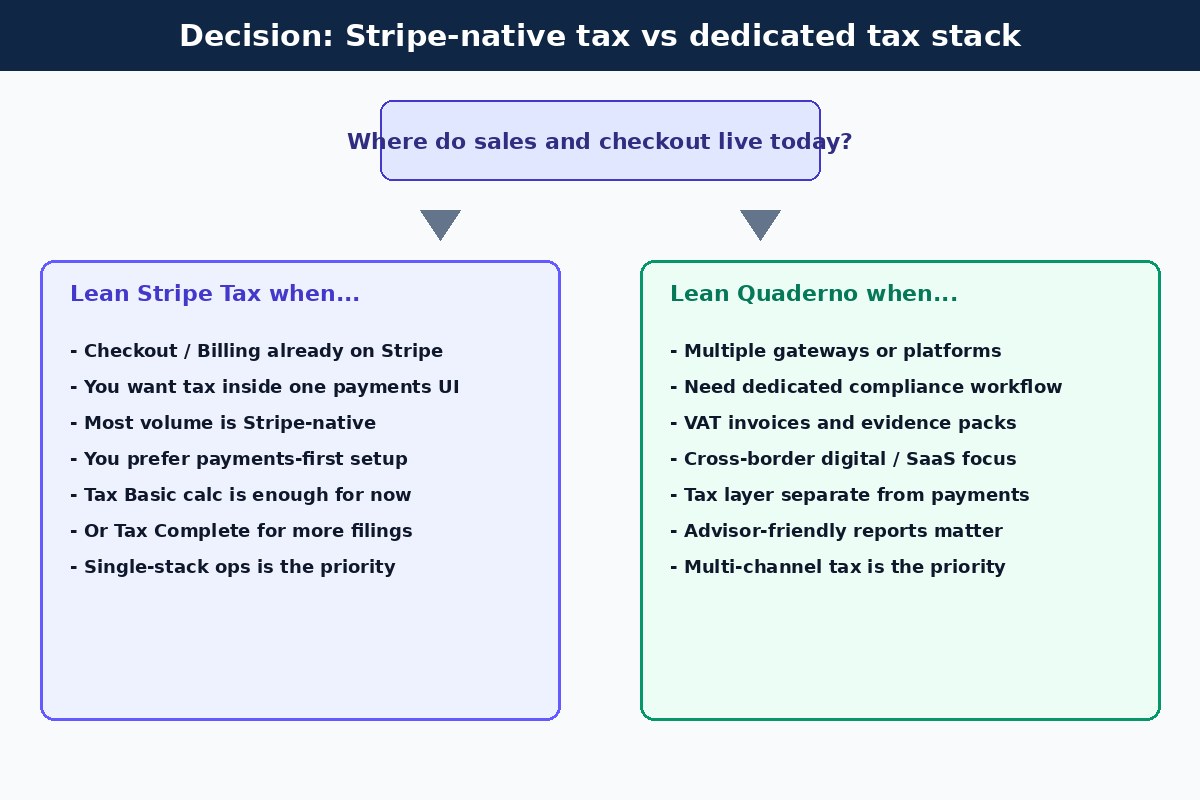
- Stripe already runs checkout, billing, or payment links for most digital revenue
- You want tax calculation inside the same UI and API your payments team uses
- Ops prefers a payments-first stack over a separate tax application
- You are comfortable verifying Tax Basic versus Tax Complete against official Stripe pricing for your volume and filing needs
- Non-Stripe channels are small enough to handle with a temporary workaround or a later project
Stripe Tax is often the lighter path for a SaaS or digital catalog that already standardized on Stripe and needs correct rates at payment time without standing up another vendor relationship.
When to choose Quaderno
- You sell through more than one gateway or platform and need one tax workflow
- Invoices, VAT evidence, and advisor-ready reports are first-class requirements
- Digital products, SaaS, and cross-border B2C are core to the business model
- You want nexus or threshold-style alerts plus calculation outside a single processor
- You prefer flat monthly pricing by transaction volume (verify current tiers) over percentage-of-volume calculation fees
Quaderno is often the better fit when compliance workflow is the bottleneck, not card acceptance. If Finance keeps rebuilding tax spreadsheets across PayPal, Stripe, and invoice sales, a dedicated layer usually pays for itself in fewer closed-month surprises.
Can they work together?
Sometimes. Teams occasionally use Stripe Tax on Stripe-native checkout while evaluating a dedicated tool for invoices, multi-channel reporting, or non-Stripe volume. That only works if you assign a clear system of record for each job: who calculates at checkout, who issues the invoice, who stores evidence, and who feeds the filing pack.
Avoid double-taxing a single order through two calculators. Avoid two customer invoices for one charge. Document the split in your ops wiki and re-test after every major catalog or channel change. If the split is messy after one quarter, consolidate.
Common mistakes
- Picking Stripe Tax only because you like Stripe, while half of revenue clears elsewhere
- Picking Quaderno without listing which integrations you will actually connect this year
- Treating illustrative blog prices as your contract; skipping official pricing pages
- Confusing tax calculation tools with nexus and registration decisions
- Reusing US sales tax settings as a VAT answer for EU/UK buyers
- Enabling collection before registration is authorized where a permit is required first
- Ignoring renewals, refunds, and free-trial conversions in evidence packs
- Running Melio-style bill-pay tools as if they solved sales tax for digital products (they do not)
FAQ
Is Quaderno only for digital products?
No. Digital products, SaaS, and subscriptions are common fits, but the product is a tax compliance platform. Match it to your channels and invoice needs, not to a single SKU type.
Should every Stripe user pick Stripe Tax?
Not automatically. If Stripe is your only material channel and you want native calculation, Stripe Tax is a strong default to evaluate. If you need multi-gateway compliance workflows or heavier invoicing evidence, compare Quaderno (and peers) even if Stripe remains your primary processor.
Does Stripe Tax handle VAT and US sales tax?
Stripe Tax is built to calculate sales tax, VAT, and GST in many jurisdictions when configured correctly. Coverage, product tax codes, and filing options still need verification against your catalog and Stripe’s current documentation.
Does Quaderno replace my accountant?
No. Quaderno can automate calculation, invoices, alerts, and reporting workflows. Registration timing, edge-case taxability, and filings strategy still need human judgment. See the tax compliance hub for related guides.
How should I compare pricing fairly?
Model twelve months of expected taxable volume and transaction counts. Include filing add-ons if needed. Use official pages for Stripe Tax and Quaderno the week you decide. Public ballparks in this article are illustrative only.
What should I map before choosing?
Map where sales happen, where customers live, which system issues invoices, what evidence your advisor needs, and how many gateways you will keep. The more complex that map is, the more a dedicated tool like Quaderno deserves a serious look.
Where do nexus and registration fit?
Tools help after you know the duties. Start with sales tax nexus for digital products and when should an online business register for sales tax?, then configure calculation and invoices.
Is this tax advice?
No. This is an educational Ops and Finance comparison. Confirm rules with primary authorities and a qualified professional.
Related guides
- Do digital products need sales tax?
- Sales tax nexus for digital products
- When should an online business register for sales tax?
- VAT invoice requirements for digital products
- Tax compliance hub
- Comparisons
Official references to verify
Confirm features and fees on primary vendor pages before you change checkout tax settings:
- Stripe Tax pricing
- Quaderno pricing
- Your state DOR pages for digital product taxability, nexus, and registration
- EU and UK tax authority guidance for VAT on electronically supplied services / digital supplies
Start with a channel map, a twelve-month volume model against official pricing pages, and a clear owner for invoices and evidence. Those three artifacts turn Quaderno vs Stripe Tax from a feature debate into an ops decision you can revisit when your stack changes.