Disclosure: This guide is educational and may include affiliate links. We may earn a commission if you sign up through our Melio partner link, at no extra cost to you. It is not legal, tax, accounting, or financial advice. Product terms, pricing, ACH limits, card fees, merchant rates, and QuickBooks plan requirements change; verify details on Melio, Intuit QuickBooks, and with a qualified professional before you choose a tool.
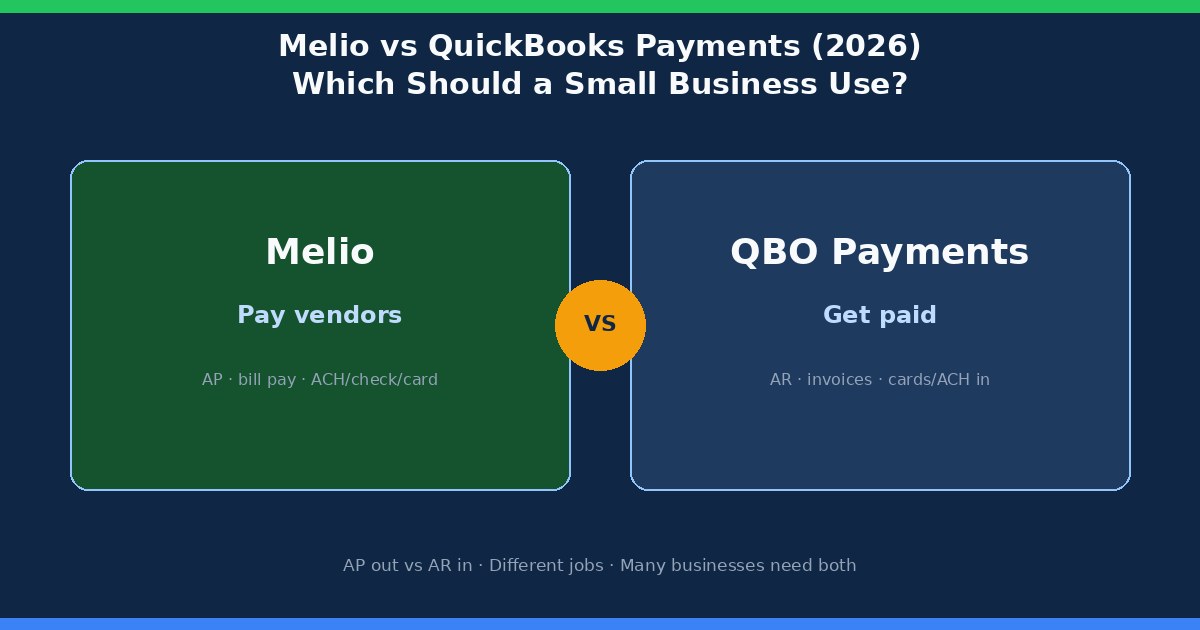
Melio and QuickBooks Payments get compared because both move money for small businesses, but they sit on opposite sides of the cash cycle. Melio is built to pay vendors and manage outgoing bills (accounts payable). QuickBooks Payments is built to collect customer payments on invoices inside QuickBooks Online (accounts receivable). Many owners eventually need both: one path for money out, one path for money in.
Quick answer: Melio or QuickBooks Payments?
Choose Melio when the friction is paying suppliers, contractors, rent, or recurring vendor bills online, including ACH, mailed check substitutes, and card-funded vendor payments when that float helps. Choose QuickBooks Payments when the friction is getting customers to pay invoices by card or ACH while the payment lands cleanly against the invoice in QuickBooks. If you have a real AP backlog and a real collections lag, plan for both rather than forcing one product to do the other’s job.
QuickBooks Payments is also not QuickBooks Payroll. Payroll withholds employment taxes and runs W-2 cycles; Payments processes customer remittances on invoices. If you are comparing payroll products, use our Gusto vs QuickBooks Payroll guide instead of this page.
Who this comparison is for
Use this if you already run QuickBooks (or are about to) and keep hearing “just turn on payments” without a clear answer to which cash problem you are solving. It helps owners who still mail checks to vendors while also waiting on customer invoice payments, bookkeepers who reconcile Melio ACH alongside QuickBooks invoice receipts, and teams shortlisting tools inside our comparisons hub and bill pay overview.
It is written for US small business ops. International merchant acquiring, full ERP AP suites, and ecommerce checkout platforms are adjacent topics, not the center of this map.
What Melio does (AP / bill pay)
Melio is an online bill pay and accounts payable product for US small businesses. You enter or upload vendor bills, schedule payments, and send money by ACH, check delivery, or, when available, by funding the payment with a credit or debit card even if the vendor prefers ACH or a check. The vendor typically receives funds the way they choose; you choose how you fund the payment on your side.
That AP focus is why Melio shows up in vendor payment workflows: replacing mailed checks, batching supplier runs, and giving owners optional card float on bills that would otherwise leave the checking account immediately. Melio also syncs with QuickBooks for many users, so the payable still lands in the books without living only in a bank portal. For a deeper product walkthrough, see our Melio review for small business owners and the head-to-head with BILL in Melio vs Bill.com.
If your week is dominated by “who do we owe and when,” Melio is addressing that queue. Card-funded bill pay has its own fee math; that path is covered in pay vendors with a credit card and the broader check-replacement guide how to pay business bills online without mailing checks.
What QuickBooks Payments does (AR / invoice collection)
QuickBooks Payments (Intuit) is payment processing tied to QuickBooks invoicing and related collection tools. You send an invoice from QuickBooks Online, the customer pays by card or ACH (and other options Intuit offers on your account), funds deposit to your bank on Intuit’s timeline, and the invoice tends to mark paid with less manual matching than a separate merchant account dump.
That AR focus is why service businesses already living in QuickBooks often enable Payments first: the operational pain is “customers pay late or by check,” not “vendors need a structured payable run.” QuickBooks Payments is usually a weaker answer when the bottleneck is supplier approvals, check mailing, or card-funded AP float. Those are Melio (or another bill pay tool) problems.
Again, do not confuse Payments with Payroll. Turning on invoice card acceptance does not set up withholding, tax deposits, or W-2 filing. Keep payroll decisions on the payroll track.
Melio vs QuickBooks Payments at a glance
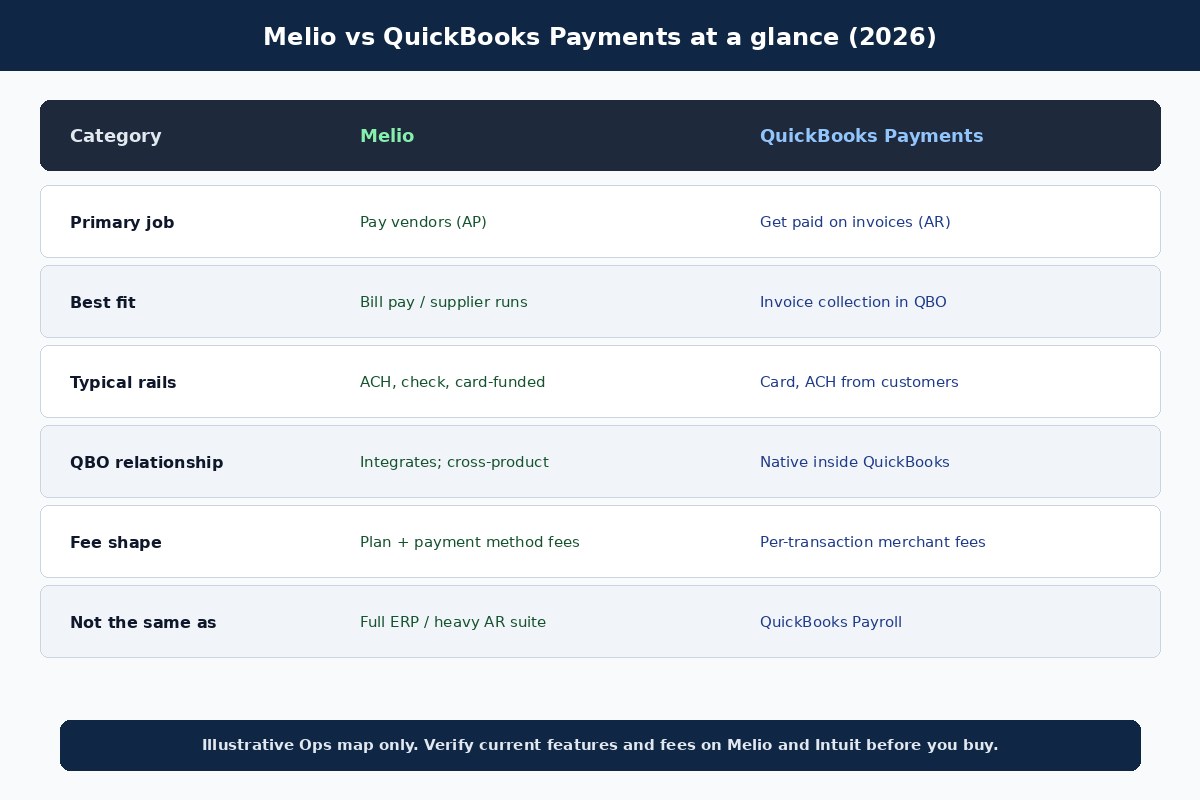
| Category | Melio | QuickBooks Payments |
|---|---|---|
| Primary job | Pay vendors (AP / bill pay) | Collect customer invoice payments (AR) |
| Best fit | Supplier runs, check replacement, card-funded bills | Invoice-led businesses already in QuickBooks |
| Typical rails | ACH, check delivery, card funding to vendor ACH/check | Customer card and ACH on QBO invoices |
| QuickBooks relationship | Integrates; still a cross-product AP workflow | Native payment processing inside QuickBooks |
| Fee shape (illustrative) | Plan tiers + method fees (ACH allotments, ~2.9% card) | Per-transaction merchant fees (card %; ACH %) |
| Weak fit | Primary customer checkout / invoice AR | Structured multi-vendor AP and check mailing |
| Not the same as | Full ERP or heavy AR suite | QuickBooks Payroll |
Paying vendors vs collecting: the AP-out / AR-in fork
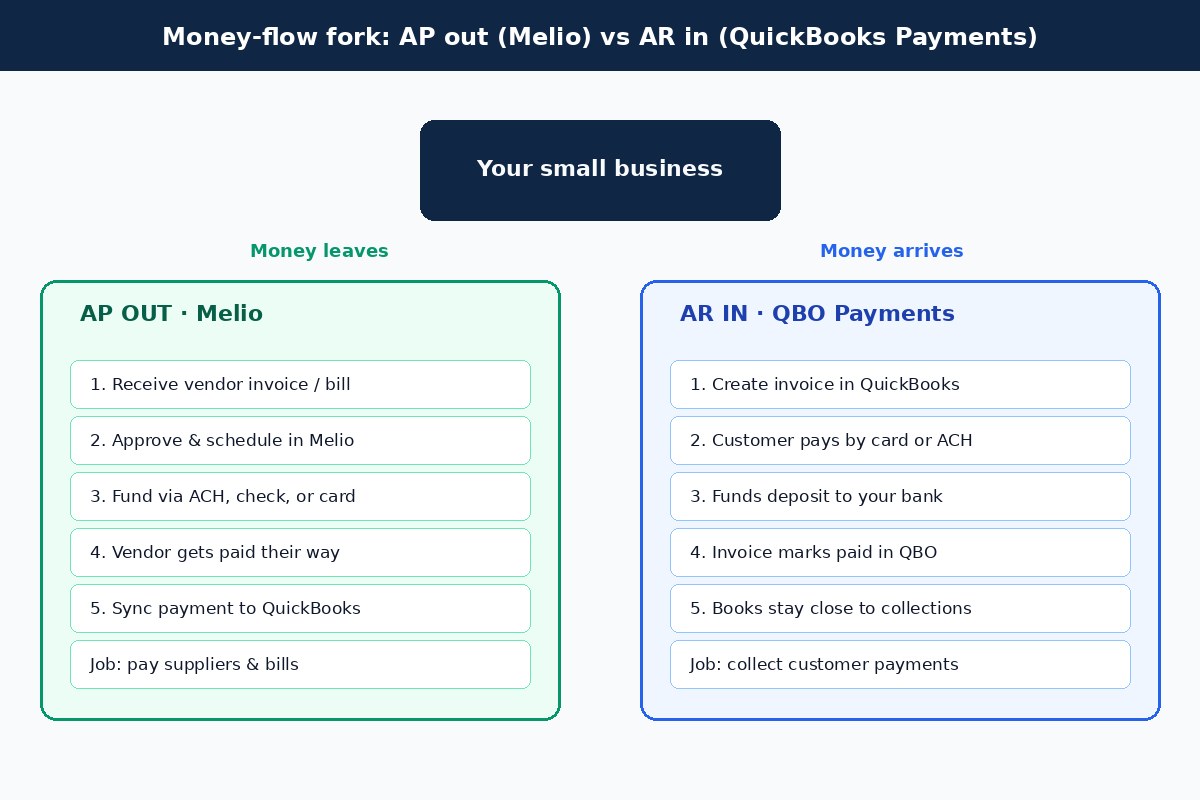
Draw one week of cash movement on a whiteboard. On the left, list every vendor payment you initiated: rent, inventory, agencies, contractors, utilities. On the right, list every customer payment you expected against open invoices. Melio maps to the left column. QuickBooks Payments maps to the right column. Shared vocabulary (“ACH,” “card,” “QuickBooks sync”) does not make the columns the same product decision.
Owners get stuck when they buy the AR tool hoping it will clean up AP, or the AP tool hoping it will replace invoice collection. QuickBooks can record both sides of the books; the payment products still specialize. A clean AP checklist still matters either way; see the accounts payable checklist for small business owners for intake, approval, and fraud gates before money leaves.
Fees (illustrative — verify official)
Do not treat this section as a live price list. Melio and Intuit update plans, ACH allotments, card rates, and ACH merchant fees. Use the numbers below as worksheets you recalculate against the official Melio pricing page and Intuit QuickBooks Payments fee page before you commit.
Melio (illustrative, published list patterns): a free Go-style tier often includes a small monthly allotment of free ACH payments (commonly cited as about 5/month) with a modest per-ACH fee after that; paid Core / Boost / Unlimited-style tiers (examples often around $25 / $55 / $80 per month on list) expand free ACH allotments. Paying a vendor by card is commonly around 2.9% when that funding method is available. Check mailing, same-day rails, and wires carry separate fees. Always confirm current plan names and limits on melio.com/pricing.
QuickBooks Payments (illustrative, published list patterns): there is typically no separate monthly Payments subscription beyond your QuickBooks product, with pay-as-you-go merchant fees. Commonly cited card rates sit near about 2.99% for many invoice / online card payments, with different rates for in-person and keyed entry. Customer ACH is often cited around 1% per payment; caps and account-vintage rules have changed over time, so verify your account’s current ACH fee on Intuit. Instant deposit and international card add-ons may apply. Confirm on Intuit’s QuickBooks Payments pricing materials before modeling margin.
Compare cost against the job. Melio fees attach to how you fund and send vendor payments. QuickBooks Payments fees attach to how customers pay you. A business that pays 40 vendors by ACH and rarely takes cards cares about Melio’s ACH allotment. A business that invoices $80,000 a month by card cares about QBO Payments’ card rate and deposit timing. Running both can still be rational when each fee stream maps to a different cash problem.
Accounting sync and the QuickBooks home-field question
QuickBooks Payments has a home-field advantage if your invoices, customers, and bank feeds already live in QuickBooks Online. Payment status, fees, and deposits stay closer to the invoice record, which reduces “paid in Stripe, still open in QBO” cleanup. Melio integrates with QuickBooks for many AP workflows, but you still operate an AP product alongside the ledger. That is usually fine; it is simply a different systems map than native Payments.
Ask your bookkeeper which failure mode hurts more today: uncleared vendor payments and check stubs, or unpaid invoices and merchant fee journals. The louder failure mode usually points to which product to turn on first. Sync quality also depends on plan features, user permissions, and how carefully you map vendors and categories—test with a small set of live bills or invoices before you migrate a full month.
When to choose Melio
- You mail checks to vendors and want ACH or check delivery without sharing your bank login with every supplier.
- You need scheduled supplier runs, clearer payable status, and optional card funding for vendor bills.
- AP volume and timing matter more than customer card acceptance this quarter.
- You want Melio’s QuickBooks sync for payables while keeping invoice collection wherever it already works.
When to choose QuickBooks Payments
- You already send invoices from QuickBooks Online and want customers to pay by card or ACH on the invoice.
- Collections lag and manual payment matching are the louder ops problem.
- You prefer merchant processing that stays native to the QuickBooks invoice lifecycle.
- Vendor bill pay is already handled (bank bill pay, Melio, or another AP tool) and does not need replacing yet.
When both make sense
Many small businesses have two real queues: bills to pay and invoices to collect. Melio can own the AP queue while QuickBooks Payments owns the AR queue. That is a stack, not indecision. The alternative—forcing one product to cover both—usually leaves either vendors unpaid on schedule or customers stuck mailing checks.
If budget is tight, sequence the rollout. Fix the queue that creates late fees, cash crunches, or bookkeeper overtime first. Add the second tool once the first workflow is boring and reliable. Document who initiates Melio payments, who reviews QBO invoice links, and how fees post in the chart of accounts so month-end does not invent a third process.
Common mistakes
- Buying the wrong side of the cash cycle. Enabling QuickBooks Payments does not replace Melio-style vendor bill pay, and Melio does not replace invoice card collection.
- Confusing Payments with Payroll. Customer payment processing is not W-2 payroll. Use payroll guides when the question is employees and tax deposits.
- Ignoring fee direction. Melio card fees are often what you pay to fund a vendor bill; QBO Payments card fees are usually what you absorb (or price for) when a customer pays you.
- Skipping vendor bank-detail verification. AP fraud loves rushed ACH or check changes. Call a known number before you update remit-to details.
- Assuming free ACH stays unlimited forever. Melio plan allotments and overage fees change; model your monthly vendor count against the current free ACH allowance.
- Never testing reconciliation. Process a few live Melio payments and a few QBO Payments invoices, then confirm how fees and deposits land before you announce a company-wide switch.
FAQ
Is Melio the same as QuickBooks Payments?
No. Melio focuses on paying vendors and managing outgoing bills. QuickBooks Payments focuses on accepting customer payments on QuickBooks invoices. They can both sync or connect around QuickBooks accounting, but they solve different jobs.
Can Melio replace QuickBooks Payments for collecting invoices?
Melio’s center of gravity is AP / bill pay. Some Melio features touch getting paid, but if your core need is customer invoice card/ACH collection inside QuickBooks, QuickBooks Payments is usually the more direct fit. Confirm current Melio receivable features on Melio if that is your primary goal.
Can QuickBooks Payments replace Melio for paying vendors?
Generally no for structured vendor bill pay, check mailing substitutes, and card-funded AP float. QuickBooks can record bills and pay from bank feeds or bill pay features depending on your setup, but Melio is purpose-built for the outgoing vendor payment workflow many small teams want.
Do I need Melio if I already use QuickBooks?
Only if vendor payments are a real bottleneck. Many QuickBooks users still benefit from Melio for ACH/check vendor runs and optional card funding. If vendors are already paid cleanly and on time, you may not need another AP tool yet.
Is QuickBooks Payments the same as QuickBooks Payroll?
No. Payments processes customer remittances. Payroll runs employee pay, withholding, and employment tax workflows. Compare payroll products in Gusto vs QuickBooks Payroll when that is the decision.
What fees should I expect?
Expect Melio fees tied to plans and payment methods (ACH allotments, card funding percentages, check/wire add-ons) and QuickBooks Payments fees tied to how customers pay (card percentages, ACH percentages, optional add-ons). Treat any number in this article as illustrative and verify official Melio and Intuit pages for your account.
Can I use Melio and QuickBooks Payments together?
Yes. That combination is common when AP and AR are both active pain points. Document fee accounts, who approves vendor payments, and how invoice payment links are sent so the two tools do not create duplicate processes.
Which should I turn on first?
Turn on the tool that matches the louder weekly friction. Late vendor payments, check runs, or AP float needs point to Melio first. Slow invoice collections inside QuickBooks point to QuickBooks Payments first. Reassess after 30 days of clean ops data.
Related reading
- Melio vs Bill.com
- Melio review for small business owners
- Bill pay overview
- Pay vendors with a credit card
- How to pay business bills online without mailing checks
- Accounts payable checklist for small business owners
- Comparisons hub
- Gusto vs QuickBooks Payroll (payroll is a different product than Payments)
Try Melio
If Melio fits the bill payment and vendor AP workflow described here, you can explore Melio through our partner link: Try Melio. Terms, eligibility, and offers can change; verify pricing, free-tier ACH limits, card fees, QuickBooks sync features, and plan details directly on Melio before you enroll.
Research note: We favor concrete cash-flow job checks (AP out vs AR in) over generic feature lists. Provider terms, prices, ACH allotments, and merchant rates change; verify official Melio and Intuit details before you buy.