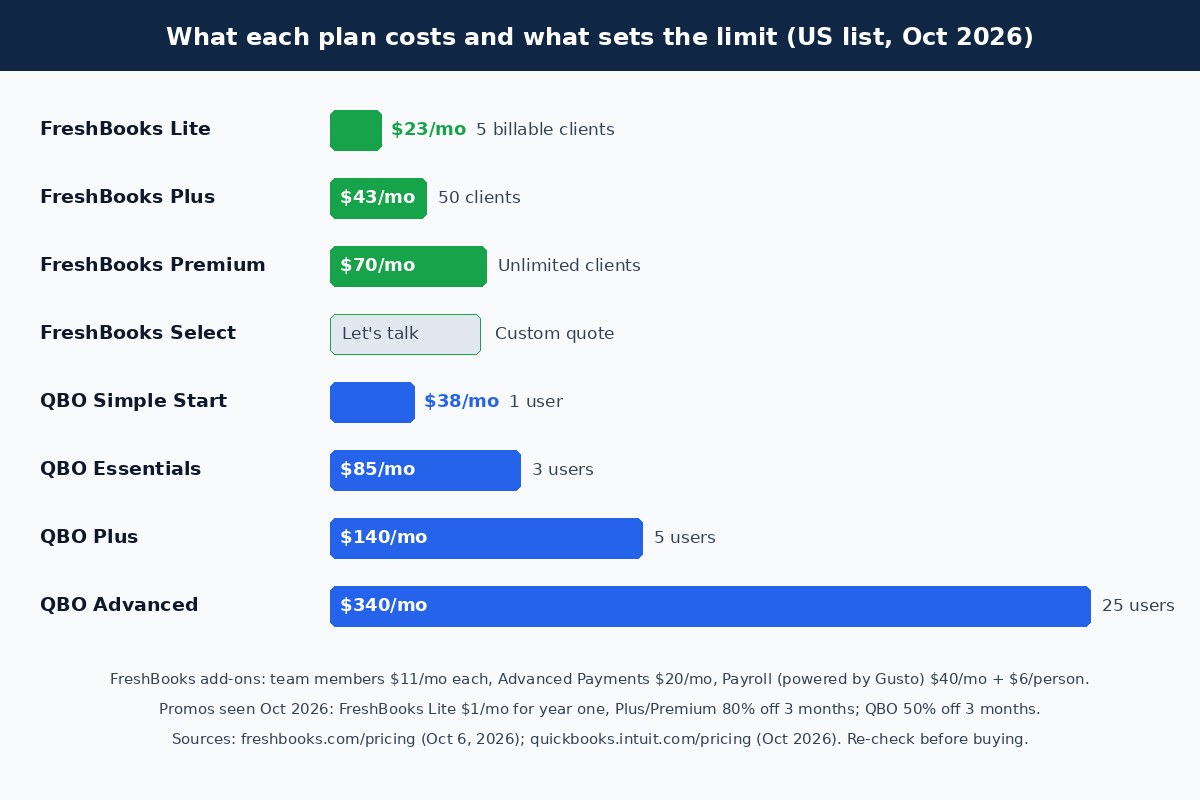
Choose FreshBooks if you run a service business that lives on invoices, time tracking, proposals, and client retainers; choose QuickBooks Online if you need a full multi-user ledger with inventory, deeper reporting, and the accounting ecosystem many US CPAs already use. FreshBooks prices by billable clients ($23, $43, or $70 a month for 5, 50, or unlimited clients), while QuickBooks Online prices by users ($38, $85, $140, or $340 a month for 1, 3, 5, or 25 users). For solo freelancers, FreshBooks is usually simpler; once three or more people touch the books, QuickBooks usually wins.
Research note: FreshBooks plans, add-ons, and promotions were checked on FreshBooks’ pricing page on October 8, 2026. QuickBooks Online list prices and the current promotion come from Intuit’s QuickBooks pricing page (rechecked October 8, 2026). Vendors change plans and offers often, so confirm in the cart. This comparison is educational and is not accounting or tax advice. Some links may be affiliate links.

Quick answer: FreshBooks or QuickBooks?
Takeaway: Match the tool to how your business makes money: billed client work points to FreshBooks, products and multi-user books point to QuickBooks.
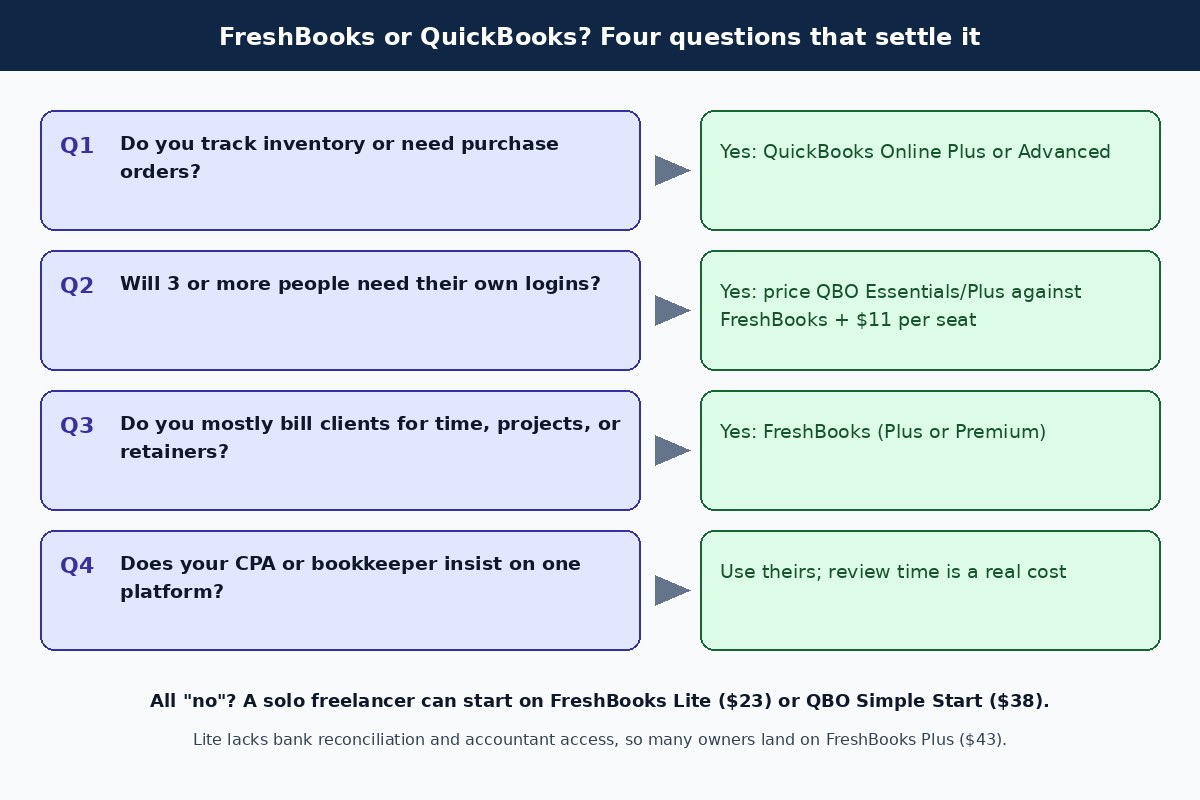
Most people searching this comparison are a freelancer or small agency outgrowing spreadsheets, or an owner whose bookkeeper is asking for QuickBooks. The table below covers the common cases. If you are still deciding whether you need software or a person, read bookkeeper vs accountant first.
| If your business… | Start with | Why |
|---|---|---|
| Is one person billing a handful of clients | FreshBooks Lite or Plus | Fast invoicing; Plus adds bank reconciliation and accountant access |
| Bills by the hour or project with proposals and retainers | FreshBooks Plus or Premium | Proposals, retainers, and e-signatures start on Plus |
| Sells physical products or needs inventory | QuickBooks Online Plus | Inventory and project tracking are Plus and Advanced features |
| Has 3 to 5 people in the books | QuickBooks Online Essentials or Plus | Seats are included; FreshBooks charges $11 per extra team member |
| Has a CPA who works only in QuickBooks | QuickBooks Online | Lower review friction often outweighs subscription savings |
What is FreshBooks?
Takeaway: FreshBooks is invoicing-first accounting software for service businesses, with plans capped by billable clients.
FreshBooks is cloud accounting software built around getting paid: invoices, estimates, time tracking, expenses, and client payments by card, ACH bank transfer, Apple Pay, Google Pay, and buy now, pay later. Double-entry accounting reports and bank reconciliation are included from the Plus plan up. FreshBooks counts both active and archived clients toward a plan’s limit, and deleting an old client frees the slot without losing its invoices.
- Lite: $23/month. 5 billable clients, unlimited invoices and estimates, expenses, time tracking, automated bank import. No double-entry reports, bank reconciliation, or accountant access.
- Plus: $43/month. 50 clients; adds proposals, retainers, e-signatures, double-entry reports, bank reconciliation, receipt data capture, and accountant access.
- Premium: $70/month. Unlimited clients; adds accounts payable (bills), project profitability, bill receipt capture, and custom email templates.
- Select: custom quote. Lower card and capped ACH fees, two team members included, Advanced Payments included, dedicated support, and Easy Switch data import.
Add-ons on every plan: team members at $11/month each, Advanced Payments at $20/month (included in Select), and FreshBooks Payroll at $40/month plus $6 per person. Yearly billing takes an extra 10% off.
What is QuickBooks Online?
Takeaway: QuickBooks Online is Intuit’s full double-entry ledger, priced by user seats, with the widest app and accountant network.
QuickBooks Online (QBO) is cloud accounting software covering invoicing, expenses, bank feeds, reconciliation, sales tax, financial statements, and, on higher tiers, inventory, projects, and advanced reporting. Its practical advantage for many owners is familiarity: many US bookkeepers and CPAs work in it daily, and many business apps connect to it first.
- Simple Start: $38/month. One user plus accountant access; core books, invoicing, and reports.
- Essentials: $85/month. Three users; adds bill management and more multi-user controls.
- Plus: $140/month. Five users; adds inventory and project profitability.
- Advanced: $340/month. 25 users; heavier reporting, automation, and controls, with Bill Pay Elite included.
Intuit raised Essentials, Plus, and Advanced for renewals on or after August 1, 2026 (from $75, $115, and $275). Simple Start stayed at $38. If you see $30 or $35 for Simple Start in another comparison, it is out of date. For a lighter alternative to both, see Wave vs QuickBooks Online.
FreshBooks vs QuickBooks pricing in 2026
Takeaway: Compare list prices for budgeting; promotions change the first year but not what you pay after that.
| Tier | FreshBooks | QuickBooks Online |
|---|---|---|
| Entry | Lite $23 (5 clients) | Simple Start $38 (1 user) |
| Middle | Plus $43 (50 clients) | Essentials $85 (3 users) |
| Upper | Premium $70 (unlimited clients) | Plus $140 (5 users) |
| Top | Select (custom quote) | Advanced $340 (25 users) |
| Extra users | $11/month per team member | Move up a tier |
| Payroll | FreshBooks Payroll $40 + $6/person | Separate QuickBooks Payroll add-on |
| Free trial | 30 days, no card; 30-day money-back guarantee | 30-day trial or the intro discount |
Both vendors run steep intro offers. On October 8, 2026, FreshBooks showed Lite at $1/month for the first year and 80% off Plus or Premium for three months ($8.60 and $14). Intuit offered 50% off QuickBooks Online for three months ($19, $42.50, $70, or $170) or a 30-day free trial, not both. Here is what the first year looks like with those offers, compared with a normal year at list price:
| Plan | First year with Oct 2026 promo | A full year at list price |
|---|---|---|
| FreshBooks Lite | $12 | $276 |
| FreshBooks Plus | $412.80 | $516 ($464.40 billed yearly) |
| FreshBooks Premium | $672 | $840 ($756 billed yearly) |
| QBO Simple Start | $399 | $456 |
| QBO Essentials | $892.50 | $1,020 |
| QBO Plus | $1,470 | $1,680 |
Client limits vs user limits: which pricing model costs you less?
Takeaway: FreshBooks gets expensive when your client list or headcount grows; QuickBooks gets expensive when you need more seats or inventory.
The two products charge for different things. FreshBooks includes extra users only on Select (two team members) and otherwise charges $11 per extra team member, while its tiers step up with billable clients. QuickBooks Online includes no client cap and bundles more users at each tier. That difference flips the answer for some common setups:
| Scenario (monthly list price) | FreshBooks | QuickBooks Online | Lower cost |
|---|---|---|---|
| Solo, 4 clients, no accountant login | Lite $23 | Simple Start $38 | FreshBooks |
| Solo consultant, 30 clients, CPA needs access | Plus $43 | Simple Start $38 | QuickBooks |
| 3-person agency, 80 clients, pays bills | Premium $70 + 2 seats = $92 | Essentials $85 | QuickBooks |
| 5 people, sells products with inventory | No native inventory listed | Plus $140 | QuickBooks by default |
| Solo, 40 clients, wants proposals and retainers | Plus $43 | Simple Start $38 (no retainers listed) | FreshBooks on features |
The middle rows surprise people. A solo consultant with more than five clients pays more on FreshBooks Plus than on QuickBooks Simple Start, so the choice comes down to whether FreshBooks’ proposals, retainers, and client experience are worth $5 a month to you. For many service businesses they are.
Which features actually change the decision?
Takeaway: Inventory, seats, accounts payable, and your accountant’s preference decide most cases; invoicing quality rarely does.
| Feature | FreshBooks | QuickBooks Online |
|---|---|---|
| Invoices, recurring invoices, late fees, reminders | All plans | All plans |
| Proposals, retainers, e-signatures | Plus and up | Not a headline feature |
| Time tracking | Unlimited on all plans | Basic time entry; QuickBooks Time sold separately |
| Double-entry reports, bank reconciliation | Plus and up (not Lite) | All paid plans |
| Accountant access | Plus and up | Included (2 accountants; 3 on Advanced) |
| Bills / accounts payable | Premium and Select | Essentials and up; Bill Pay add-on |
| Project profitability | Premium and Select | Plus and Advanced |
| Inventory | Not listed on pricing page | Plus and Advanced |
| Users | Owner + $11 per team member | 1 / 3 / 5 / 25 by tier |
| Payroll | Add-on powered by Gusto | QuickBooks Payroll add-on |
If you sell products, the inventory row usually ends the debate in favor of QuickBooks Online Plus. If you sell your time, FreshBooks’ client-facing tools (proposals that convert to projects, retainers, and a client portal) are its main advantage. Reconciling payouts from Stripe or other processors is similar work in either ledger; our walkthrough on reconciling Stripe payouts in QuickBooks shows the pattern.
Getting paid: invoices and payment fees
Takeaway: FreshBooks publishes simple processing rates; check the per-transaction cost in either tool before you pick on subscription price alone.
FreshBooks Payments lists 2.9% + $0.30 per card transaction and a 1% fee on ACH bank transfers, with lower card and capped ACH rates on Select. Select includes card storage and in-person or phone card acceptance; other plans can add Advanced Payments for $20/month. QuickBooks Payments has its own published rates on Intuit’s site, and many QBO users pair it with a separate processor. At $20,000 a month in card invoices, a 0.5-point rate difference is about $100 a month, which dwarfs the gap between most subscription tiers. Our Melio vs QuickBooks Payments comparison breaks down the payments side.
Paying bills and vendors
Takeaway: Accounts payable is a weak spot on lower FreshBooks plans; QuickBooks has native bill tools and the larger bill-pay ecosystem.
FreshBooks includes accounts payable only on Premium and Select. QuickBooks Online handles bills from Essentials up, and Intuit’s August 2026 pricing notice says Bill Pay Elite (approvals, audit trail, 1099 e-filing) is included in Advanced and sold as a $45/month add-on for the other tiers, with free standard ACH for Bill Pay users. Our guide to paying bills with QuickBooks walks through both routes.
Melio is the other common route. Melio’s integration page lists two-way sync with QuickBooks Online, QuickBooks Desktop, Xero, and NetSuite, covering bills, vendors, payments, and vendor credits. FreshBooks is not on that list, so FreshBooks users who adopt Melio would record payments in FreshBooks by hand. See Melio pricing and the accounts payable checklist if vendor bills are a growing chore.
Payroll and contractors: FreshBooks, QuickBooks, or Gusto?
Takeaway: Both ledgers sell payroll as an add-on, and FreshBooks’ version runs on Gusto.
FreshBooks Payroll is “powered by Gusto” and costs $40/month plus $6 per person on top of your FreshBooks plan. FreshBooks says it covers employee payroll and contractor payments, automatic federal and state payroll tax filing, and direct deposit, with entries flowing into your FreshBooks chart of accounts. It is not available during a free trial. QuickBooks sells its own payroll tiers as an add-on; compare them in Gusto vs QuickBooks Payroll or browse the payroll hub.
Standalone Gusto is a third option that works with either ledger. Gusto’s pricing page lists Simple at $49/month plus $6 per person and names both QuickBooks and FreshBooks among its accounting integrations. For four employees that is $73 a month on Gusto Simple versus $64 on FreshBooks Payroll. The standalone account costs a little more and keeps payroll in place if you later switch ledgers. If you mainly pay 1099 workers, read how to pay contractors with Gusto.
Who should choose FreshBooks, and who should choose QuickBooks?
Takeaway: FreshBooks suits owners who want to bill and get paid with little accounting knowledge; QuickBooks suits businesses that need a ledger others can work in.
FreshBooks fits if you:
- Sell services billed by the hour, project, or retainer
- Work alone or with one or two collaborators
- Send proposals and want clients to approve and pay online
- Have fewer than 50 active clients, or can justify Premium for more
- Prefer a simpler interface over deep reporting
QuickBooks Online fits if you:
- Hold inventory, sell products, or need purchase orders
- Have three or more people entering or approving transactions
- Work with a bookkeeper or CPA who standardizes on QuickBooks
- Want native bill management and the widest choice of connected apps
- Expect to need classes, locations, or advanced reporting
Switching from FreshBooks to QuickBooks (or back): a cutover checklist
Takeaway: Switch at a month or quarter end and move balances, not every historical transaction.
- Pick a cutover date at a month or quarter end, ideally after your accountant closes that period.
- Run and save a balance sheet, profit and loss, AR aging, and AP aging from the old system as of the cutover date.
- Export clients or customers, vendors, products and services, and open invoices and bills.
- Set up the chart of accounts in the new system and enter opening balances from the saved balance sheet.
- Recreate open invoices and unpaid bills so customer and vendor balances match the aging reports.
- Reconnect bank and card feeds starting the day after cutover to avoid duplicate transactions.
- Reconnect payment processing, payroll, and bill pay (Gusto and Melio connect to QuickBooks; Gusto also connects to FreshBooks).
- Keep the old account, or full exports and PDFs of reports, until your accountant confirms the year-end close.
Before you cancel, note that FreshBooks says your data stays stored after a trial ends in case you return. Do not rely on that for tax records; export what you need.
FAQs
Is FreshBooks cheaper than QuickBooks?
At the entry level, yes: FreshBooks Lite is $23 a month against $38 for QuickBooks Simple Start. Once you need more than five clients, bank reconciliation, or accountant access, FreshBooks Plus is $43, which is $5 more than Simple Start. With three or more users, QuickBooks Essentials at $85 is often cheaper than FreshBooks Premium plus team-member seats.
Is FreshBooks real accounting software?
Yes. FreshBooks includes double-entry accounting reports and bank reconciliation, but only from the Plus plan up. Lite covers invoicing, expenses, and basic reports.
Can my accountant work in FreshBooks?
Yes, on Plus, Premium, and Select, which include accountant access. Many US accountants still prefer QuickBooks Online, so ask yours before you choose.
Does FreshBooks have inventory tracking?
FreshBooks’ pricing page does not list inventory tracking on any plan. QuickBooks Online includes inventory on Plus ($140) and Advanced ($340).
How much is QuickBooks Online in 2026?
Intuit lists $38 (Simple Start), $85 (Essentials), $140 (Plus), and $340 (Advanced) per month as of October 2026, with 50% off the first three months for new customers or a 30-day free trial.
What payroll works with FreshBooks?
FreshBooks Payroll, powered by Gusto, at $40 a month plus $6 per person. Standalone Gusto also lists FreshBooks as an accounting integration.
Does Melio integrate with FreshBooks?
Not according to Melio’s integration page, which lists QuickBooks Online, QuickBooks Desktop, Xero, and NetSuite. You can still pay vendors through Melio and record the payments in FreshBooks yourself.
Can I switch from FreshBooks to QuickBooks mid-year?
Yes. Use a month or quarter end as the cutover date, carry over opening balances and open invoices and bills, and keep exports from FreshBooks for your records. Ask your accountant to confirm the opening balances.
Next step
Sign up for the free trial of the product that matches your answers above and run one real month of invoices, expenses, and a reconciliation before you commit to a promo plan. If you land on QuickBooks Online and pay vendors by ACH or card, Melio syncs bills and payments both ways with QBO. If you are adding employees or contractors to either ledger, compare FreshBooks Payroll with standalone Gusto on your real headcount.
For more side-by-sides, browse the comparisons hub or read Wave vs QuickBooks Online if a free ledger is still on your list. For the vendor-payment side of your books, start with the bill pay hub, and for sales tax and 1099 questions, the tax compliance hub.