Best 1099 software for small business in 2026 is a workflow choice, not a single brand winner. If you only need a year-end batch, start with free IRS IRIS or a pay-per-form e-filer such as TaxBandits, Tax1099, or Avalara 1099 & W-9. If you already pay US contractors inside QuickBooks Contractor Payments or Gusto, filing inside that stack usually beats buying a separate seasonal tool. For payments made in calendar year 2026, the IRS reporting threshold for most Form 1099-NEC nonemployee compensation is $2,000 (it was $600 for payments made before 2026)—confirm totals against that rule before you spend on software.
Disclosure: This guide is educational and may include affiliate links. We may earn a commission if you sign up through our Gusto partner link, at no extra cost to you. It is not legal, tax, accounting, or financial advice. Product features, fees, filing coverage, and IRS rules change. Verify current details on each vendor’s pricing page, on IRS.gov, and with your CPA or bookkeeper before you file or switch tools.
Research note: List prices and IRS thresholds cited below were checked on official pages on October 22, 2026 (Asia/Bangkok). Always re-check before you enroll or transmit returns.

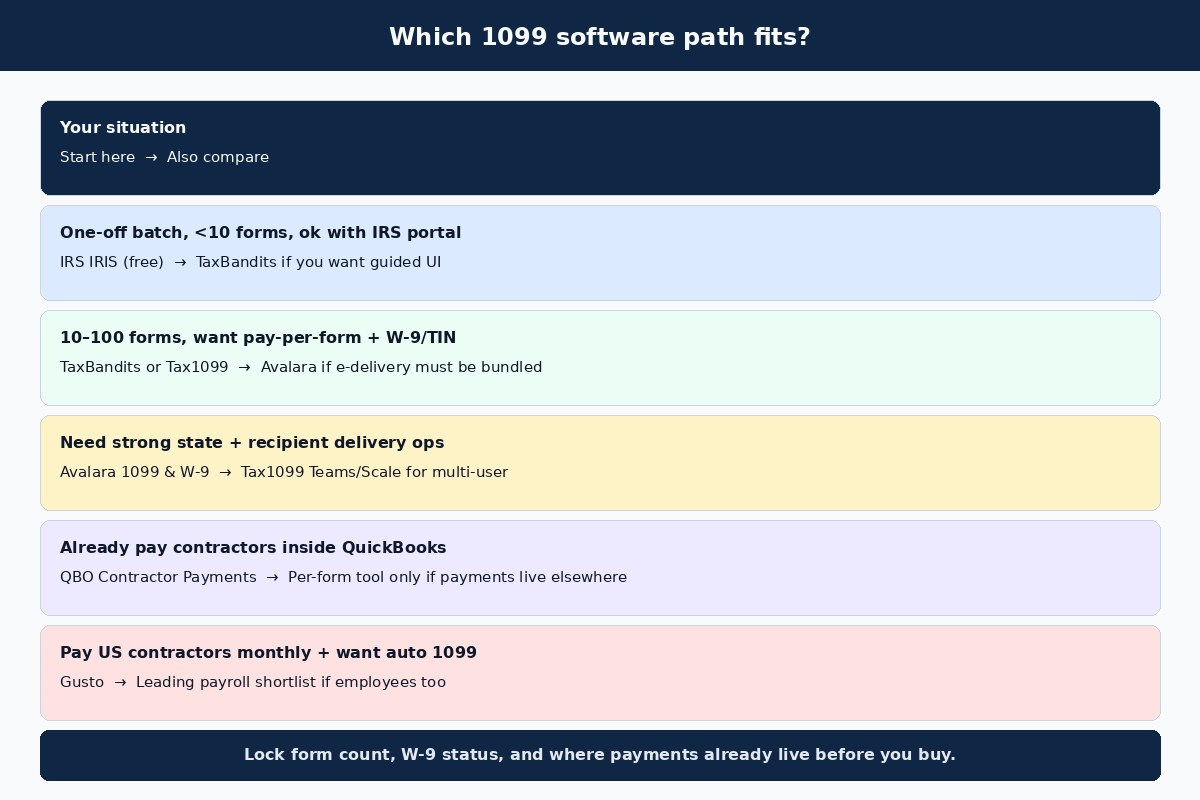
Quick answer: which 1099 software fits?
Takeaway: Choose by form count and payment home first—free IRIS or per-form tools for a one-off batch; QuickBooks or Gusto when you already pay contractors there.
Most “best 1099 software” lists rank e-file vendors against each other. For a US small business, the better first question is: Where do contractor payments live today? If payments sit in a spreadsheet or bank ledger and you only file once a year, a seasonal e-filer (or free IRIS) is enough. If payments already run through QuickBooks or Gusto, year-end forms should follow that data trail. Deep filing how-to lives in how to file 1099-NEC; W-9 intake is covered in collect a W-9 from a contractor.
| Your situation | Start here | Also compare |
|---|---|---|
| One-off batch, few forms, willing to use IRS portal | IRS IRIS (free) | TaxBandits for a guided commercial UI |
| 10–100 forms, pay-per-form, want W-9/TIN options | TaxBandits or Tax1099 | Avalara if recipient e-delivery must ride with the e-file fee |
| Heavier state / recipient delivery ops | Avalara 1099 & W-9 | Tax1099 Teams or Scale for multi-user workflows |
| Already pay contractors in QuickBooks Online | QuickBooks Contractor Payments | Per-form tool only if many payments never hit QBO |
| Pay US contractors monthly and want auto 1099-NEC | Gusto | Leading payroll providers if you also need W-2 payroll |
2026 rules to lock before you buy software
Takeaway: For 2026 calendar-year payments, most 1099-NEC nonemployee compensation reports at $2,000+; file by the January deadline; e-file if you have 10+ information returns in aggregate.
Software cannot fix a wrong threshold or a late filing calendar. Before you compare prices, lock three IRS facts (always re-read the live IRS pages—rules get updated):
- Reporting threshold. Per IRS guidance checked October 22, 2026, for payments made before 2026 the common 1099-NEC threshold was $600; for payments made in 2026 the reporting threshold is $2,000 for the covered nonemployee compensation categories (backup withholding still triggers a form regardless of amount). After 2026, see Publication 1099 for any inflation adjustment. Source: IRS: Am I required to file a Form 1099?
- Deadline. Form 1099-NEC is due to the IRS and to the recipient by January 31 (next business day if that date falls on a weekend or DC holiday). For 2026 calendar-year payments, that landing is early 2027—confirm the exact weekday on the IRS filing calendar when you schedule transmission.
- E-file rule. If you file 10 or more information returns in aggregate (1099 series, W-2, and related forms counted together per IRS rules), you generally must e-file. IRIS is the IRS free portal path; commercial software is the paid guided path.
Also remember classification: paying someone through “1099 software” does not make them a contractor. Worker status follows the working relationship. See W-2 vs 1099 and do I need to 1099 an LLC. Pillar context: tax compliance.
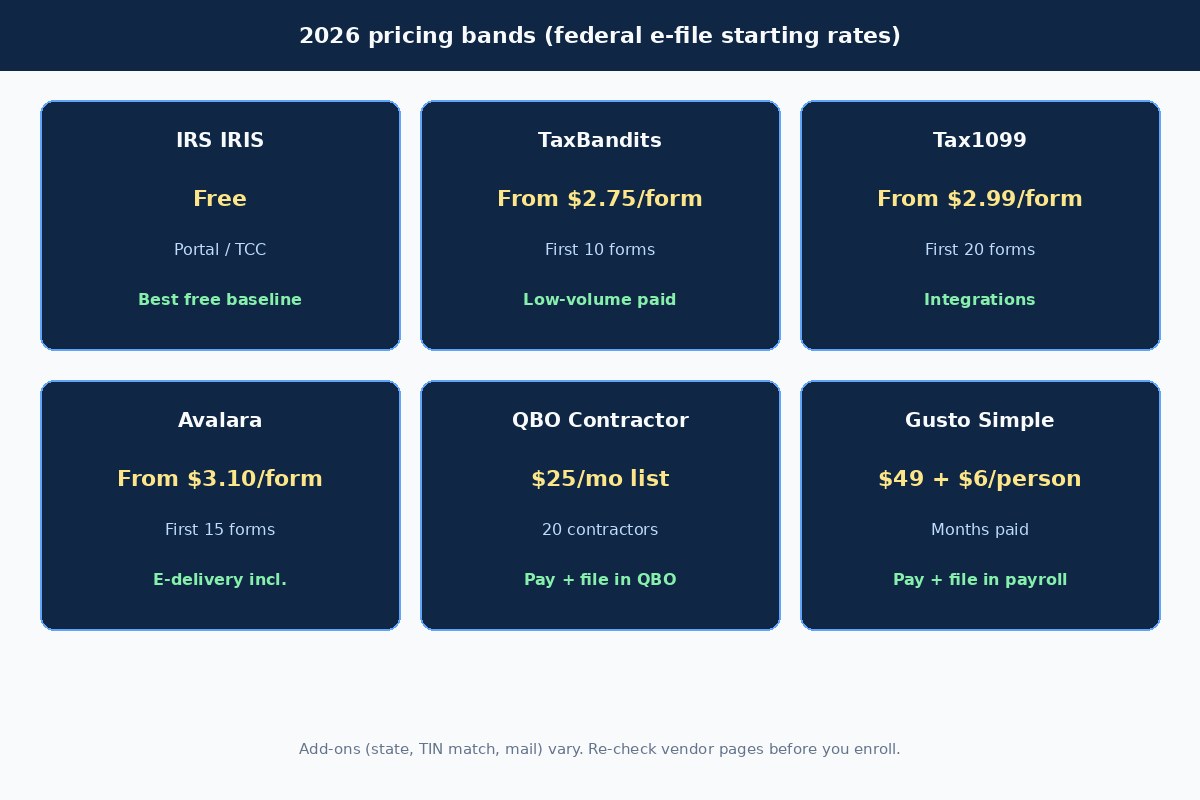
Comparison table: billing model and starting price
Takeaway: Per-form tools win for seasonal batches; monthly contractor-pay products win when payments and forms must stay in one system.
| Tool | Billing model | Starting federal price (checked 2026-10-22) | Best for |
|---|---|---|---|
| IRS IRIS Taxpayer Portal | Free IRS portal | $0 (TCC / account setup time) | Lowest cost, low volume, willing to use IRS UI |
| TaxBandits | Pay per form (+ add-ons) | From $2.75/form (first 10) | Guided seasonal e-file; low form counts |
| Tax1099 (Zenwork) | Pay per form; optional Teams/Scale | From $2.99/form (first 20); Teams $249/yr; Scale $349/yr | Integrations + seasonal Essential plan |
| Avalara 1099 & W-9 | Pay per form (+ state/mail/TIN) | From $3.10/form (first 15); e-delivery included with IRS e-file fee | Recipient e-delivery + scaling tiers |
| QuickBooks Contractor Payments | Monthly subscription | $25/mo list (intro discounts vary); includes 20 contractors + $2 each extra | QBO shops that pay contractors in-product |
| Gusto | Monthly plan + per person | Simple $49/mo + $6/person; Plus $80 + $12; Premium $180 + $22 (contractors billed only in months paid) | Year-round US contractor pay + included 1099-NEC e-file |
IRS IRIS — free baseline for e-file
Takeaway: Use IRIS when cost is the constraint and you can complete TCC/setup before January—not when you need heavy W-9 automation or white-glove support.
The IRS Information Returns Intake System (IRIS) Taxpayer Portal lets eligible filers e-file Form 1099 series at no filing fee. You can key returns or upload a CSV. That makes IRIS a real “best 1099 software” answer for tiny batches—if you start early enough for account and Transmitter Control Code (TCC) processing (IRS materials note TCC processing can take weeks).
IRIS is weaker when you need commercial W-9 solicitation, bulk TIN matching UX, branded recipient portals, or accountant multi-client workflows. Those are the gaps paid tools fill. Official overview: IRS reporting payments to independent contractors.
TaxBandits — low-volume paid e-file
Takeaway: TaxBandits is a strong default when you want a guided commercial UI and the lowest entry per-form band among the paid tools we checked.
On TaxBandits pricing (checked October 22, 2026), federal 1099/W-2-family filing lists at $2.75 for each of the first 10 forms, then $1.75 for forms 11–100, with further step-downs at higher volume. Combined Federal/State Filing (CF/SF) with the federal return is listed free; direct state filing lists at $0.95/form. Common add-ons include TIN verification at $0.35/TIN, online recipient access at $0.50/form, and domestic mailing at $1.85/form. Volume tiers generally require one submission or prepaid credits—split batches can lose the discount.
Pick TaxBandits when you want error checks, W-9 request tools, and corrections coverage without a monthly payroll subscription. Skip it as your only system if you still need a place to pay contractors every week—pairing a payment trail (spreadsheet, Melio for vendor bills, or payroll) still matters. Payment tracking ideas: track contractor payments spreadsheet.
Tax1099 — integrations and Essential pay-as-you-go
Takeaway: Tax1099 fits seasonal filers who want QuickBooks/BILL/Xero-style imports plus optional Teams/Scale seats.
Tax1099 (Zenwork) Essential pricing is pay-as-you-go. The published 1099 federal tiers start at $2.99 for each of the first 20 forms, then $2.59 (21–150), $1.99 (151–250), $1.42 (251–500), and $0.72 (501–1000), with custom quotes above that (checked October 22, 2026 on Tax1099 e-file pricing). Teams lists at $249/year and Scale at $349/year on top of form fees. Add-ons commonly include real-time TIN match at $1.00, e-delivery at $0.50/form, and US print & mail at $1.95/form (rush surcharge possible in the last days of the season).
Choose Tax1099 when import connectors and multi-user plans matter more than shaving a few dollars off a 10-form job. For a tiny batch with no imports, TaxBandits or IRIS may be simpler math.
Avalara 1099 & W-9 — e-delivery bundled
Takeaway: Avalara (formerly Track1099) is worth the higher entry form price when recipient e-delivery and corrections workflow need to sit inside the e-file fee.
Avalara’s pay-as-you-go IRS e-filing tiers (checked October 22, 2026 on Avalara 1099 pricing) list $3.10 for each of the first 15 forms, $2.30 for forms 16–165, $1.30 for 166–500, and $0.63 at 501+. The IRS e-file fee description includes recipient e-delivery, e-corrections, and PDF/CSV downloads. Direct state e-filing lists at $1.49/form. TIN matching lists at $0.45/form; postal mail lists at $1.84 (or $2.89 January 27–31).
Avalara also sells W-9 collection tiers (Individual / Professional / Enterprise form caps). That matters if January pain usually starts with missing W-9s, not with the e-file button.
QuickBooks Contractor Payments — QBO-native path
Takeaway: If contractor pay already lives in QuickBooks Online, Contractor Payments is usually better “1099 software” than exporting CSV into a seasonal tool.
Intuit’s Contractor Payments product (list price checked October 22, 2026 on QuickBooks contractor pages) is $25/month at list, often shown with time-limited intro discounts, and includes 20 contractors with $2 per additional contractor. The product markets next-day direct deposit (eligibility/cutoff rules apply), contractor self-setup for W-9/bank details, and 1099 preparation/e-file for payments recorded in QuickBooks. Mail and some state steps can carry extra fees—read the live product footnotes before you assume “unlimited free everything.”
This path fails when a large share of reportable payments never hit QuickBooks. In that case, fix the payment ledger first, then decide between IRIS/TaxBandits and a payroll tool. Related: best ways to pay 1099 contractors without payroll software.
Gusto — pay contractors and e-file 1099-NEC together
Takeaway: Gusto wins when you pay US contractors during the year and want W-9 collection, payment history, and 1099-NEC e-file in one payroll workflow—not when you only need a $30 January batch.
On Gusto pricing (checked October 22, 2026), Simple is $49/mo + $6 per person, Plus $80 + $12, and Premium $180 + $22. US contractors are billed at the per-person rate only in months you pay them (or record certain historical payments). Gusto’s help materials state that 1099-NEC e-filing for eligible contractors paid through Gusto is included; Gusto does not support 1099-MISC in the same way, backup withholding, or state-specific contractor withholding. The legacy contractor-only plan closed to new customers on October 1, 2026—new buyers pick a current plan and pay contractors on it.
If that matches how you operate, evaluate Gusto as your contractor pay + filing stack: Try Gusto. Step-by-step payment ops: how to pay contractors with Gusto. Broader payroll shopping: payroll and comparisons.
Cost math: about 10 forms vs about 25 forms
Takeaway: For a pure January e-file job, per-form tools stay in the tens of dollars; monthly pay products only win if you already needed them for payments.
Illustrative federal-only math using the published tiers above (no state, TIN, or mail). Your cart will differ:
| Scenario | TaxBandits (tier sum) | Tax1099 Essential | Avalara | IRIS |
|---|---|---|---|---|
| ~10 federal forms | 10 × $2.75 = $27.50 | 10 × $2.99 = $29.90 | 10 × $3.10 = $31.00 | $0 |
| ~25 federal forms | 10×$2.75 + 15×$1.75 = $53.75 | 20×$2.99 + 5×$2.59 = $72.75 | 15×$3.10 + 10×$2.30 = $69.50 | $0 |
Now contrast monthly tools: QuickBooks Contractor Payments at a $25 list base is already more than a 10-form TaxBandits job before you count months of use. Gusto Simple at $49 + $6 per paid contractor is a payment system cost, not a January stamp. Buy those when you need the payment rail; do not buy them only to e-file five forms you could put through IRIS.
W-9, TIN matching, and state filing checklist
Takeaway: Software quality matters most on data intake—missing W-9s and bad TINs create January emergencies that no e-file button can hide.
- Collect W-9s before first payment when practical. Store legal name, TIN type, and address exactly as the contractor will expect on the form.
- Decide on TIN matching. Paid tools list ~$0.35–$1.00 per match. Matching is optional for many small filers but useful if you have recurring B-notice pain.
- Map state rules. Some states participate in CF/SF; others need direct e-file or paper. Budget Avalara’s $1.49, TaxBandits’ $0.95 direct, or Tax1099’s state options when CF/SF is not enough.
- Plan recipient delivery. E-delivery usually needs consent workflows; postal mail has peak-week surcharges on some vendors.
- Keep a payment source of truth (QBO, Gusto, or a controlled spreadsheet) so Box 1 totals match what you actually paid.
When not to buy separate 1099 software
Takeaway: Skip a seasonal e-filer if IRIS covers you, or if Gusto/QuickBooks already owns the payment data—and never use software to paper over misclassification.
- You file fewer than 10 total information returns and are comfortable with IRIS timing.
- All reportable contractor payments already flow through Gusto or QuickBooks Contractor Payments.
- Your real problem is worker classification or missing contracts—not the e-file button.
- You only paid via payment cards / third-party networks that generate 1099-K under the payment settlement entity rules (do not double-report casually—confirm with your tax pro).
FAQ
What is the best 1099 software for small business in 2026?
There is no single best product. For a one-off batch, IRIS (free) or TaxBandits/Tax1099/Avalara are the practical shortlist. For businesses that already pay contractors in QuickBooks or Gusto, those platforms are usually the better “software” choice because the payment history and forms stay aligned.
Is IRS IRIS really free for 1099-NEC?
Yes—the IRS Taxpayer Portal path is designed as a no-cost electronic filing method for eligible Form 1099 series filers. You still invest setup time (including TCC processing when required) and you still must meet accuracy and deadline rules.
How much does 1099 e-filing software cost per form?
Among paid tools checked October 22, 2026, published federal starting bands were about $2.75–$3.10 per form at low volume, with lower marginal rates as volume rises. State filing, TIN matching, and mail are usually extra.
Did the 1099-NEC threshold change for 2026 payments?
Yes. IRS materials state that for payments made in 2026 the reporting threshold for covered 1099-NEC nonemployee compensation is $2,000 (versus $600 for payments made before 2026). Always confirm on IRS.gov for your exact payment types and year.
Should I use Gusto or a per-form tool if I only file once a year?
If you only need January e-file and do not need Gusto for payroll or contractor payments, a per-form tool or IRIS is usually cheaper. Choose Gusto when you want ongoing contractor payments, W-9 collection, and included 1099-NEC filing in one system.
Does QuickBooks file 1099s for contractors?
QuickBooks Contractor Payments markets 1099 preparation and e-file for payments recorded in QuickBooks, with product footnotes on state coverage and mailing fees. It is a strong fit when contractor pay already runs in QBO.
Do I need TIN matching?
Not always. Many small filers e-file successfully without paid TIN matching if W-9s are clean. Matching is more useful when you have volume, recurring mismatches, or prior IRS notices. Priced add-ons on the tools above typically range from about $0.35 to $1.00 per TIN.
When is the 1099-NEC due for the 2026 tax year?
1099-NEC is due January 31 to the IRS and recipients (next business day if January 31 is a weekend/holiday). For 2026 calendar-year payments, that deadline falls in early 2027—confirm the exact date on the IRS calendar when you schedule filing.
Next step
If you pay US contractors through the year and want W-9 collection, payment history, and 1099-NEC e-file in one place, start with a current Gusto plan and verify the monthly math on Gusto’s pricing page: Get started with Gusto. If you only need a seasonal e-file batch, compare IRS IRIS against TaxBandits, Tax1099, and Avalara using your real form count—including state and mail add-ons. For filing mechanics and contractor payment ops, continue with how to file 1099-NEC, how to pay contractors with Gusto, and the payroll pillar.