Disclosure: This guide is educational and may include affiliate links. We may earn a commission if you sign up through our Melio partner link, at no extra cost to you. It is not legal, tax, accounting, or financial advice. Product terms, pricing, payment rails, and approval features change; verify details with Melio, your bank, your accounting software, and a qualified professional before you act.
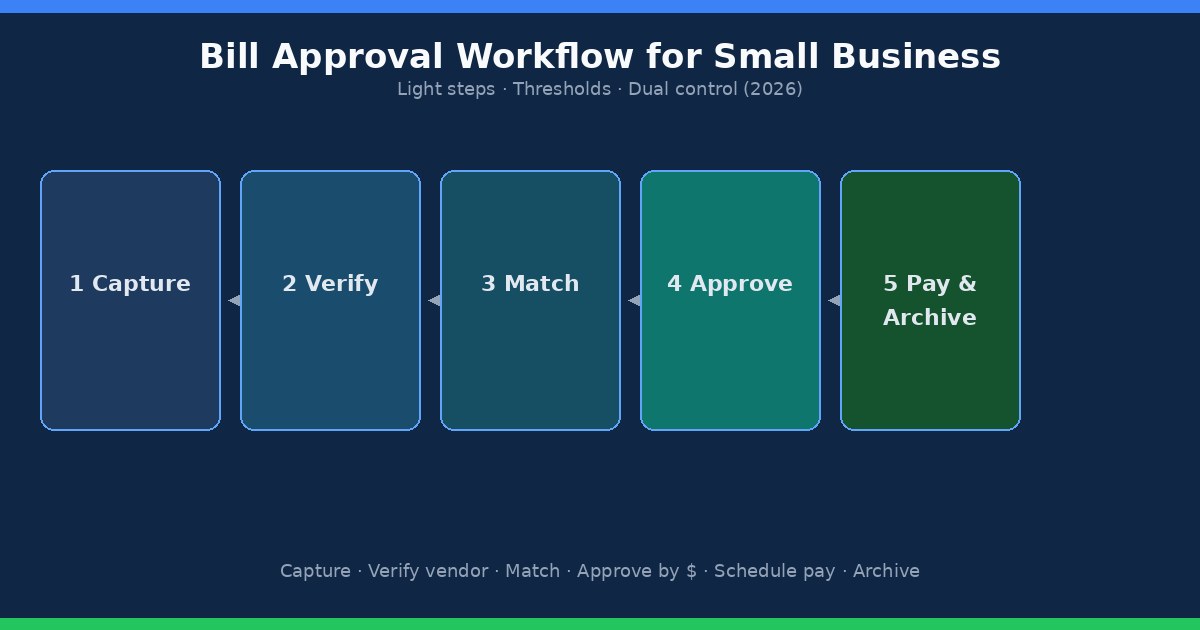
A bill approval workflow for a small business should stay short enough that invoices still get paid on time. Capture the invoice, confirm the vendor, match a PO or receipt when you use them, approve by a dollar threshold, schedule payment, and archive the record. Dual control matters as you grow. A seven-step bureaucracy for a three-person company usually creates late fees faster than it prevents mistakes. This 2026 Ops and Finance guide walks through a light loop you can run from email today, then shows when Melio-style bill pay or a fuller BILL-class AP tool starts to earn its keep.
Quick answer: what does a small business bill approval workflow look like?
Keep six moves in order: (1) capture every vendor invoice in one place, (2) verify the vendor and any bank details against your vendor master, (3) match a purchase order or receiving receipt when those documents exist, (4) approve by amount and risk, (5) schedule ACH, check, card, or wire after approval, and (6) archive the PDF with remittance and who approved. Solo owners can combine steps on routine bills under a small threshold. Add a second approver and release controls when volume, staff, or fraud risk rises. For the broader monthly AP loop, see the accounts payable checklist for small business owners.
Why bill approvals matter for small teams
Approvals exist to answer four practical questions before money leaves: Is this a real vendor? Does the invoice match what we agreed to buy? Is the coding and due date intentional for cash flow? Did the right person say yes? Without that gate, duplicate PDFs, wrong bank accounts, and “urgent” invoices slip through because someone was busy.
Small teams feel the cost in late fees, strained vendor relationships, and cleanup weeks before tax season. Fraud schemes often target shops that pay from email attachments and update banking details from the same email that requested the change. A light approval rule does not require enterprise software. It requires a written path and a habit of stopping on exceptions.
Solo owner workflow: keep the loop light
If you still pay most bills yourself, design for speed with a few hard stops. Create one shared inbox or bill pay intake so invoices are not trapped in personal email. Open each bill, confirm the vendor name matches your records, and check amount and due date against the contract, subscription, or last month’s bill. Match a PO or packing slip only when you already use those documents for that vendor. Approve on the spot for routine amounts. Schedule payment by due date, not by the day you happen to open the PDF. Save the invoice and payment confirmation where your bookkeeper can find them.
Hard stops for a solo owner: new vendors, any change to remit-to name or bank details, wires, and invoices above your personal “I want a night to think” threshold. Call a known phone number before you pay those. Log who you spoke with. That single habit blocks many business email compromise attempts without adding five approval layers to every $49 software seat.
List your ten most common vendors and mark which ones are truly routine. Recurring rent, known SaaS, and the same freight carrier can follow the fast path. One-off contractors and capital purchases stay on the slow path. If you are moving off paper checks, pair this workflow with how to pay business bills online without mailing checks.
Adding a second approver without creating bureaucracy
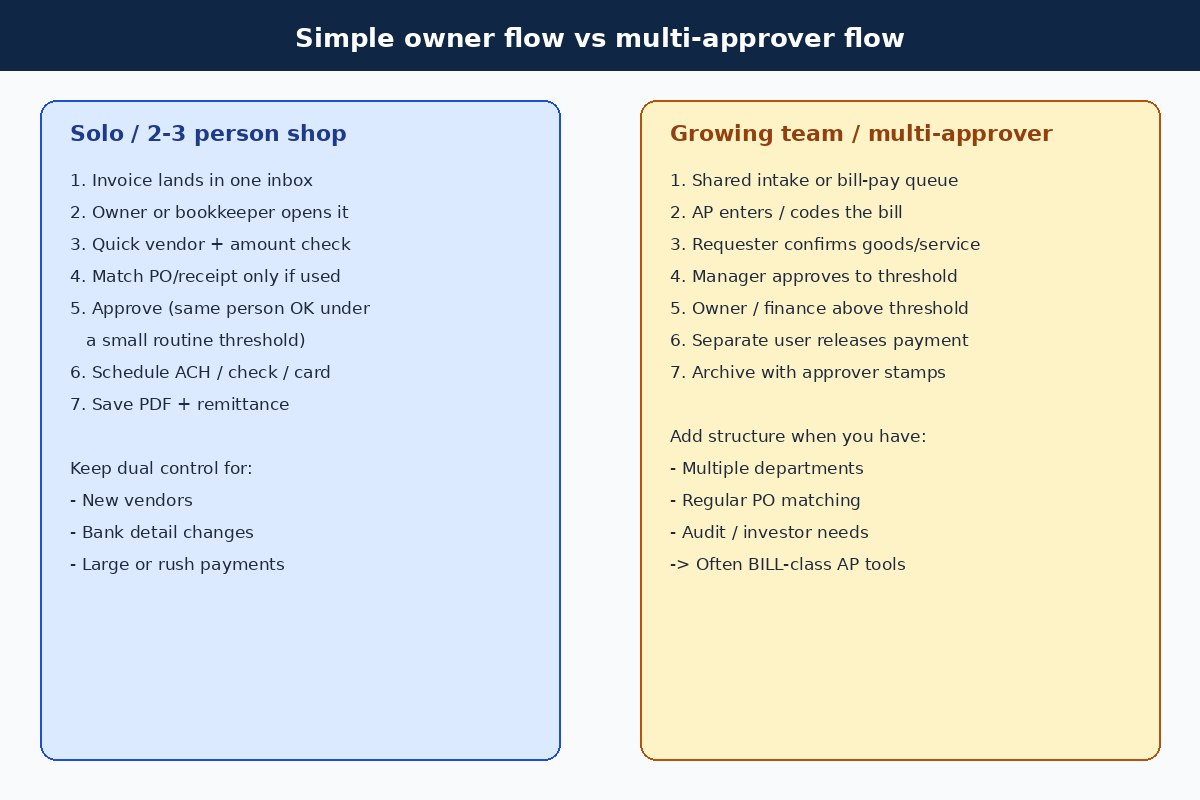
Bring in a bookkeeper, office manager, or department lead when invoice volume outgrows one person’s calendar. Split the work clearly: one person captures and codes, another confirms goods or services when needed, and the owner (or finance lead) approves above a dollar line. On the smallest teams, the same person may capture and approve routine bills while a second person releases payment or reviews the weekly batch.
Write substitutes before someone goes on vacation. An invoice that sits for ten days waiting for the only approver is an expensive process. Name a backup for each threshold and keep MFA on every bill pay and bank login. Approvals should leave a stamp: who, when, and which rule applied. A shared sheet works until a tool records that automatically.
Multi-approver does not mean every invoice needs three signatures. Route by risk. Recurring bills under threshold can clear with one trained reviewer. New vendors, bank edits, and large one-offs need the higher tier. That pattern scales from a three-person shop to a small finance pod without inventing a corporate AP committee.
Dollar thresholds that fit a small business
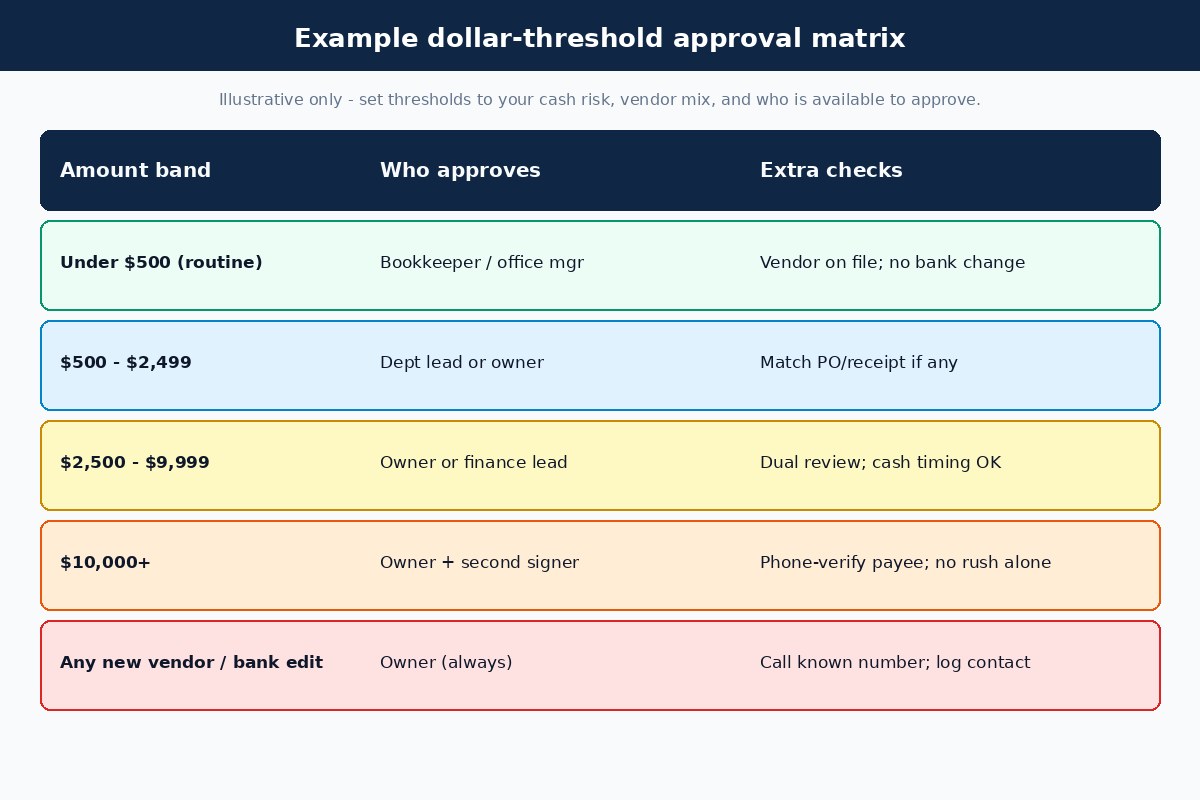
Thresholds turn opinion into a rule people can follow when you are offline. The numbers below are illustrative. Set them against your average invoice size, cash buffer, and who is available to approve.
- Under $500 (routine): Bookkeeper or office manager may approve if the vendor is on file and banking details did not change.
- $500–$2,499: Department lead or owner; match PO or receipt when those exist.
- $2,500–$9,999: Owner or finance lead; confirm cash timing before release.
- $10,000+: Owner plus a second signer; phone-verify payee details; avoid solo rush wires.
- Any new vendor or bank detail change: Owner always, regardless of amount; call a known number and log the contact.
Review thresholds quarterly. If half your bills sit in the top band, the line is too low and you become the bottleneck. If nothing ever hits the top band, raise the dual-control trigger so it still catches real risk. Combine amount rules with payment method rules: ACH to known vendors can clear faster than wires to new payees. Compare rails in ACH vs wire transfer for vendor payments.
Roles and segregation of duties
Segregation of duties sounds corporate. In a small business it means one compromised login or one rushed afternoon cannot add a vendor, approve a large bill, and release cash alone. Practical splits:
- Vendor master edits (especially bank fields) need a different person from the one who releases payment, or at least a second confirmation.
- Bill entry / coding can sit with a bookkeeper; approval sits with the budget owner or founder above threshold.
- Payment release above a set amount requires a second user or a delayed batch the owner reviews.
- Reconciliation should not be owned only by the same person who paid every bill without a monthly review.
Two-person companies will overlap roles. Overlap on routine bills is fine if MFA is on, bank-change calls are mandatory, and large payments wait for a second set of eyes (spouse partner, outside bookkeeper, or delayed self-review with a written checklist). Document who holds each right in Melio, BILL, your bank portal, and your accounting vendor list. Disable unused users after role changes.
Tool fit: email vs Melio vs BILL-class AP
Software should speed a workflow you already wrote down. It should not invent a workflow you refuse to follow.
Shared email + spreadsheet works when you pay a handful of predictable vendors, everyone knows the rules, and you reconcile monthly. Weaknesses show up when attachments scatter, approvals leave no stamp, and bank changes hide in threads.
Melio fits many lean teams that want ACH and optional card-funded vendor payments with lighter approval needs. You still define who may pay and how you handle exceptions; Melio is not a full multi-layer AP department in a box. Verify current pricing, ACH limits, and card fees on Melio’s official pages before you enroll. Product context sits in Melio review for small business owners and the broader bill pay overview. Card-funded bills have their own fee math in pay vendors with a credit card.
BILL-class tools (including BILL, formerly Bill.com, and similar platforms) tend to matter when multiple approvers, role permissions, PO matching, and audit trails are daily requirements. If your matrix has several dollar bands, department queues, and investor or lender reporting needs, compare Melio against that heavier stack in Melio vs Bill.com. More software context lives under comparisons.
Choose tools after you can answer: Who enters bills? Who approves at each threshold? Who can edit bank details? Who releases payment? How do remittances sync to QuickBooks Online, Xero, or your ledger? A free-looking email process still costs late fees and duplicate payments. Software fees pay off when the path is already owned.
Implementation steps for the next two weeks
- Write the six-step loop on one page: capture, verify, match (if any), approve, schedule, archive.
- Pick one intake channel and forward every vendor bill there for fourteen days.
- Draft a threshold table with real names and backups; print it next to whoever pays bills.
- Freeze bank detail edits until you verify them by phone on a known number.
- Run one clean payment batch under the new rules; fix whatever stalled.
- Decide whether email is enough or whether Melio / a fuller AP tool should be tested after the manual path works.
- Schedule a 30-day review of late fees, exceptions, and who became the bottleneck.
Do not buy software during a panic catch-up week. Clear the unpaid pile with dual review on high-risk items first, then automate. Pair implementation with your monthly AP checklist so approvals do not float outside intake, reconciliation, and close.
Common mistakes
- Building a seven-step approval chain for a three-person company, then paying late anyway.
- Updating vendor bank details from the same email that requested the change.
- Letting one login add vendors, approve large bills, and release payments with no second check.
- Scheduling payment before approval “to save time,” then forgetting to cancel wrong bills.
- Skipping PO or receipt match on inventory vendors that already use those documents.
- Setting thresholds so low that every invoice waits on the owner.
- Buying AP software before naming who owns each step.
- Ignoring Melio vs BILL fit until multi-user approvals are already chaotic.
Bill approval checklist
- One intake inbox or portal for all vendor invoices.
- Vendor master with legal name, remit info, terms, and a known phone number.
- Bank / payee changes verified by phone; contact logged.
- PO or receipt match when those documents exist; exceptions parked with a name.
- Written dollar thresholds with primary and backup approvers.
- Approver name and timestamp recorded (tool stamp or shared sheet).
- Payment scheduled after approval; method fits cash and vendor (ACH, check, card, wire).
- Dual control on new vendors, bank edits, wires, and high-dollar releases.
- Invoice PDF + remittance archived with the bill.
- Weekly glance at exceptions; monthly reconcile to bank and vendor statements.
- Tool access, MFA, and unused users reviewed quarterly.
FAQ
Do I need a formal approval workflow if I am the only person who pays bills?
Yes, but keep it light. One intake channel, a short verify-and-approve habit, hard stops on new vendors and bank changes, and archived PDFs prevent most solo-owner messes without adding layers of signatures.
How many approvers should a small business use?
Start with one reviewer for routine bills under threshold and a second person for large, new, or high-risk payments. Add department approvers only when budgets and volume justify the delay. Count roles by risk, not by org-chart fashion.
What dollar threshold should I start with?
Use amounts tied to your typical invoice size and cash buffer. Many small shops start with a low routine band for known vendors, an owner band in the mid thousands, and dual control for five-figure bills plus any new payee. Adjust after 30 days of real traffic.
Is Melio enough for approvals, or do I need BILL?
Melio often fits lean teams that need ACH and optional card payments with lighter approval structure. BILL-class tools matter more when multi-user roles, structured queues, and AP audit trails are constant. Read Melio vs Bill.com and verify current features and pricing on each official site.
Should every invoice require three-way matching?
No. Use three-way matching when you receive countable goods or milestones against POs. Recurring services with clear contracts often work with two-way matching plus a quick confirmation that the period of service was delivered.
How do I stop invoice fraud without slowing every payment?
Automate intake and routine ACH batches. Keep humans on change-sensitive steps: new vendors, bank edits, wires, and exceptions above threshold. MFA plus dual control on release catches many schemes without double-reviewing every small recurring bill.
What records should I keep with each approved bill?
Keep the invoice PDF, approval evidence (name and time), remittance or confirmation, and vendor master support such as W-9 and contracts when they apply. Ask your CPA how long to retain files for your entity and state, and store them by vendor and date.
What is the first step if our approvals are a mess today?
List unpaid invoices with due dates, freeze new vendor bank edits until verified, pick one intake inbox, write a one-page threshold table, and run one clean payment batch under dual review on high-risk items. Expand tools after the next close, not during the catch-up.
Related guides and next step
Put the six-step loop and threshold table next to whoever pays bills this week. After one clean cycle, decide whether email still works or whether a lean bill pay tool removes enough manual work to test. Keep Melio pricing, ACH limits, card fees, and approval features verified on Melio’s official pages before you enroll.
If Melio fits the lighter approval and bill pay workflow described here, you can explore Melio through our partner link: Try Melio. Terms, eligibility, and offers can change; verify pricing, free-tier ACH limits, card fees, and plan features directly on Melio before you enroll. If you need multi-user structured AP, start with the Melio vs BILL comparison linked above rather than forcing a lean tool into a heavy process.
Related SmallBizPayGuide resources:
- Accounts payable checklist for small business owners
- Bill pay overview
- Pay business bills online without mailing checks
- Pay vendors with a credit card
- ACH vs wire transfer for vendor payments
- Melio vs Bill.com
- Melio review for small business owners
- Software comparisons
Official references worth bookmarking include Nacha materials on ACH payments and FTC guidance on business payments and billing practices. Rules and product features change; treat this page as an operations map, then confirm current requirements with your providers and advisors.